Autosave file - can't locate

Hi All

I was working on a file that I had called Oct5, but accidentally pressed cmd+N and opened a new file. I hadn’t saved it in over 90mins, but have auto-save set to every 2mins.

Will it save a recoverable file anywhere? I’ve looked, but can’t see anything anywere, I’m just hoping that someone can help.

Using a macbook.

Thanks

Not sure about a Mac, but Lightburn saves a backup file in the same folder location as where the original started from.

Thanks Mikey, first place I looked, not there.

I suspect that backup is not created until you make a change in the design. If no changes were made, no need for a backup file.

You are running from a local drive, and not an iCloud, Dropbox, or other cloud storage method, right?

Hi Mikey

I had been working on the file constantly, I’d just forgotten to press save in that period of time.

Just looking to see if there’s anywhere else I can find the auto-save file, other than the folder the file was saved in - local downloads folder.

Thanks

You can make a search for * backup.lbrn *

Thanks. Yes, tried that too, nothing there.

I don’t have an answer to what caused it, but in the future you might want to verify the backup is being created. I did not see an option to turn it on or off.

It’s a timed thing:

Note, however:

Each auto-save overwrites the previous auto-save, and when you manually save the file, the auto-saved copy is deleted.

Basically, the Auto Save file helps with crash recovery, not surviving a controlled flight into terrain. :grin:

Thanks Mikey, yes I know that, I was just hoping there would be some wierd place that it would have saved to. Auto-save should be just that and automatically save.

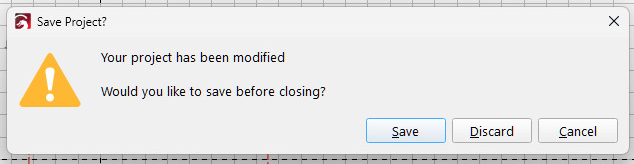
LightBurn put up this prompt before opening the new file:

When you clicked Discard, you confirmed you did not want to save the file, so LightBurn did exactly what you asked … not what you realized you wanted about three seconds later.

Source: Been there, done that, stacked another T-shirt. :grin: