Was on V2.1.BS, rolled back to 2.0.05 Win10 C3D Controller
Nothing but issues with the recent updates. Lost a few days of production because of them. Worked on designs hoping for a fix to all the issue it created, especially with the cams……..that were working fine. Updated version has the endless “conecting” screen or frozen images.
No fix found. Only resolution found was to dump the updates and roll back to a stable version.
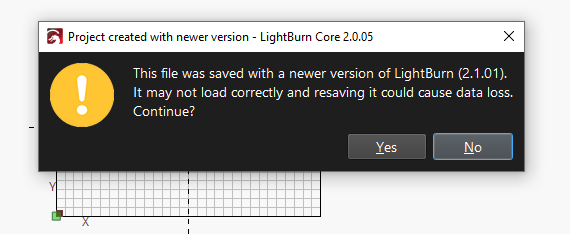
Now when I pull up the files I had been working on (using V2.1.BS), I get this error. And all the work I had done with the new version is gone from the files.
Save the file using a different file name so you have two copies then you will keep your original file intact. Just label it saved in 2.0.05 or something like that.
Files that I had started pre recent updates. Around the 2.0.05 update.
I worked on them with the update. LB was not usable after recent updates (cam issues), so I rolled back to a stable version. When I did it reverted all the recent work I did on those files also. All the design wok I did with the recently updated version is gone after I rolled back. So, I tried the new version again and the work is gone.
I think this is exactly what it’s supposed to do. You saved them in a beta version and then rolled it back to an earlier version, so you will always get this error message. I think the yellow exclamation mark (bang) indicates a warning.
As far as I know there’s been no changes in the data structure between your versions, so it should load Ok, this is just a warning. This should be in the fix it list or what’s been updated.
I hate to point out, but you should always make a backup of your information before upgrading. However, I doubt anythings been lost or I’m completely missing what you’re saying.