RonSa
October 22, 2026, 8:47pm
1
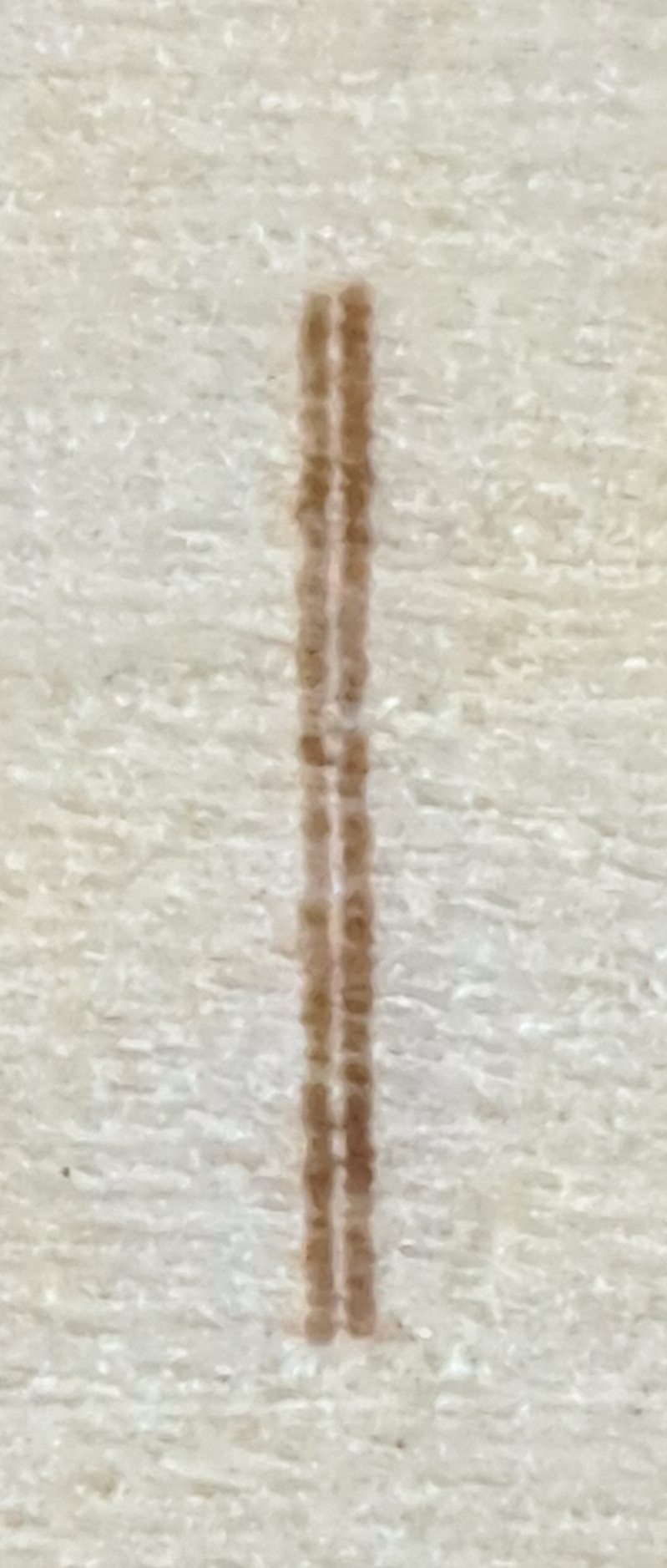
I’m getting a double line when I’m engraving a bidirectional fill along the X axis. My first thought was the belt or it’s gear was loose. Sadly it wasn’t.
The shadow image is about 0.3mm off
The problem doesn’t happen when turning off the bidirectional fill or along the Y axis.
Laser head is tight.
Any thoughts on what I should inspect?
The image below should be a single line and is one of the two lines in the LB file.
Here’s the filemaple leaf-4.lbrn2 (212.8 KB)
ednisley
October 22, 2026, 10:01pm
2
RonSa:
a double line when I’m engraving a bidirectional fill
Measuring and filling out the Scanning Offset Adjustment values should fix that:
Run the test pattern at 50 mm/s, then every 100 mm/s up through whatever the machine’s maximum speed might be.
A measuring magnifier will be helpful to get meaningful results.
1 Like
Colin
October 22, 2026, 10:02pm
3
Ed’s guidance is what I would recommend here - when you move the laser head really fast, even with a tight motion system, there’s some induced flex/stretch in the belts that needs to be accounted for.
RonSa
October 22, 2026, 10:19pm
4
ednisley:
Measuring and filling out the Scanning Offset Adjustment values should fix that:
Scanning Offset Adjustment - LightBurn User Guide
Run the test pattern at 50 mm/s, then every 100 mm/s up through whatever the machine’s maximum speed might be.
Interesting, I’ll give that a try. Thanks
Truth be told, I wasn’t having this problem over the weekend.
RonSa
October 22, 2026, 10:52pm
5
@Colin @ednisley
The one on top was from earlier today
ednisley
October 22, 2026, 11:36pm
6
Then, no matter how sure you are, it’s a mechanical problem.
Check everything for the loose widget you missed the last time around. You’re trying to find a motion of less than a quarter of a millimeter, so being patient and thorough beats knowing this thing can’t be the problem.
Source: been there, knew that.
MikeyH
October 23, 2026, 12:19am
7
This may help. You have Xaxis backlash.
I often read that someone with a backlash problem says they tightened everything. When asked if they checked the set screws, they say, “yeah, those are tight too.”
Sometimes they can feel tight when actually they are not. In the illustration below, the “B” image illustrates the proper position of the set screw in relation to the flat area on the shaft. Of course you cannot see this, so how are you supposed to know if yours is correct?
If you try to tighten the screw in the “A” image, you will …
RonSa
October 23, 2026, 7:22pm
8
@ednisley @Colin
I’m sure of that too.
I Double Checked everything and when I finish typing this I’ll start my third time.
Is it possible I need a new belt or maybe the stepper motor is causing the slack?
Each line in 0.5mm
ednisley
October 23, 2026, 7:43pm
9
RonSa:
a new belt
Perhaps going down through a list of things to check will help. This is for Sculpfun machines, but they’re all similar enough to have the same gotchas:
Make sure the frame is set up straight and that the frame must be aligned at right angles. After assembly, you can check this by moving the x-gantry completely to the front or back. Both ends should reach the front or back profile bar at the same...
Est. reading time: 28 minutes
Reports from folks showing how hard it can be to find The Loose ThIng after you know you’ve checked everything :
Hi all, probably a very simple issue, but new machine, new user. Excuse the subject matter, long story short thought i’d start with text, instructions for elderly person to use phone on something they cant lose. Anyway, I tried to include symbols along with the text, and suspect that is causing my issues. First try i did lines of text, each one a separate entity, and outlined icons, put them in. Came out with a lot of letters fine, but some with squidged lines.
[20260311_213116]
I suspected d…
[PXL_20260125_151457555]
After loosening the belts I found the left connector here was loose so only the motor side of the y axis advance was driving and the other side was riding along. I tightened the set screw and everything works perfectly.
I want to thank you for trouble shooting it with me and teaching me about path to text. I appreciate your help.
Hi there Ed
I finally founf the problem with my X axis and i really hope this bit of info helps others in the future.
I disassembled the entire X axis and went through every component only to find it was the drive belt! The creality falcon comes with the Xaxis already assembled and I assume the belt had been in a certain position in storage for many months if not years.
Even though the X axis belt was the first thing i tensioned when looking for the error of losing sizes, I never noticed tha…
Thank you gentleman, I ended up changing the X belt after cleaning out a bunch of dust and debri that was under it, then I did check the tightness of the wheels, which were good and found the X motor was also loose
OMG, found it thanks to that video, I got what you mean now! It was this one:
[image]
After tightening it (but only enough, for the 45 degree test to still pass), the wobbling disappeared. With this and the tightened belts, my circles are now within the acceptable fault tolerance for my projects and almost perfect.
Hello,
I’m having the following problem my laser is engraving some words in my design like double and when is time to cut the edge in some corners it goes like a s instead of a straight line. How can I fix this issue?
I attach some picture above
[IMG_2643]
[IMG_2644]
RonSa:
maybe the stepper motor
Unless it’s loose on the frame or the pulley is loose on the shaft, a stepper motor won’t be the problem.
2 Likes
RonSa
October 24, 2026, 9:15pm
10
Thanks Ed, I’m back in business.
Secondly, underneath each of the three carriages you will find a wheel that needs to just touch the underside of the frame, these are adjusted by turning the eccentric nut. To see if these need adjusting, firstly gently rock each carriage from side...
Est. reading time: 28 minutes
2 Likes
RonSa
October 24, 2026, 9:18pm
11
@ednisley How do I mark your post as the solution?
ednisley
October 24, 2026, 9:25pm
12
Alas, Community Laser Talk lacks that checkbox, for reasons I cannot explain.
It’ll go on my list of “So you think you’ve checked everything …” notes.
2 Likes