Hi all,
Just a question general about duplication of an object.
If I duplicate an object in lightburn it is placed directly over the original.
In corel draw you can set the duplication to be offset by a set amount. Eg 4mm x 4mm top and right"
No, it doesn’t work in LB, but it would be a nice feature. I recommend putting this as a suggestion in “Feature Suggestion”. (You can find it here on the page at the top)
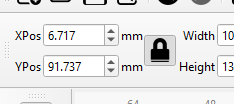
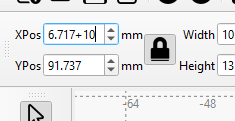
When I duplicate an object the new object is pre-selected and can be moved accurately in the X and/ or Y direction in the XPos and YPos fields. Operators like + and - can be used in these fields, May be a good workaround for you.