The Current Position is only .001, .001 from Absolute Coords of 0,0, so that’s why I didn’t bother taking any other screenshots of laser head positioning because the L/L corner was constant for all tests. I hope this helps. Let me know if you need anything else. I think I’m going to run a sample test of my project now to see how it does with positioning and without errors! Have a great day!
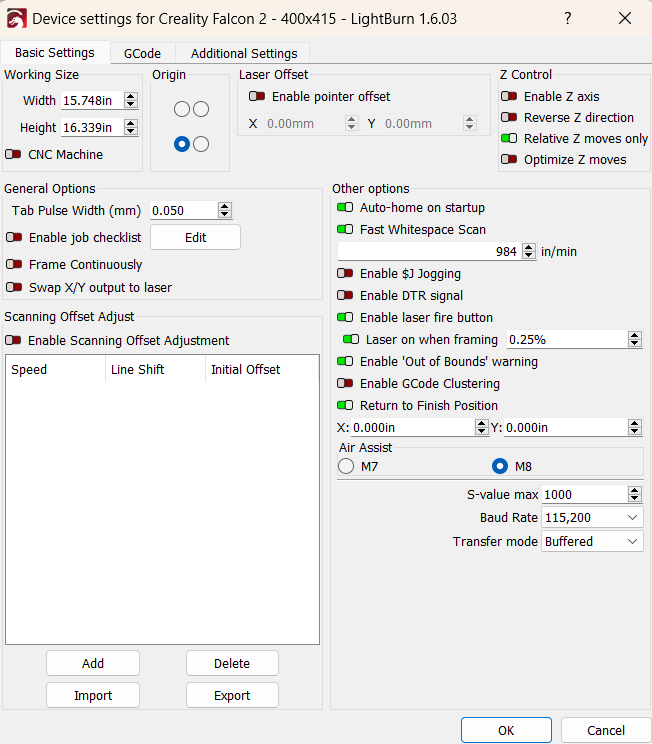
Thank you for that info. I don’t see a problem with your sizing like I somewhat expected to see. The only thing I can think of is that you weren’t dead center on your X axis when you set your lower center origin. Since your graphic is 387mm wide on a 400mm bed it doesn’t have to be off by much to cause a problem.
Type in the move box X 200 and whatever Y value you need to clear your feet. Click Go and set the origin. Test it on cardboard.
I was only in the shop for about 2 hours this morning before I had outside chores for the better part of the day.
I was able to get the entire output of the project per my original methodology, (not the mermaid method). I used a low number for lines per inch and low power, since I was only trying to prove out my method. And it worked as expected. Leaving all the graphics visible, even out of boundary items, was key for not causing errors.
Having my new spoilboard was very helpful. The lowest line (X-Axis) is only about 1/2" behind the feet of the machine. I have 3 positions for each leg and so I spread them out to the widest position.
Due to this helpful spoilboard, I decided to use Absolute Coords and then repositioned the board 3" each direction per those out of bound item when I was ready to engrave them.
But here’s what I’m having trouble with. Current Position, or User Origin. Let’s say I move the laser head by remote, then use Get Position, and then Set Origin. Then after I do this, then I perform a Frame and it would always crash! I know for a fact, that the image had enough room to be lasered in the given area because I proved it with by using Absolute Coords and running the program in 3 steps successfully. I just don’t understand why I can’t get (CP or UO) to work in the Start From?! This is driving me crazy! I’m guessing this might be due to those out of bound items that are still visible?
I spent several hours doingyard work today too. Need to prep for the coming Hurricane.
Good deal.
When using User or Current, turn on “Cut Selected Graphics” and only select what you want to burn. Play with the “Use Selection Origin” as well. You will see that the green origin point can move around depending on what is selected. When in Absolute, it automatically ignores anything out side the work area, but in the other modes it looks at anything on the screen, even if it’s outside the work area.
User Origin with the Left Butterfly selected and use selection origin off.
I’ll keep you in my thoughts and prayers! Well if you need higher ground to stay, you’re more than welcome to drive 8-1/2 hours to my log home in the Blue Ridge Mountains and we could have a few shop days together!
This is making better sense now! Don’t ask me why I’ve ignored reading up on these features. Probably because the term “cut” was implied and I’m only doing engraving. I haven’t got to do any actual cutting with my new laser yet because I still need to get proper safety equipment. I’ve barely used this engraver since buying it new 6 months ago. But this winter, I will be doing a custom enclosure with honeycomb, outside venting, camera, and possibly a scissor lift to engrave thick items. I’m going to test this out later this morning and hopefully I will get a better grasp on the proper usage.
Yes, I do. I think you put me on the right track.
I apologize for putting you through all of my nonsense. If I would only take the time to read the manual or watch videos and learn this better. Winter is the perfect season for this. I know it’s not that difficult of a software, I just need dig into it and quit winging it!
If I can master 5 different 3D parametric software in 21 years, this will be a breeze. Those 3D CAD programs were very complex and each took around 1 year to learn. I taught many classes on the subject with various companies during my 31 year career. My wish for Lightburn is to have them incorporate a sketching menu that adheres more to parametric driven sketches with dimensions and constraints. It’s accurate, faster, and believe it or not, much more simple.
I would enjoy that but I think we’ll be fine where we are. I live in an older Manufactured Home and it’s held up through 40+ years of Hurricanes and Tropical storms. We’re about an hour north of Tampa and the storm is “suppose” to hit a couple hours north of us, but they do have a mind of their own sometimes.
Glad I was able to help. Sometimes it just takes a fresh set of eyes or different perspective to “see” things. I don’t know how many times I have “been sure” I was doing sdomething right only to find out I wasn’t, LOL.
If we ever plan another vacation to your area I’d love to get together for some shop time.
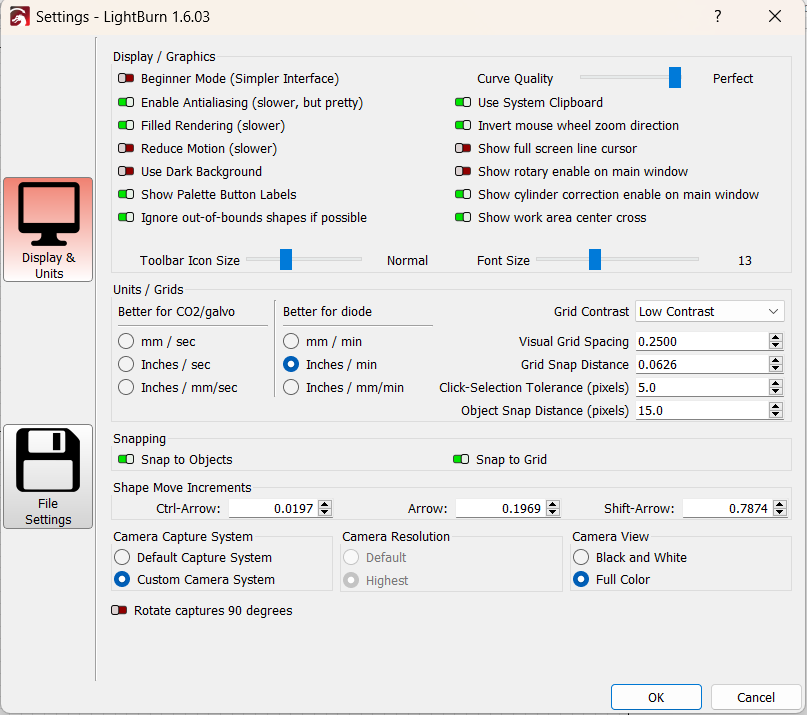
There’s also an interaction with the Ignore out-of-bounds shapes if possible setting:
Generally you want it turned on, but one side effect is ignoring shapes that are out by an itsy, leading to questions about “Why isn’t LightBurn engraving my shape?”
Tim, I hope you are getting out of town this time for hurricane Milton. This one is no joke, expected to be a class 5 hurricane soon and hitting you directly as a class 3. I’m within a few miles of Georgia and I’m sure we will be taking a beating all the way up here. It is going very slow which makes it worse. Good luck.
Jim
Thank you for checking. We are definitely keeping our eye on it. We live in a Manufactured Home and will be evacuating it. We are not leaving the area but are going to our Daughter’s house which is a new concrete block house. It is still forecast to stay a little south of us. The further south the better for the winds. We are inland so flooding is not a concern.
I’m glag to hear that Tim. I’m very surprised that you had ver little damage. Years ago Hurricane Michael went straight over our farm. Clear blue skies for about an hour during the eye. We had 10 inches of rain before the eye, none after. Very little damage but 60 miles east in Jacksonville, massive devastation.
Milton made landfall in Sarasota. We’re about an hour north of Tampa, so quite a bit of distance. not even any coastal flooding to speak of with Milton, unlike Helene, which flooded all of the coastal homes near us.




 I haven’t got to do any actual cutting with my new laser yet because I still need to get proper safety equipment. I’ve barely used this engraver since buying it new 6 months ago. But this winter, I will be doing a custom enclosure with honeycomb, outside venting, camera, and possibly a scissor lift to engrave thick items. I’m going to test this out later this morning and hopefully I will get a better grasp on the proper usage.