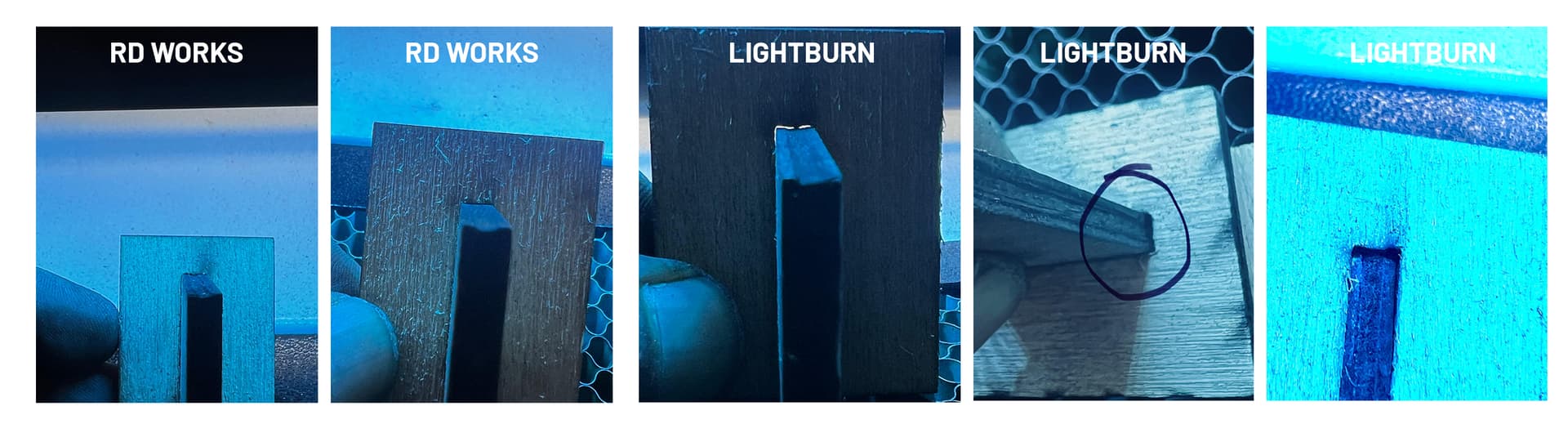
I’m experiencing a serious precision issue in the latest version of LightBurn: Objects are inconsistently stretched along the Y-axis, even when duplicated directly and drawn with exact dimensions.
System Info:
Controller: Ruida 6445S
Laser Type: Dual Head – 170W CO₂ Laser
Machine Bed Size: [100x80 cm]
Operating System: [Windows 11 ]
LightBurn Version: [LightBurn Pro 2.0.01]
What I tested:
I drew a 40 mm high rectangle and duplicated it vertically 5 times.
I applied a ±0.32 mm kerf offset on the layer, which is the optimal value for cutting 6 mm marine beech plywood with 2 passes.
Y-axis output measurements varied:
40.28 mm
40.55 mm
40.60 mm
40.84 mm
Then I removed kerf completely, ran the same test — and still got inconsistent results on Y.
Cross-Tested:
I ran the exact same design using Ruida’s free RDWorks software, recreated from scratch → flawless results.
Every cut was dimensionally perfect.
I also drew a fresh file directly in LightBurn (no imported content), and the problem persisted — especially on longer Y-axis parts (30 cm and more).
Machine axis steps and calibration have been double-checked.
I’m measuring only ~2 micron deviation mechanically on Y, so the issue is clearly not mechanical.
But in LightBurn, each shape gets taller by a few tenths of a millimeter — and inconsistently.
This makes precision joinery impossible and renders the kerf system unreliable in its current state.
Please investigate — the updated version of LightBurn is unfortunately unusable for my production needs right now.
after the update 2.0.0.1 Currently, we’re facing a consistent Y-axis distortion about 25mm of elongation on a 35cm cut piece when using LightBurn. RDWorks doesn’t exhibit this problem at all.
Just to share an update: unfortunately, the solution we found was to stop using LightBurn, . We’ve switched back to RDWorks, which runs without any issues for now.
Currently, we’re facing a consistent Y-axis distortion — about 25mm of elongation on a 30cm cut piece — when using LightBurn. RDWorks doesn’t exhibit this problem at all.
Hopefully a fix will come in future updates, but for now, we’re sticking with what works.
We already had 1.7.08 in our archive, so we installed it and tested — unfortunately, the result was the same. It seems a clean install might be necessary, because we used to run 1.7.08 without any issues. Perhaps even a removal tool could help, but I’m not an expert in this area.
I will try version 2.0.02 tomorrow and share the results.
Thanks again for your support.
 System Info:
 What I tested:
 Cross-Tested:
 I also drew a fresh file directly in LightBurn (no imported content), and the problem persisted — especially on longer Y-axis parts (30 cm and more).
 Machine axis steps and calibration have been double-checked.
 But in LightBurn, each shape gets taller by a few tenths of a millimeter — and inconsistently.