Just FYI we’re waiting on a Falcon A1 pro to be delivered to a colleague for further investigation. At this point nothing we can see points to a fault in the gcode sent, nor in the settings you’re using. We’ll see if it’s a firmware quirk or something else going on.
Much appreciated.
Btw @Creality_Rachel - do you have any idea why the problem could be happening?
@TrajoMarx If willing, can you do the following to rule out a hardware fault and to give us more infos for troubleshooting?
-
Right click in the Console Window, select “Clear Console” and enable “Show All”:
-
Enter these commands, one line at a time, and press “Enter” after each:
$i
$$
$#
? -
Enter
M8in the command box and press Enter. - The Air assist should turn on. -
Entering
M8again, it should stay on as far as I’m concerned. -
Let it run for a couple minutes. - Does it stay on?
-
Enter
G1 S0and press enter. - Nothing should happen. (Jon already asked for this part, but I’d like double-check.) -
Finally, enter the M9 command to turn the air assist off.
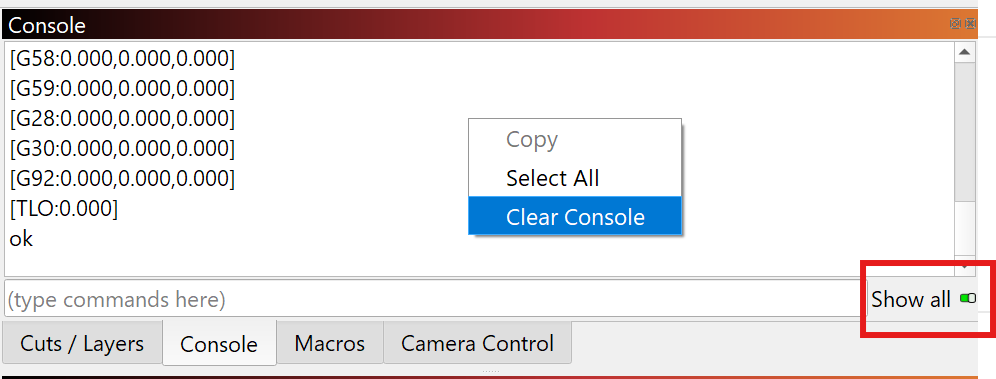
The air assist should stay on until the M9 command is sent. Kindly let us know, if it behaves otherwise.
Then, right click in the console, “Select All” and copy/paste the full output in a reply here.
$i
Summary
$i
[VER:1.1f.20220810:]
[OPT:VcHL,127,65536]
Target buffer size found
[software versions: CV40-MASTER-Release V1.0.6 20250306-1455]
ID:DCDA0C4A75F0
ok
$
$
[HLP:$$ $# $G $I $N $x=val $Nx=line $J=line $SLP $C $X $H $F ~ ! ? ctrl-x]
ok
$#
$#
[G54:-nan,0.000,0.000]
[G55:-nan,0.000,0.000]
[G56:-nan,0.000,0.000]
[G57:-nan,0.000,0.000]
[G58:-nan,0.000,0.000]
[G59:-nan,0.000,0.000]
[G28:-nan,0.000,0.000]
[G30:-nan,0.000,0.000]
[G92:0.000,0.000,0.000]
[TLO:0.000]
[PRB:0.000,0.000,0.000:0]
ok
?
?
<Idle|MPos:0.025,0.000,0.000|Bf:127,65535|FS:0,0>
ok
M8
M8
ok
M8
M8 ( ~30 seconds after the 2nd M8 the Air Assist turned off.)
ok
G1 S0.
G1 S0
error:22
Feed rate has not yet been set or is undefined.
M9 (After entering this, the Air Assist came on, but at a lower level)
M9 (Air turned off)
ok
Thanks!
I tried it again, but I waited after the first M8. The AA turned off about 30 seconds. I didn’t continue after that line.
So what you’re saying is that for you, M8 turns AA on for about 30s only?
Can you test what M7 does?
Ok - so what you said was curious to me about what the behavior was supposed to be.
I decided to try out Creality Falcon Suite’s Gcode export for the A1.
Turns out, they use M9 for air assist on, and I guess G1 S0 or M2 shuts it off?
Can you try running:
M9
G1 S0
M2
with about 10 seconds in between - to see if the air assist starts up properly, then which command shuts it off?
I suspect you’re going to need to create a custom gcode profile for the Falcon A1, where the air assist on will be changed to be M9…
@Creality_Rachel can you please get in touch with your engineering team and ask why they use M9 to turn on air assist, instead of M8?
This is really non-standard.
This is getting more weird as I do this.
My initial M9 started the Air for only about 3 seconds and stopped.
I tried again and the Air stayed on longer (7 seconds). Not long enough to enter G1 S0.
Eventually it stayed on long enough to enter G1 S0 (which did nothing).
m9
m9
ok
g1 s0
g1 s0
error:22
Feed rate has not yet been set or is undefined.
m2
m2
[MSG:Pgm End]
ok
Thank you.
ALSO:
I quickly entered M9 followed by G1 S0. It did not shut off. Then entered M2 while it was still running. It still did not shut off. Later it shut off on its own.
Thank you.
Thank you for all the testing!
We’re waiting to receive the A1 pro at this point. Something very odd is going on and the command to turn air assist on and off seem to be non standard.
Unless we get clear answers from Creality on this sooner, I’m afraid you’ll need to wait until my colleague has managed to understand what is really happening there.
thx for keeping us updated
We will! It’s unusual and frustrating behavior to say the least.
1 Like
FYI, New LB update is still the same.
Yes, I’m sad to say that we haven’t been able to look at the Falcon A1 in 2.0 yet - I’ll double check that it is on the priority list.
Hello, I’m having the same issue. My setup is Creality Falcon A1, Windows 11, and LightBurn (latest version).
My project uses three layers:
- Engraving — Air Assist OFF
- Stitching holes (cut) — Air Assist ON
- Outer cut — Air Assist ON
Engraving completes fine. When cutting the stitching holes, the Air Assist turns on at the start but then shuts off partway through that same layer. When it moves to the outer cut layer, the Air Assist turns back on and the job finishes normally.
I can provide the project file and saved G-code if needed. Thanks.
Plus, I did this same project with my ACMER P3 and my Algolaser DIY KIT and it was perfect.
Please share the project file and the gcode output from “save g-code”.
Also please provide the specific laser and firmware version and lightburn version you are running.
We are working directly Creality’s engineering team on this now. From what I can tell it’s not a g-code output issue.
M8 and M9 are both air assist on at different levels.
sure thing Joe,
Lightburn Version: LightBurn Pro 2.0.02
Created by LightBurn Software, LLC
Machine: Creality Falcon A1
Firmware: [software versions: CV40-MASTER-Release V1.0.6 20250306-1455]
ID:7C2C678B5574
All Patches - lightburn.gc (175.2 KB)
All Patches - lightburn.lbrn2 (337.0 KB)
Hi @TheBaron , @TrajoMarx and @birnenpfluecker
Thank you for the information - Creality wanted to check if you imported their creality falcon a1.lbdev file to create the device profile?