Cutting some 5mm ply on a 90w C02. Ran a material test and it looked great except it did not full cut the border. Ran it a 2nd time with the “Edit Border Settings” set the the value that was a full cut in test #1 (S10P60). Still did not cut the border through, not even close. Ran a third test and upped the border settings to S10P80 same result.
Created a test sq, Set power to 10/60 . Not cut through, even though the test grid it is clearly through. Ran it again at 10/80 with same result.
Baffeled. The only changes were the speed and power adjustments.
Such a material test is not ideal. You need to increase the size of the squares. If you command the laser to run a 5mm distance at 200mm/s, the laser will never reach the commanded speed, and the test outcome will be wrong. Use much bigger squares, that will give a more reliable result.
The machine is running in mm/sec ( as shown in the test grid legends)
Machine is well maintained and focus etc are all fine.
This is 5mm interior ply. It is a partial sheet from a supply I bought in bulk and am familiar with its qualities.
All of the tests shown were done in a 1 hour window. my confusion is that taking settings from the test grid are not being applied. Test # 2 literally shows that a S10P60 cuts clean through inside the test grid and that is exactly what the border settings were set to but did not cut through. Those 2 cuts at the same settings were literally 30 seconds apart.
What I see in the test grid is exactly what I would expect from this machine/material combo. If it cuts through at 10/60 in the grid, why does it not cut through in the border ?
Sorry for the lack of scale the test panels in the photo have 12mm boxes and the 2 sq I made to try and reproduce the grid cuts are 22mm. To be fair I rarely run anywhere near 200mm/sec on this machine and I get that it is likely not reaching max speed in short hops. That does not explain however why, when cutting at 10 speed 60 power during the test it then will not cut through at 10 speed 60 power for the border. And then when I set up a basic shape to cut outside the test it will not reproduce the results shown in the test grid.
In the test grid, it is possible your machine never reaches programmed speed. Running slower, there is more energy put into the material. It is just plain physics. @misken explained this above and offered a solution.
The machine appears to my eye to be running at speed. 200mm/sec on the top row. As it goes down through the test grid the speed does ramp down row by row until it is running at 10mm/sec for the bottom row. This all looks normal, and I am getting exactly what I would expect in the entire grid with these parameters. The gradient from fast/low down to slow/high all appears as expected so I am not concerned with the box size or speeds here, the grid is coming out as expected with no problems.
Let me try and explain once more, The grid is fine, all looks good and as expected. The grid shows a full cut through s10 p60 and higher. I set the border settings to that value and it does not cut through. When it is supposedly cutting the border it appears to be at the 10mm/sec speed so it has to be the power not running at the requested 60.
UPDATE:
I am going to submit this as a bug in 2.2
I went to our 155w laser and ran the test panel there (each machine has a dedicated PC). Same problem. It too did not apply the border settings correctly so its not hardware specific. I have never had this issue before and I have run probably 200+ test panels on dozens and dozens of different materials. My laptop I believe has not been updated yet so I will bring that in and try running these again on 2.1
Do you run min/max power settings that are not equal?
What is your acceleration value for the axes?
What is the start speed value within the controller?
I cut 5mm sub flooring 11mm/s@45% power and my machine is only 43W, determined with a Mahoney meter.
Quite different from your settings.
If you have
properly working tube
clean and aligned optics
proper focus
They pretty much just work. Might want to check these out as you’re running a machine with over twice the total power with a 50% higher power setting than I and virtually the same speed?
The mention of a second machine triggered this thought…
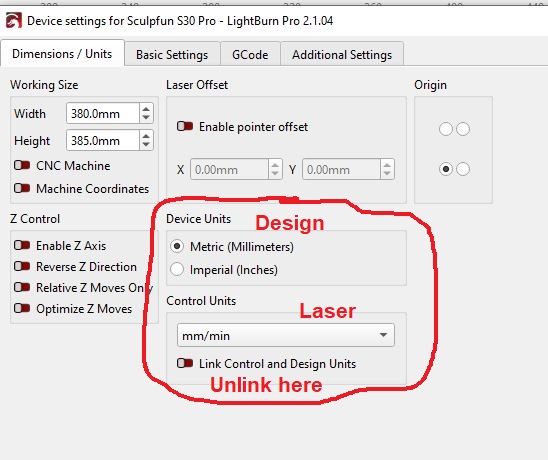
Have you checked the UNITS for your settings? There is a new switch in the settings window that may have impacted your actual settings for the machine.
A second thought is did you roll back to the previously working version and it was okay? If this is so, then create a Bundle, save it, update, then import the Bundle.