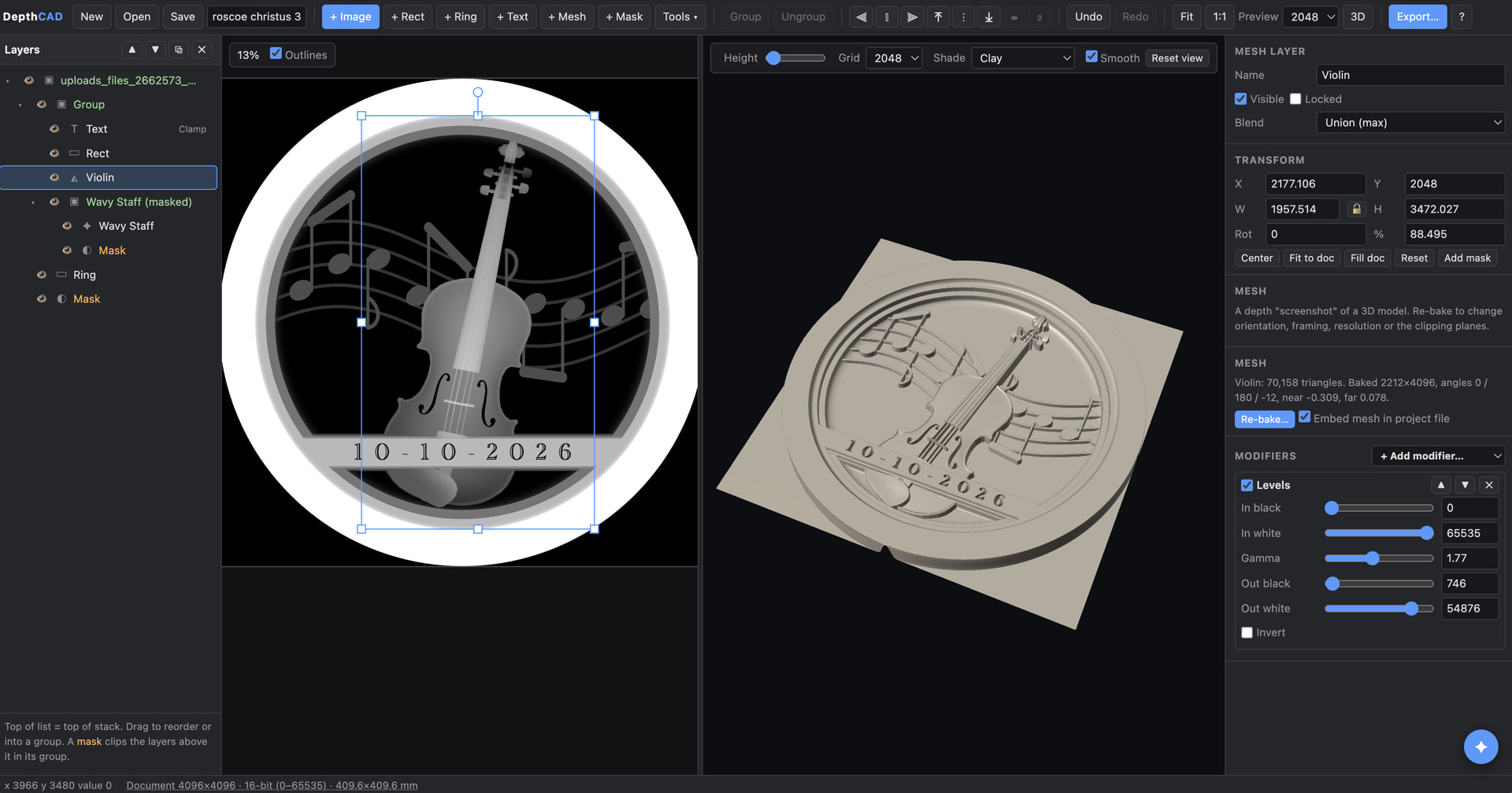
I hope this isn’t off-topic, but I created a free open-source software package to help people design depth maps for use with lightburn. It’s called “DepthCAD” and is available via github:
It’s a browser-based, layer-oriented editor for building 16-bit grayscale depth maps for laser engraving. You can import scanned or rendered depth maps, take depth “screenshots” of 3D models, composite them with shapes, text and parametric tools, mask and transform every layer, preview the result as a 3D surface, and export a clean grayscale PNG.
I tried to make it easy to do the things I wanted to do: composite intricate 3d shapes with nice borders; render text; and easily and parametrically-ish define things like complex profile shapes that can be used to make circular or square “molding”.
Since I figured I wouldn’t be creative enough to give everyone the tools they wanted, I also added an AI-native assistant that can use DepthCAD as a sort of API; the AI assistant can dynamically make new tools for you to use, which can saved (and shared) as JSON files.
It’s all self-contained; just open up “depthcad.html” on your computer and away you go.
I have seen a few of these, it’s nice it’s under MIT agreement and runs in the browser.
Maybe I’m missing something, as I haven’t actually attempted to use it.
An 8 bit byte can represent 256 different shades of gray. To make use of this you have to make 256 passes. This usually takes over an hour, usually closer to two.
The machine, using 3D slice, takes the number of slices (passes) you use to sample in order to generate enough single bit ‘layer’ or passes and values for every possible combination, that’s why it takes 256 passes.
If you go to a 16 bit graphic and ask for 256 passes, it still only samples the 8 bits. If you ask for 512 passes, it uses 9 bits. To make use of that you have to run 512 passes, that will use a 9 bit ‘word’. If you want to go to 1024 passes, for 10 bits, you have to make 1024 passes.
It takes me a 2 hours a side or per job, on average to do a coin, using 9 bits doubles that to 4 hours and another bit makes it 8 hours a side. I’d think the increase in time for another pass would be detrimental to using a 16 bit image format, in itself, not to mention I can’t hardly believe you could actually see it. I’m sure not going to use a full 16 bits, requiring 65k passes…
I’m confused on where this helps in what we are doing. The only way to effectively use it is for you to use the same number of slices as the rage of bits permit… Maybe I don’t follow on something, where am I missing it? Maybe someone from Lightburn has some input.
I know a lot of work goes into writing this, so we thank you for that.
Your intuitions are correct - there’s no way you need the full 16 bit resolution for the final depth map, and even 8 bits (=256 layers) is probably plenty.
The reason it’s architected this way is to solve a particular problem I kept having: when wanted to incorporate a 3d object (by doing an orthographic depth-rendering of a mesh), I would often get striations in regions of shallow gradients - quantizing a mesh to 256 levels lost too much detail for me. So, I work in 16 bits, and then down-convert to 8 bits at the final step (when you export an 8 bit grayscale final PNG). Critically, that final export dithers 16 bits down to 8 bits, so you avoid the striations.
It might be overkill, but it doesn’t really slow things down, and I’m a bit obsessed with the quality of the final product.
Below is a screenshot of what I’m trying to avoid - it’s from a high-resolution statue, but a naive depth render of the depth map leaves these striations that are clearly visible in the final product.
No, that’s just using a regular image viewer. The problem is fundamental to the depth-rendering of the mesh, if you’re limited to 8-bit resolution. I suppose someone could have created just a 16 bit mesh renderer and then dithered the result down 8 bits, but I’ve liked having the extra resolution while I’m working - I don’t have to worry about losing information as I compress / resize / composite layers’ heights.