Hello, we have been working on a customer project for the last week. We are engraving a large order of tumblers on a Longer machine frame with a Laser tree K30 laser. We did extensive settings testing on found the best speed/power combination was 425 speed and 7% power. Run time 19:27 minutes.
When I opened the program today after an update yesterday the speed settings had changed to speed 7 and power 7. I reset the speed to 425 but knowing the laser it sounded like it was running much faster than normal and the estimated time from preview dropped from the usual 19:27 minutes to 2 minutes. At the higher speed the machine was running it didn’t even mark the tumbler.
I reset the speed to 7 and the estimated time went back to 19:27 and engraved as normal. The power level setting was unaffected by any of this.
Was there a change in the new version of the software yesterday that may have changed an internal setting. We have a few other projects in the queue with established files and parameters and I’m used to using these to cut various materials, however now I’m at a loss as to how to interpret the new speed settings.
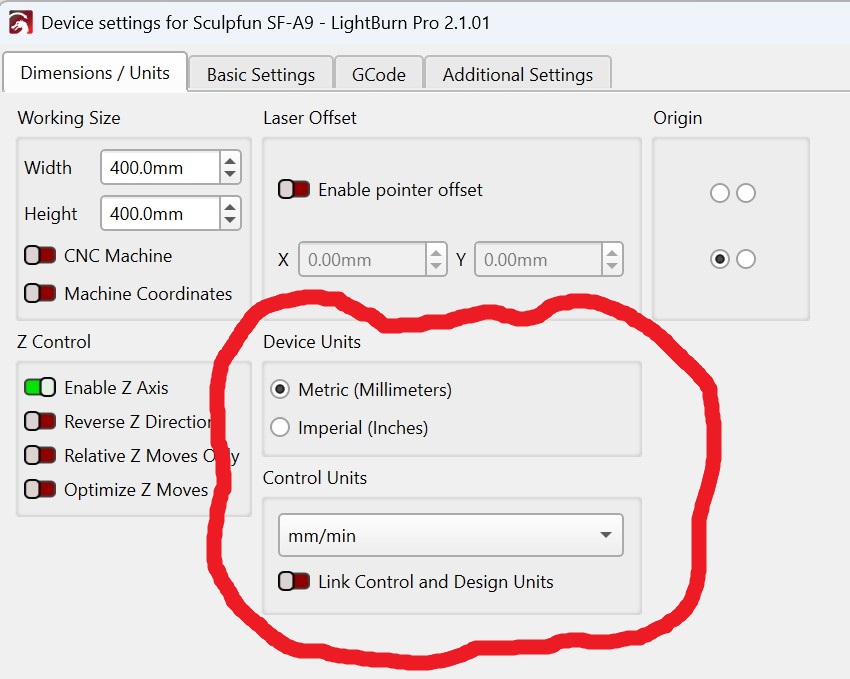
Yes, before yesterday. Lightburn now has the ability to link (sync) the design (grid) and control (laser) settings. Turn off the switch in the image. Then check your settings because you attempted some corrections.
Thanks Mike, that was it. It defaulted to mm/sec and we were running mm/min as it’s a blue diode. We did two updates in the last two days I’m guessing it was in the first one not certain when that option came in, unless it was activated by a warning we had about a mismatch in machine working size settings. I should have looked closer at the cut settings editor page as it clearly showed mm/sec there
But many thanks for your quick solution. Just curious what is the benefit of linking control and design units ? I usually run in metric and sometimes will switch to imperial when checking a dimension. When I switch to imperial in device settings with link on and mm/sec the working size of the machine changes to inches and the estimated time in preview drops to 13:38 from 19:47 but all other parameters stay the same. I can’t test that time right now, but I don’t believe it would be a realistic time reduction as nothing has changed but the unit of measurement. So what is the benefit of this new feature ?
About 1/2 of the users work entirely in Imperial or Metric in both design and run. This update made them happy.
The other 1/2, including you and I, run in Metric, but flip back and forth between Metric and Imperial in the design window. Unfortunately the default switch setting favored the other half. Kind of like how a marriage works.
Fortunately it was a really easy fix and now we can all have it our way.