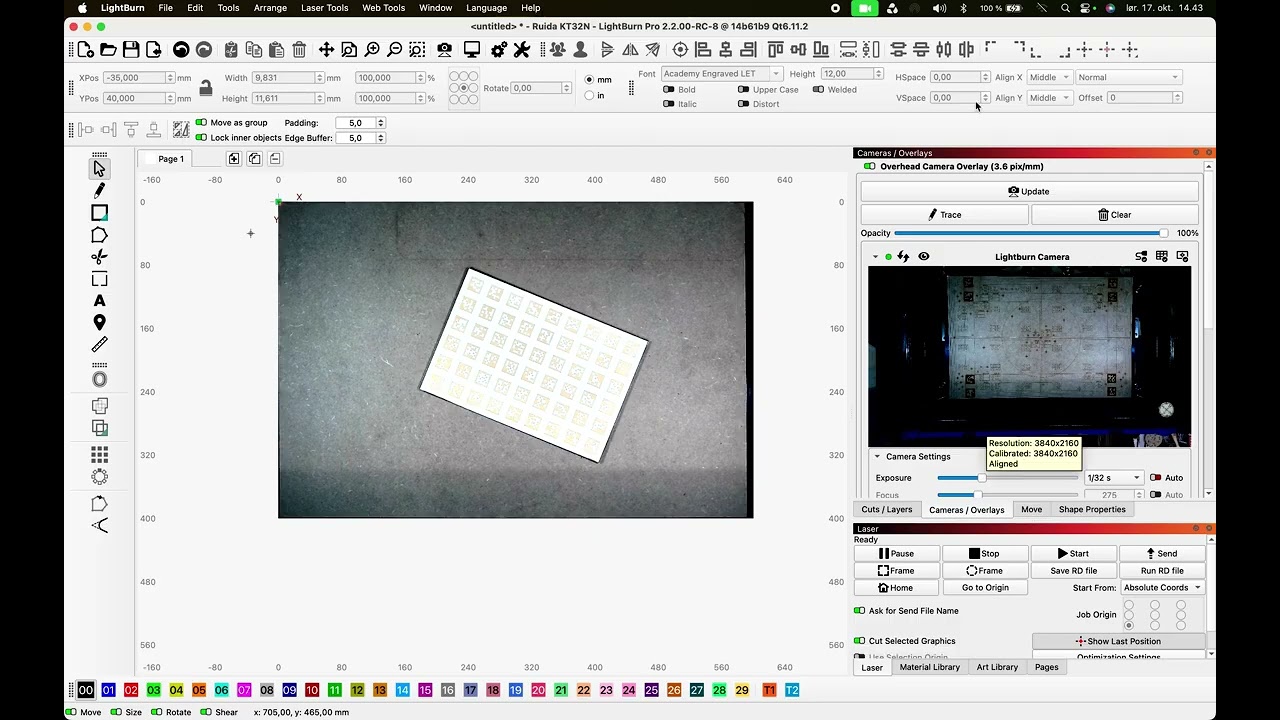
This was a wonderful software program for both professional and amateur. Since 1.7, updates are less for amateurs than professional. Example, camera calibration and alignment are a snap. Even after reading documentationfor 2.1 camera setup are impossible to follow. How can I revert back to version 1.7? I’ve litterally wasted hours trying to figure out how to set up my camera when I should be doing projects. Maybe these new tools benefit someone who is trying to make money. I’m retired, I want to do projects rather than read vague instructions for a new update. I do not want futher updates!
It’s a shame that you have bad experiences with the current LightBurn versions, especially the camera part of the program.
Everything can be made better and many of the new features are not necessarily important for all users, this of course also applies to LB.
But the fact that you mention camera setup/calibration/use as your biggest problem is a bit remarkable.
Don’t get me wrong, staying on LB version 1.7.08 is perfectly fine if you don’t need many of the new features and or only have a limited use for it, I also have a single computer with the latest (Linux) LightBurn 1.7.08 version installed, but that has completely different reasons.
Incidentally, this is also where LB shines with the option that you don’t have to update/pay for new versions but still use the program forever.
I’m responding to your post because I can see that you have the “same” laser with the same controller as I do. I assume that you also have an original LB standard camera that fits your machine and you have been able to use it with the older LB versions without problems.
Contrary to your experiences, I must say that it takes me less than 5 minutes to perform a lens calibration and a working area calibration with sub 0.5mm precision over my entire 600x400 mm, with the current LB versions. (without print/engraving time for April tags/alignment templates)
I certainly will not move you to change your mind about your program rollbacks, you should do what you feel best with, but it should also be noted that your decision basis may be wrong.
I literally spent hours of frustration, trying to figure out how to run calibration and alignment routines. Once, I selected my camera, I went from the attached screen to a screen that showed me the test patterns. It did not allow me to select a pattern. So, I kept trying to do the calibration and it gave me the same result. I’ve attached screen shots.
The small delays come from the distance between my laser and my computer.
The exposure itself is more clear for daily work, here in the video it just had to catch the tags.
The “tolerance” or precision is on average less than 0.3mm, in this setting today, if it gets too much above 0.5mm I’d like to start over again.
The only real problem I have is my camera lens which does not have an optimal distortion-free view, i.e. there are distortions especially in the TL corner - but as I said, I compensate by averaging over the entire area or using one of the areas with the least distortion.
The video is not edited or cut, I have no skills for that either
Maybe I’m doing something wrong but I seem to be able to install new versions without removing old versions. I’ve had no real reason to do so but I’m a hoarder I guess.
I’m a little bit curious, what exactly is harder in the newer versions for you? Have you seen my little video?
(I’m not defending or discussing whether one or the other is better, it’s just my personal curiosity)
Thanks Berndt, I think Ed solved my problem. My screen resolution is well below the minimum for 2.1, which explains why I’m not seeing buttons at the bottom of the screen. I’m using an old laptop in my shop. Guess, I need a new laptop!
I went back to 1.7.08, and the text in Lightburn is so small, I can’t read it. I’m using an old PC whose recommended screen resolution oy 1920 X 1080. How far back do I have to go? I found that I need a new PC to run 2.1
It’s great that you’ve found a solution to the current problem. You can also ask your children or grandchildren (if you’re lucky enough to have any) and ask them about their “old” computers.
It has 2 big advantages, you get a computer that is generations newer than yours (young people have a completely different understanding of what is useful and what is too old) and you probably get a screen twice as big as the one you have now. LB is much more pleasant to work with when all buttons and functions can be clearly seen
If the young people have thrown away their old PC, you can consider buying a used laptop for little money, go for a 15" at least and preferably a 17" screen if it’s a laptop and a 19" or larger if it’s a desktop PC. I’ve found 3 19" screens at our recycling station - for free.