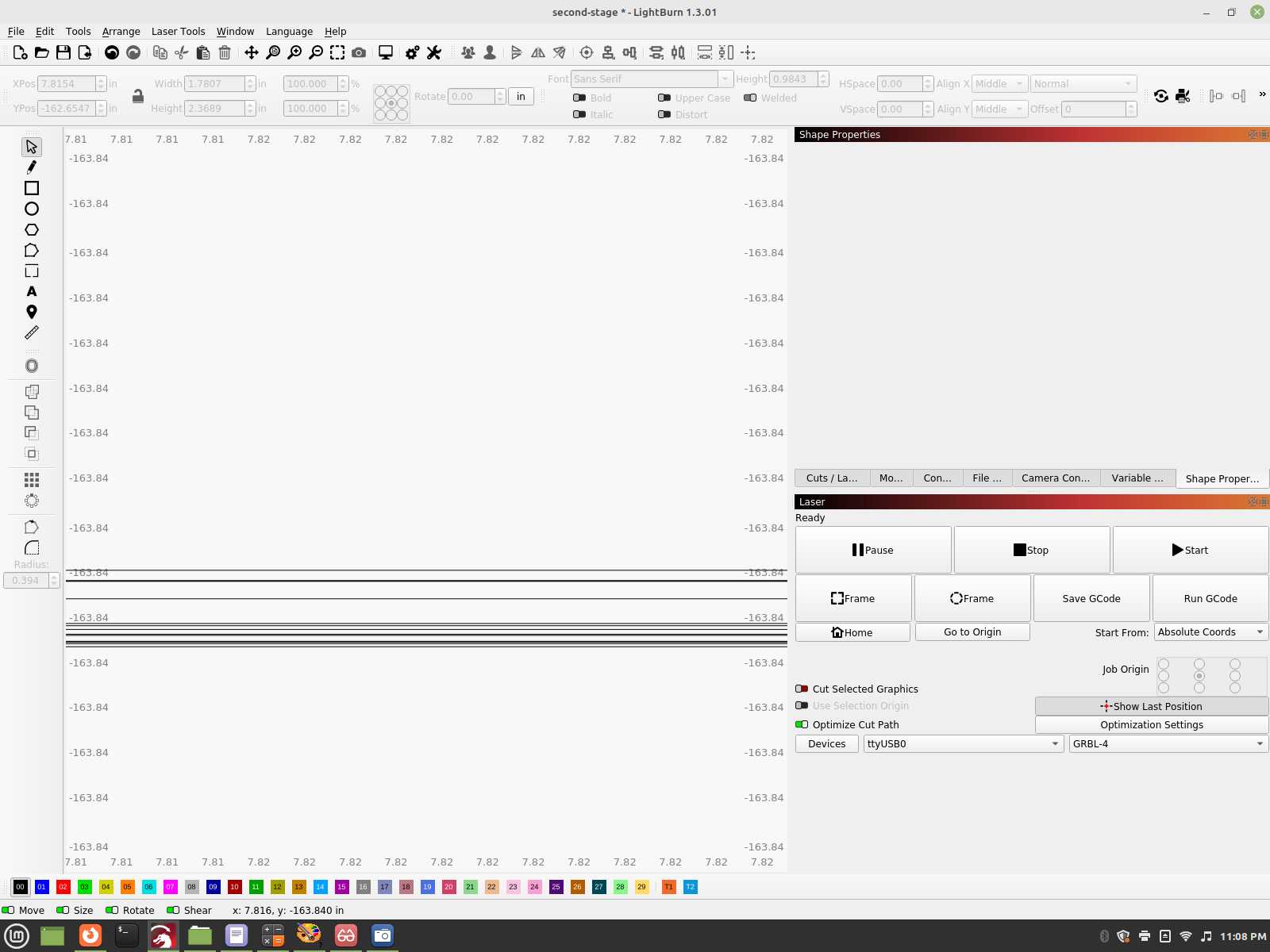
Every single line shown here should be exactly lined up, nope, sad, sick mess we have here. I can’t revise them nor make them fit in alignment. I have to attach some tabs to each, each one of those lines are part of the formers, all smaller then each other, have to be centered between the center one and the outer edge. I have a million edits to do to after they are put into place. This is so wrong, damn lazy programming.
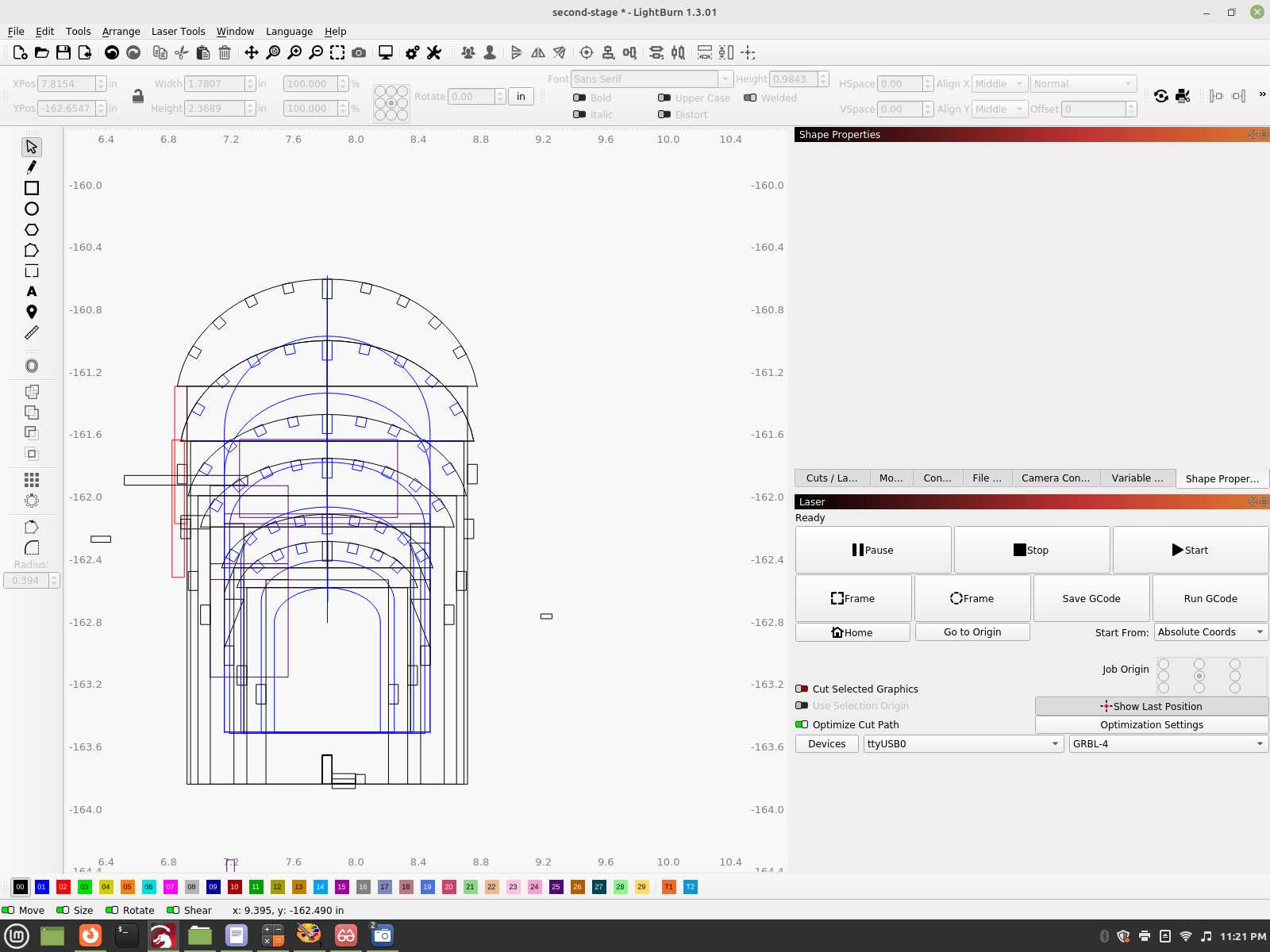
View of the forms stacked, zoomed in view of the lower section shown together like this. You see that block to the right of the center, that’s a tab that has to be cut on each one, that has to be center in all of them between the center and their outer edge
, at best I can do work around, get a vertical alignment, I still have to fix the horizontal since each one of these that should be perfect on the bottom section are all over the place. Block between it is just to align things from the last former to the center.
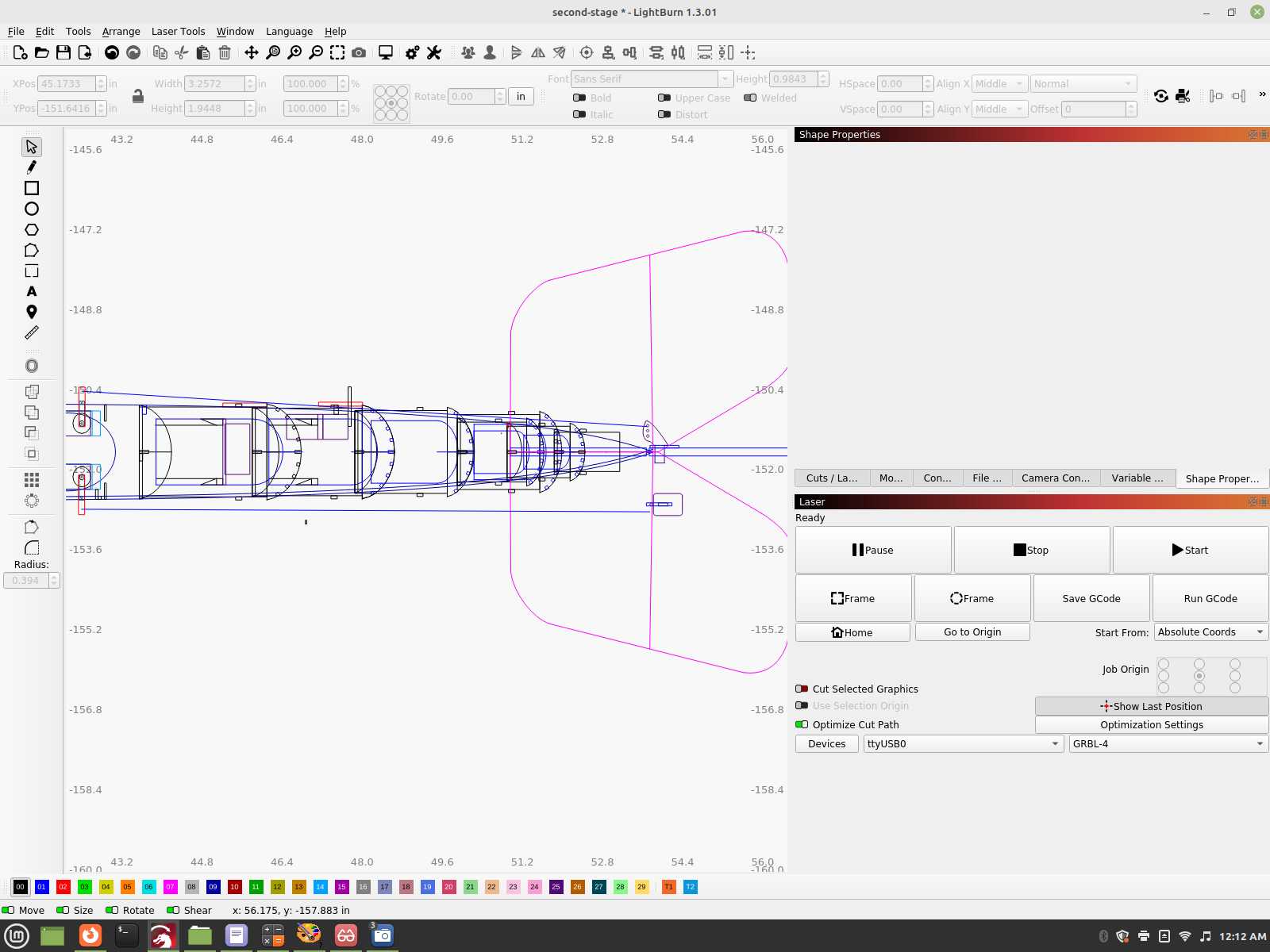
And laying them flat, on top of where they go into the fuselage, a big nope again, center spar to line up and it’s pushing the formers all over the place. This just is so disappointing, all of that work, and finding out this weak software can’t handle essentially what any vector graphics program can do… I guess if it runs faster that’s all that counts right???
… It is incredible how much time you (we) spend on discutire a software you don’t like and can’t handle either.
You have found that Lightburn is not the software you expected and you can’t use it - so stop using it!
However, if you find a laser software that acts as a CAD-CAM program at just about the same price and can handle 3-4 different type of laser machines and are just as easy to operate, please report this back.
If it’s for a Ruida, your only choice is likely RDWorks.
Good luck

I don’t use copy and paste. I’m a right click context guy. I want Lightburn to put all things in a right click menu.

Use fusion 360. I’m a hobbyist. I have no desire to design complex projects. Lightburn fulfills those expectations for me. I used the 30-day trial and figured this was the right software for the level of projects I wanted to do.
There was an enhancement made to accuracy. It’s in the LightBurn Public Beta. You’re welcome to test it to see if that improves your accuracy.
https://drive.google.com/drive/folders/1eOw5Ea2soarfXAcKJjq5bDgtstpXTfNX
Happy to help if I can.
You are absolutely correct. This happens because the Ruida controllers are all metric and GRBL was written with metric machine parameters. When dimensions in Inches are sent to the controller, they are converted to metric for motion planning. I can’t speak to the accuracy of the metric conversions in the controllers.
This is a substantial reason for the existence of LightBurn.
This particular project was my first one I began with. I realized soon enough that it would be wise to get some simpler models under my belt before completing it in order to fine tune my skills and assumed the issues I faced was just because I needed to learn the software better. There really is no way to figure out if it’s user error or software limitations until you have gained enough experience with it, with this last effort in the post to finally determine if indeed, there is something I’m missing and yet to have to learn.
Don’t get me started on the menu system they have in place, there is a lot to be desired, and yes, I too like the right click features, they need more options in that area so you don’t have to use the left/top menu’s, or memorize the hot keys.
I just picked up Librecad, it’s reduced Lightburn to be only a laser controller, It’s still simple, I wasn’t expecting much out of Lightburn along the complexity either, but I’m not getting the bugs and limitations I do with LB with it. I also like the fact it is fully supported in the Linux Distro OS, I did not have to go through the nightmare I did with LB to make it work in Linux.
I just wish it had a Linux version. I do not recommend anybody new to designing to start out with a 3d format, it’s enough for them to handle 2d. I do 3d photo-realistic graphics in Moray Ray Tracer and Pov ray, so am used to working in the 3d environment. I used to have a copy of Lightwave, it’s the same 3d software Pixar originally was using, much more feature rich but also a heavy resource hog.
Every bit of this is outside the realm of Lightburn. Is it possible your expectations are exceeding the design purpose of Lightburn?
You are right on target with this. We are here to help you along in the journey.
What problems did you have there? It is a one-click install usually. I installed it on some Ubuntu and Debian distros, never had any problem — download-install-run.
I guess answers here are paid by them, you are a fake poster obviously. You have got to be kidding!!! They never even posted in anything that it’s Linux compatible until I dug in and started a thread here, how to make it happen and with the help of some amazingly smart people, none, absolutely none from the lightburn developers, I made it happen, with the people here, not them at all.
This is such an insult for them to pawn this off, with your sock puppet account like this. I’m losing more respect for the operation at this stage…
Read through along who I am replying to, to gain a point of reference upon. No, I wasn’t expecting 3d format and performance…
This platform is limited, so at the very least, just make the menu’s user friendly, better yet, customizable so one can pull in or out from the right click menu any time on the mouse, and all controls, not just that limited selection.
If it’s going to be a kids version which it is, for hobby use only, at least make it more user friendly.
It still baffles me why people are talking about mm to fraction’s, it’s still has absolutely nothing to do with being into a forced snap that’s not consistent…
It’s not a metric to Imperial issue, there is something more, I can set to either, same issue.
No, not interested in testing out your beta, but would certainly would like to design a graphical interface you could use for gaining the children users so it’s more like MS paint or the like. Add additional options for more advances users, right click or otherwise. This is going to be strictly at this stage, a laser controller, or if I need to show a quick preview of something I will do for production.
Still, since I started here, I’ve found some additional work arounds, to get more exacting lines, nobody here has mentioned. I’m trying to just finish this current project with it before learning a new menu system and format. Perhaps it may come down to just using it a bit more, in design world, but adding one or a few additional pieces of cad type software to supplement for it’s inadequacies to make things better too.
Calling me a fake poster? You behave like one of those Facebook kids. No knowledge of anything, and then blaming others that are only trying to help. If you can’t get it running on Linux (it’s running on Linux for years now, that has nothing to do with you at all, I think), it’s obviously your fault. The fact that you are incapable of getting it running doesn’t mean others can without an issue. It actually IS a one-click-installation.
I guess you have very little knowledge of software, computer science and coding, since you don’t even get the simplest point of metric vs. imperial conversion. The issue is not the units, it’s how they are handled.
Additionally, you might ask some mathematicians to explain the difference between imperial and metric, you gave so many wrong statements above, that’s really baffling.
I guess there will be no interface for children users like you. As mentioned, a basic understanding of software, design, and engineering is required to use LightBurn. Most users (even graphical designers without deeper engineering knowledge) can handle the clean, simple and structured UI that LightBurn offers. I don’t think they plan a kid-version for you.
That being said, I will return to helping users with real problems instead of spending the time with useless discussions.
Excuse my tone, but yours was completely inappropriate and I started to copy the style.
It’s well-tested and the new release is imminent.
We write in Qt6. Thanks for volunteering. Looking forward to seeing your efforts.
We have a fairly enthusiastic community. They’re downright evangelical at times. Aside from my supervisor’s oversight, comment and lock, I’m the only other paid staffer on this thread.
I’ll invite the design team to attempt to make this more readily apprehended.
This is starting to become uncivil. I’d like to offer a friendly reminder to flag posts instead of rising to take the bait.