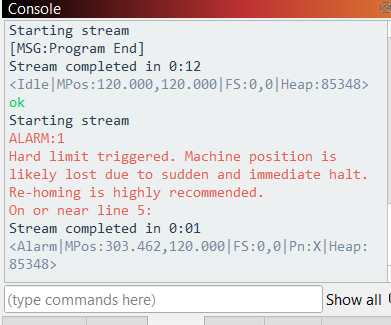
Set up LokLik, installed latest Lightburn (2.1.03)
When trying to start a practice project, just to get the basics down, I have opened the software, added my image (to burn onto a practice piece of wood), can set the position, can move the laser to the right spot. (see attached image - Display Screen)
Make sure picture is selected, click on Frame so I can be sure it will burn i n the right area, and get an error (see attached image - Try to frame)
Any idea what is going on here?
I have used $X to reset alarm and $H to move the laser back to proper position, but the error repeats
I did not hit the HOME button after the error
Going back to try
Set to ABSOLUTE COORDINATES (it was current position before)
Had it Move to Position
While it is in the upper left corner of the practice board, I have clicked FRAME.
It went ahead and moved in the frame pattern this time.
You are on the road to laser greatness! This forum is an excellent source of information and shared experiences. Do not hesitate to try out different buttons and settings. Once you gain a little experience with the software, the logic will be more natural to you. Push every button to see what it will do!
Use the preview button to see what the machine will try to produce.
Use the back one step button CTRL+Z if you make a mistake.
Test the results on cheap cardboard (Amazon boxes work for me)