I purchased a Longer Ray5 10w laser engraver this past week. After assembly, I attempted to connect to my laptop by USB and once completed, there is not movement or sound of any kind from the laser machine except one beep.
I am able to operate the machine off of the touch screen and SD card, but not USB.
LONGER Ray5 10w
grbl
unknown firmware (I am not sure how the locate this)
LightBurn 2.2
HP Pavilion x360 (model: 15-er1051cl)
Windows 11
Perhaps going through the Troubleshooting process will help:
I have used the troubleshooting from LightBurn with no success.
Some previous discussions may be helpful:
https://forum.lightburnsoftware.com/search?q=LONGER%20Ray5%20usb
I will be helpful to know what you’ve tried and what happens (or not) as a result. For example:
- Appropriate USB driver (CH340?) successfully installed?
- USB device appears in Windows Device Manager?
- Any error messages?
- Same USB device available & selected in LightBurn?
- Anything in LightBurn
Consolewindow?
I have verified the CH340 USB driver is installed.
USB Device does not appear in Windows Device Manager.
Not receiving any error messages.
USB device does must be added manually otherwise it is not available to be selected in LightBurn.
The only content in LightBurn Console is “waiting for connection”
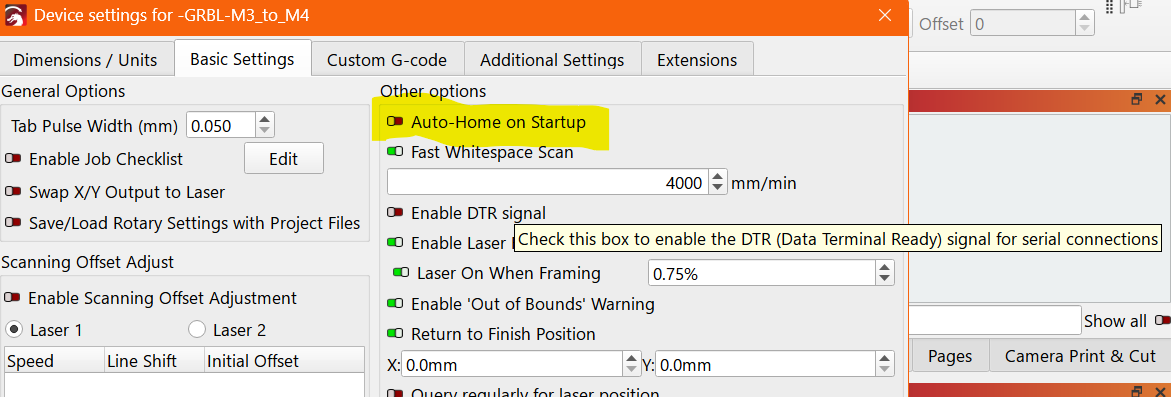
I have enabled as recommended and the only change I can find is the console. It now reads:
Runn
[MSG:Screen Uart_RX:GPIO(42), Uart_TX:GPIO(41)]
[MSG:Grbl_ESP32 Ver 1.3a Date 20211103]
[MSG:Compiled with ESP32 SDK:v4.4.8-dirty]
[MSG:FlameSensor on pin GPIO(4)]
[MSG:Buzzer on pin GPIO(1)]
[MSG:I2C SCL on pin GPIO(18), I2C SDA on pin GPIO(17), AccelSensor on pin GPIO(8)]
[MSG: Correct ID:0x33]
[Board:LGT LASER RAY5 V1.2]
[Machine:Longer Laser Ray5]
[Software:v1.9.13]
[Wavelength:460nm]
[Working Size:XSIZE=400.00:YSIZE=400.00]
[MSG:Axis count 2]
[MSG:RMT Steps]
[MSG:Init Motors]
[MSG:Global stepper disable pin:GPIO(3)]
[MSG:X Axis Standard Stepper Step:GPIO(14) Dir:GPIO(9) Disable:None Limits(0.000,400.000)]
[MSG:Y Axis Standard Stepper Step:GPIO(16) Dir:GPIO(15) Disable:None Limits(0.000,400.000)]
[MSG:Laser spindle on Pin:GPIO(7), Enbl:None, Freq:1000Hz, Res:14bits Laser mode:On]
[MSG:Local access point LongerLaser_53B4 started, 192.168.0.1]
[MSG:Client Started]
[MSG:Connecting FLASH-Guest-24GHz]
Name: SD
Name: SD
Type: SDHC/SDXC
Speed: 40 MHz
Size: 29820MB
Have sd card[MSG:Flood coolant on pin GPIO(19)]
[MSG:X Axis limit switch on pin GPIO(6)]
[MSG:Y Axis limit switch on pin GPIO(5)]
Grbl 1.3a [‘$’ for help]
Waiting for connection…
Runn
[MSG:Screen Uart_RX:GPIO(42), Uart_TX:GPIO(41)]
[MSG:Grbl_ESP32 Ver 1.3a Date 20211103]
[MSG:Compiled with ESP32 SDK:v4.4.8-dirty]
[MSG:FlameSensor on pin GPIO(4)]
[MSG:Buzzer on pin GPIO(1)]
[MSG:I2C SCL on pin GPIO(18), I2C SDA on pin GPIO(17), AccelSensor on pin GPIO(8)]
[MSG: Correct ID:0x33]
[Board:LGT LASER RAY5 V1.2]
[Machine:Longer Laser Ray5]
[Software:v1.9.13]
[Wavelength:460nm]
[Working Size:XSIZE=400.00:YSIZE=400.00]
[MSG:Axis count 2]
[MSG:RMT Steps]
[MSG:Init Motors]
[MSG:Global stepper disable pin:GPIO(3)]
[MSG:X Axis Standard Stepper Step:GPIO(14) Dir:GPIO(9)
Disable:None Limits(0.000,400.000)]
[MSG:Y Axis Standard Stepper Step:GPIO(16) Dir:GPIO(15) Disable:None Limits(0.000,400.000)]
[MSG:Laser spindle on Pin:GPIO(7), Enbl:None, Freq:1000Hz, Res:14bits Laser mode:On]
[MSG:Local access point LongerLaser_53B4 started, 192.168.0.1]
[MSG:Client Started]
[MSG:Connecting FLASH-Guest-24GHz]
Name: SD
Type: SDHC/SDXC
Speed: 40 MHz
Size: 29820MB
Have sd card[MSG:Flood coolant on pin GPIO(19)]
[MSG:X Axis limit switch on pin GPIO(6)]
[MSG:Y Axis limit switch on pin GPIO(5)]
Grbl 1.3a [‘$’ for help]
Which shows the USB port is set up, the controller is connected to LightBurn, and it’s ready to rock-n-roll.
The Getting Started guide will acquaint you with laying out a design, assigning laser speed / power settings, and Firing The Laser:
Working through the First Project will be helpful:
Also try without the SD card if you get more issues.