I have an XTool S1 10w, and I’m using MacOS 27.0.1.
So I grabbed Xtool 2.2, and I figured I’d start from scratch. So I followed the instructions here: xTool - LightBurn User Guide I found the (USB) laser in Laser pane, then went to Devices. The S1 was not recognized. So I followed the instructions to manually create it. That didn’t work.
Then I went back to the previous LBDEV file I’ve been using. (Attached)
xtool S1 defs.lbzip (1.7 KB)
I did “Focus Z”, worked correctly. Then after that job stopped, I opened the cover. I got the ‘cover open’ error (which I didn’t used to get, I think others have talked about that.) So I pressed “Stop” to clear that. I did “Frame”, which worked as expected. Then I pressed “Start” and the Console shows an error. I get two messages. One is the ‘unrecognized GCODE’ that has been mentioned before, it’s an easy fix. The other is “ALARM: Cancel”.
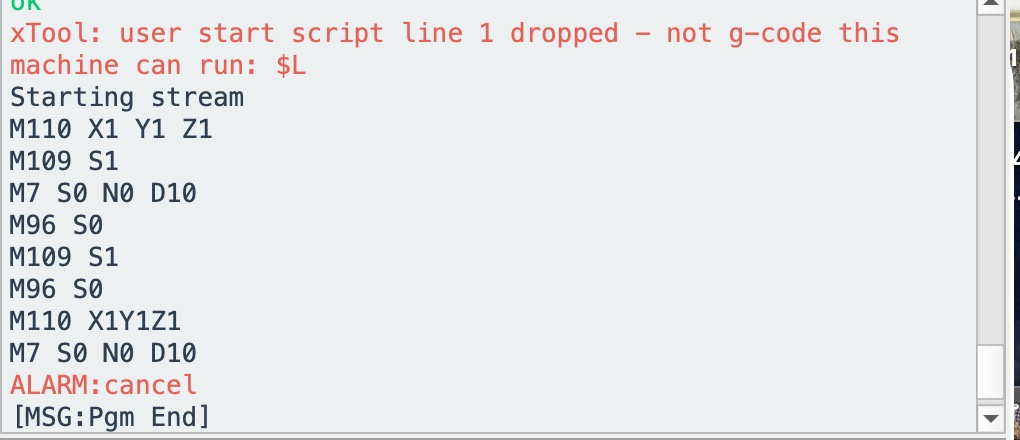
The laser does nothing.
Pressing “Start” again will move the laser and burn the test.
This is the same basic fault I’ve been reporting for several RC releases. I’m disappointed this has not been addressed.
At this point: (1) the XTool specific instructions linked from the 2.2 release page should be updated, and that in particular includes a new LBDEV file. (2) It would be REALLY NICE if auto-detect worked for the S1 (3) The problem where every other “Start” throws an error really needs to be resolved.