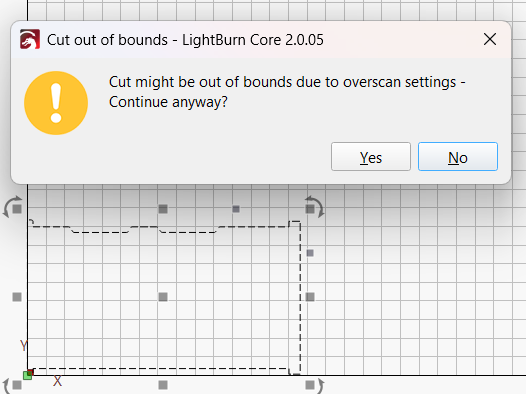
Continuing the discussion from -0.000 when auto bottom left placing using L button:
It is not fixed yet (or any answer from devs), and it doesnt matter if it is pressing the “L” button or the “place left” and/or “place bottom” button
Continuing the discussion from -0.000 when auto bottom left placing using L button:
It is not fixed yet (or any answer from devs), and it doesnt matter if it is pressing the “L” button or the “place left” and/or “place bottom” button
I still do not see anything stating why this is an issue. If this is creating a problem for you, please state what that problem is.
Technically, mathematically, plus zero and minus zero are the same thing, Zero.
Because -0.000 is less than 0 (at least, for LB) and the export fails: the object is outside of the burning zone.
This is what the developers need to know. Send an email to Support@LightburnSoftware.com and include a link to this thread.
I’m forwarding it for someone to take a look!
t.lbrn2 (7.1 KB)
Here you have a sample file with an object at 0,-0.000
When I opened it up, it confirmed those coordinates.
I saved it as an SVG without an error message. I then opened it in Chrome and it matched the Lightburn design.
Can you describe how it fails? Maybe my Import/Export settings are different. Can you snapshot (WinKey+S) your Import/Export window and add it to a your Reply?
Oh, that export! I also get that message.
But to see if it is an actual problem, I saved it as GCode (Absolute Coords), then did a Run GCode. It ran just fine on my machine.
It appears that it is just a nusance warning triggered by the negative sign. At least now the Developers have something to look at if it is serious enough.
Thanks for providing the details.
This topic was automatically closed 30 days after the last reply. New replies are no longer allowed.