316L Deep Engraving Help

Hi all!

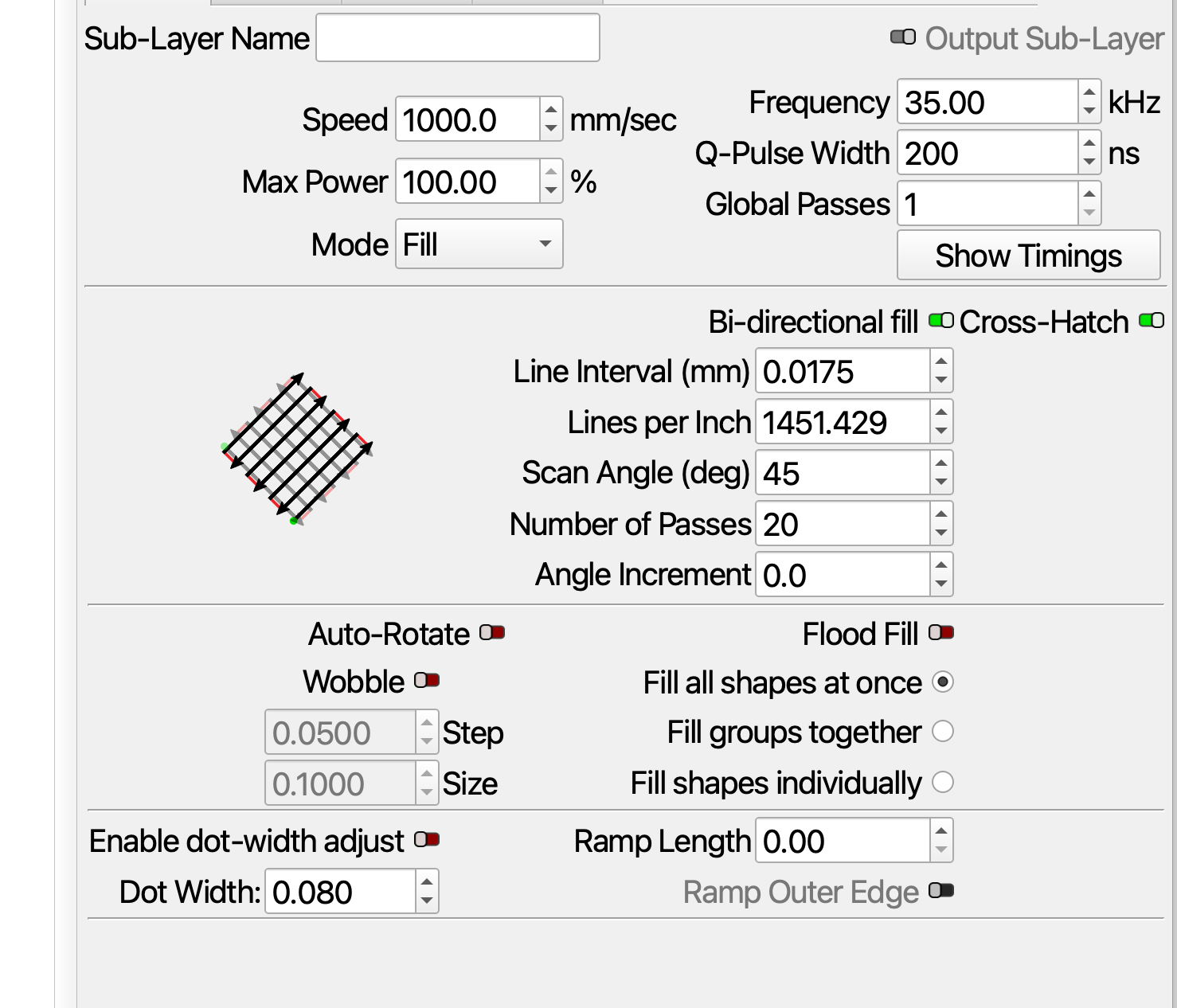
New to everything about this process, but I like to think I’m not totally incompetent. My company recently brought on a Monport 60W Pro MOPA fiber laser. We are trying to engrave some fine detailed logos down .010"-.015". I’ve played with CO2 and fiber both previous, and I’m diving into the settings for the current parts, which we later paint fill (currently enamel, will be trying thicker if we can’t get good results).

Customer wants a better finish at the bottom. Their words were “no more orange peel texture”. We can wait a few days to get new test material, and certainly don’t want to scrap real finished parts, but I’m looking for a starting place that is a little bit better than what we have tried. Here is what we’ve been able to track this week, none of which have gotten a happy result.

Frequency(kHz): 45 45 45 45 45 45 45 45 45 45 45 45 45 45 45 45 45 45
Finishing
Passes: 10 10 10 10 10 10 10 10 10 20 10 10 10 10 10 10 10 10
Interval(mm): 0.02 0.01 0.01 0.02 0.02 0.02 0.005 0.01 0.005 0.015 0.015 0.01 0.01 0.01 0.01 0.02 0.02 0.02
QPulse: 200 200 200 200 200 200 200 200 200 200 200 200 200 200 200 200 200 200
Speed (mm/s): 400 400 400 400 400 400 400 400 400 400 400 400 400 400 400 400 400 400
Power(%): 30 30 30 30 30 30 30 30 30 30 30 30 25 30 20 25 25 20
Frequency(kHz): 60 60 60 60 60 60 60 60 60 60 60 60 90 60 90 90 120 120

I have that MP 60W fiber. What material are we working on?

Stainless, found it


I measure .13 on Stainless. It’s a start.

That is using the 254MM lens 175X175 area

Thanks for this. Will test either today or tomorrow!

Rick’s settings suggest going faster with more power. I consider that a great starting point.

When going faster, you likely also want to increase the Frequency. According to Monport, the GM60 Mopa Pro can go up to 4000 kHz(!)
I’d try 100kHZ first and watch the difference.

Think of the frequency value as sandpaper: a higher frequency means more pulses per second → finer-grit sandpaper


Another interesting value, you didn’t appear to have touched yet, is Q-Pulse.
This is the duration over which the energy of the laser is being released. In simple terms, this means: lower Q-Pulse = More energy.
A shorter, more intense burst of energy also means less time for the material to spread the heat - which could be helpful when trying to get a clean engrave.

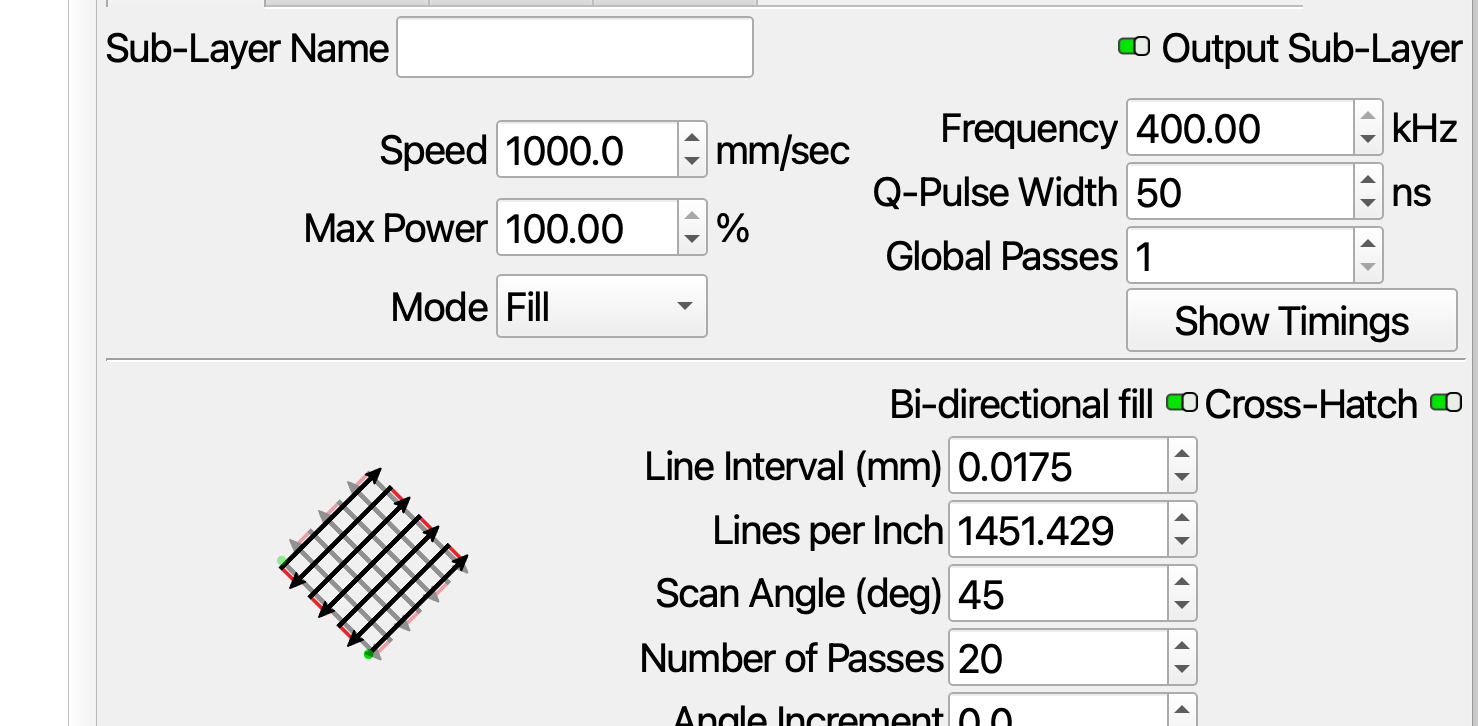
I’d be curious to see your best result and a screenshot of the corresponding settings if you want to share.

Great help. The kHZ refused to adjust any highr than 400. whats with that? I acheaved a .20 depth with the freq and Q adjustments.

My M60 JPT M7 MOPA has this warning about frequency and q-pulse settings.

★ for laser safety and long lifetime, when set ≥80ns, ≥400kHz, frequency will be limited at 400kHz


Learning about radio and electronics decades ago, I found the Q of a circuit. This applies to any emf emission, if it’s your home mains, microwave or laser, or sun light and it can be manipulated in the same way.

In simple terms, the Q of the lasers exit is very high, so nothing escapes and it just keeps being pumped up and amplifying the power within the fiber. When you set a Q-pulse length, the machine lowers the Q for the requested duration. This allows output for the requested duration, like opening the bottom spigot on a tank. It’s full and you open the valve, you get full pressure and maximum volume… However the longer you hold the valve open, the volume in the tank drops, there is less power because of less pressure and volume.

This is my MOPA (from JPT), you can see all of these pulses are about 18kw peak, but long duration pulses you can see the power drop off as it drains the energy stored in the fiber.

Some types of cavities will naturally open when pumped up to a certain energy lever, these are normally called Q-switch fiber machines.

I’m trying to agree with @Aaron.F about how you’re missing a lot of control by leaving out q-pulse width.

Assume you use mm, not inches…?


If you’re using mm, then you’re talking 10 microns, with a 0.010mm interval. The spot size of an F254mm is about 30 microns or ~0.030mm. You’re making about three passes over the same area. Sometimes we do this with a fiber on purpose to heat things up and get the proper annealed oxide layer. Just be aware of your spot size.

Make sure you can do this type of resolution, unlikely you can get the same high definition of work using an interval smaller than the spot size.

An an example, if I have a 1" bit, I can’t expect any better resolution than 1dpi.

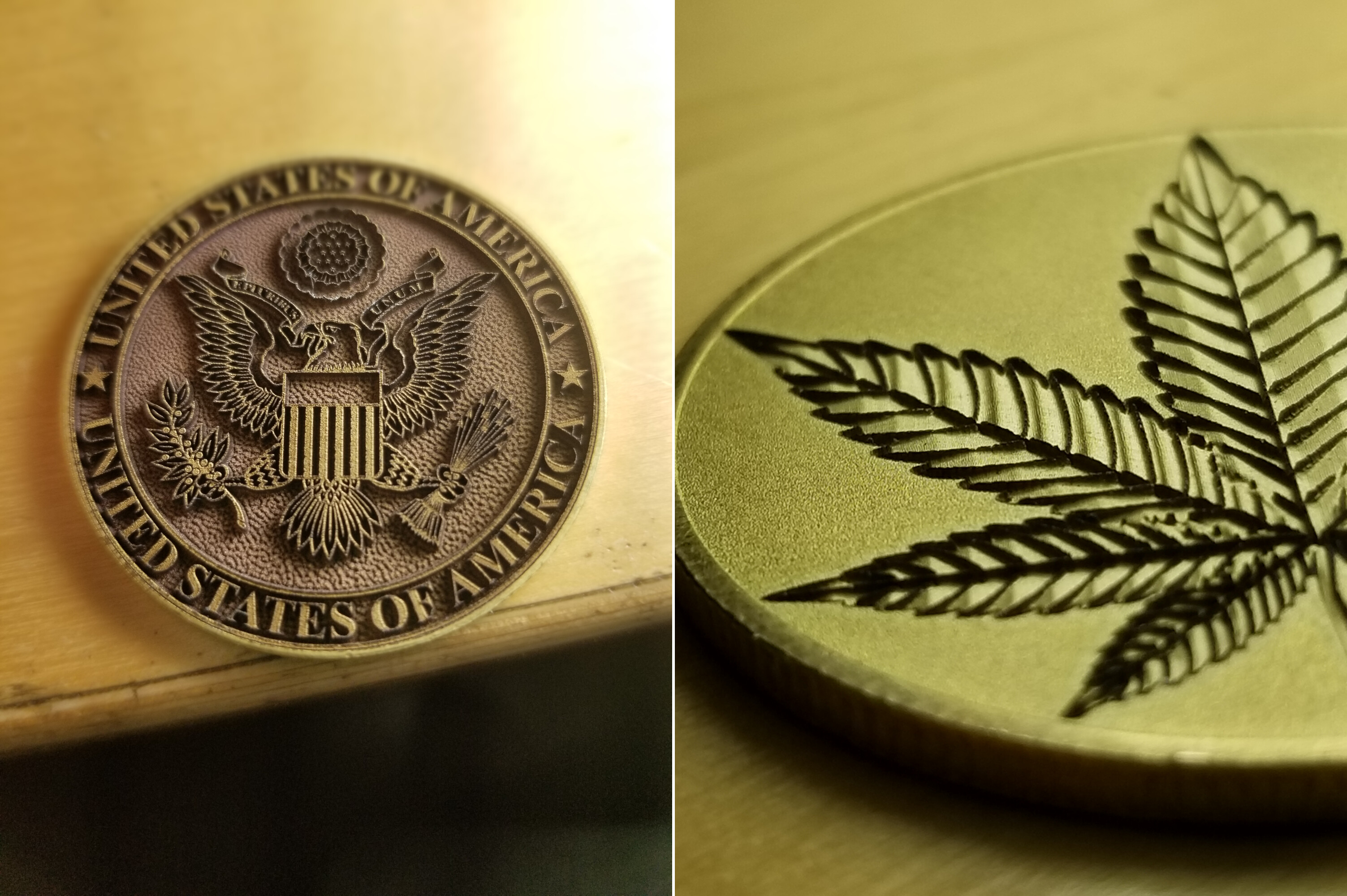
Frequency controls pulses/s (or mm) so a lower frequency give less pulses/s but can leave an uneven layer, likely what your customer is referring. The one of the left is ~45kHz and the right is about 200kHz.

Hope this makes sense?

Good luck.. keep in touch.

:grinning_cat:

Thanks for stepping in with the details, @jkwilborn

I figured that the 4 000 kHz claim was very high. (Maybe, that’s one-time use only)

There’s now a Min and Max Freq Device Setting in the Ports tab. I’d suggest leaving the maximum at 400kHz

Well it’s been a long time since I needed to use Q values in circuits, and I could have them backwards… High Q allows it to pass and a low Q blocks it.

Trying to dig into these, it seems like a bottomless pit, at some point it goes above what you can easily visualize. Bad enough with a simple co2, but now with a fiber… I’m not terrible in physics/math, but it goes way out of my range when I start examining how the physical Q switch is built and how it’s manipulated by the controller…

Thanks for hopping in, you’re input is always more than welcome.


Do you know the command structure that is sent to the source from the controller? It’s shown in my source manual, but doesn’t really explain the controller/source signals. As far as I can determine, there are only 16 different waveforms, one being CW mode. Is this something Lightburn has to contend with when dealing with the JCZ boards?

It does say:

The parameters of this instruction are the binary values of the pulse width. Users can compile
any values of pulse width, but the laser can only receive the signals of specified pulse width
(please refer to the user manual for specific pulse width). If the value of pulse width is out of the
range of specified pulse width, the laser will choose the default pulse width set last time.

:grinning_cat:

Thanks all for the support and information.

Here’s what I’m taking away:

Next focused test would likely be a set speed, interval, power, but testing kHz vs Q-Pulse. Probably higher end speed, higher end power.

Same idea to test finishing, probably at those higher frequencies.

Note on units, I’m a machinist, I think in decimal inch, so yes my goal is to go .010"-.015" or .254-.381MM. I’m trying not to switch the controller from how I found it, which was metric, if only to avoid doing excessive calculations and talk to our engineers who think in metric.

If I get a test done today, will share photos!

Me? Absolutely not! :slight_smile:
I work on an entirely different level.

I’m quite certain that we don’t talk binary with the laser source directly. I know for a fact that, for example, the “Galvo Protocol” XY2-100 is not something we ever needed to touch directly either.

Edit because I wasn’t paying attention - OP was only finishing settings, here is roughing and finishing.

Roughing
Passes: 15 20 15 10 20 20 10 20 20 15 20 15 10 20 10 10 10 10
Interval(mm): 0.015 0.02 0.015 0.01 0.01 0.02 0.02 0.02 0.02 0.025 0.025 0.03 0.01 0.02 0.01 0.01 0.01 0.01
QPulse: 200 200 200 200 200 200 200 200 200 200 200 200 200 200 200 200 200 200
Speed (mm/s): 300 300 300 300 300 300 300 300 300 300 300 300 300 300 300 300 300 300
Power(%): 70 70 70 70 70 70 70 70 70 70 70 70 70 70 70 70 70 70
Frequency(kHz): 45 45 45 45 45 45 45 45 45 45 45 45 45 45 45 45 45 45
Finishing
Passes: 10 10 10 10 10 10 10 10 10 20 10 10 10 10 10 10 10 10
Interval(mm): 0.02 0.01 0.01 0.02 0.02 0.02 0.005 0.01 0.005 0.015 0.015 0.01 0.01 0.01 0.01 0.02 0.02 0.02
QPulse: 200 200 200 200 200 200 200 200 200 200 200 200 200 200 200 200 200 200
Speed (mm/s): 400 400 400 400 400 400 400 400 400 400 400 400 400 400 400 400 400 400
Power(%): 30 30 30 30 30 30 30 30 30 30 30 30 25 30 20 25 25 20
Frequency(kHz): 60 60 60 60 60 60 60 60 60 60 60 60 90 60 90 90 120 120