Thank you for doing that, Aaron! That seems to indicate that it’s something with my engraver I guess. But I’m not sure what. Maybe start over from scratch and recalibrate everything? Timing? I’m open to suggestions on what are the most likely things to cause this. Thanks in advance
Sure!
I’m still curious what it might be.
I had my hopes up that it had something to do with the fact that version 1.7 did a Cross-Hatch.
But as mentioned, your timing settings are not too far off from what I have.
BTW, I didn’t flatten the image mask in my tests, so that part is not the issue.
If you do another test with the 1.7, it could provide insights if you can disable “Bi-directional scanning” to only scan one way.

The 2.0 brought the ability to use Angle Increment.
“To reproduce the crosshatching effect from previous LightBurn releases, set the Angle Increment to 90°.”
I did a test per your note and thought it worked, but after looking closer, it didn’t. The only change I made was bi-drectional scanning=off. This is still being done via 3D slice mode which is where the problem occurs. I just want to be sure I’m sharing all info to help find the problem. Let me know what you think.
Also, I’m attaching my original timing setup (from the factory) to be compared to what I shared above for timing. I’m still pretty new but feel like there may be something happening there?


1 Like
I did some more looking using a digital microscope and if you look at the photos, I’m 95% sure this is indicating a timing issue that’s giving me the problem. (2 pictures - one annotated with red and the other unmodified)
Thanks in advance for your suggestions and where to go from here.


1 Like
Most likely, your delays are not set up correctly.
The Jump delays are actually on the safe side. The TC’s are right in the middle of the road, even if not dialed in exact the numbers are close enough that it wouldn’t make that big an error. IMAO anyway. @indyglassman what would happen if you cut your speed and power in half? It is possible you have an mechanical problem with the galvo head. Just throwing things out.
Which version did you use here? 1.7.08, or the latest 2.0?
The reason I suggested testing with bi-directional scanning off is because, If it was a timing issue, I expected to see the same shadowing as in your previous picture, but only on one side.
As to what happened with these visible connecting lines.. I have no clue!
Looking at your Timing settings again, the one value that’s way off from the defaults is the much slower Jump Speed.:
I don’t have a reasonable explanation that this might be causing issues, but suggest setting the Jump Speed back to 4000mm/sec.
I second this!
The Spiderman coin from your first post came out excellent!
Can you run this again and see if it still works?
Thanks guys! I have NOT upgraded yet because I didn’t want to have to many variables changing at the same time. I will give the Jump Speed setting back to 4000 and report back.
@Albroswift The odd thing is that I did the Spiderman and the Batman Logo (which has issues) with in 12 hours of each other with no changes to timing or anything else. Both were done with 3D slice mode even though the logo doesn’t really need that. I don’t know how to describe it other than to say the BM Logo vs the Spiderman are very different in terms of topology. I don’t know if the spiderman just hides the issue due to the multiple engraving depths?
Progress!
- I did a recalibration of my device settings (T-on, etc) and used a USB microscope to get as good as I can.
- Created a new file in Lightburn, added my graphic (same one as before). Same settings but with a couple minor changes.
Changes:
OLD: cleaning pass every 8 layers. NEW: cleaning pass every 1 layer
OLD: cleaning pass 15% power NEW: cleaning pass 40% power
OLD: cleaing pass “whole image” NEW: cleaning pass whole image, unchecked
I did one test coin (Batman logo + Harley Quinn), both had issues previously. Now they both look very good even with the USB microscope. Running a 2nd test as a sanity check and if it’s successful then I’ll feel much better - but I expect it will be just as good.
Thank you ALL for the help and suggestions. I was happy to see Oz jump in as well as the rest of you.
2 Likes
I would be curious for any feedback regarding what I was told by the manufacture (Gweike). The issues that I had above appeared to be less noticable as I decreased from 2800mm/s to 2000mm/s.
When I asked them (Gweike) about the speed range for the machine they told me 10,000mm/s max but to try to do engraving at 1000 to 1500.
So after all your help and recalibrating, I’m using 2500 and getting very good results. But their response took me by surprise regarding the MAX vs RECOMMENDED speed. Is this common for better quality fiber lasers (or any that use galvo’s I suppose)? Or possibly it’s just substandard components that are used in their lasers?
I asked Cloudray for the specifications of my galvo unit. I got a link back to this page.
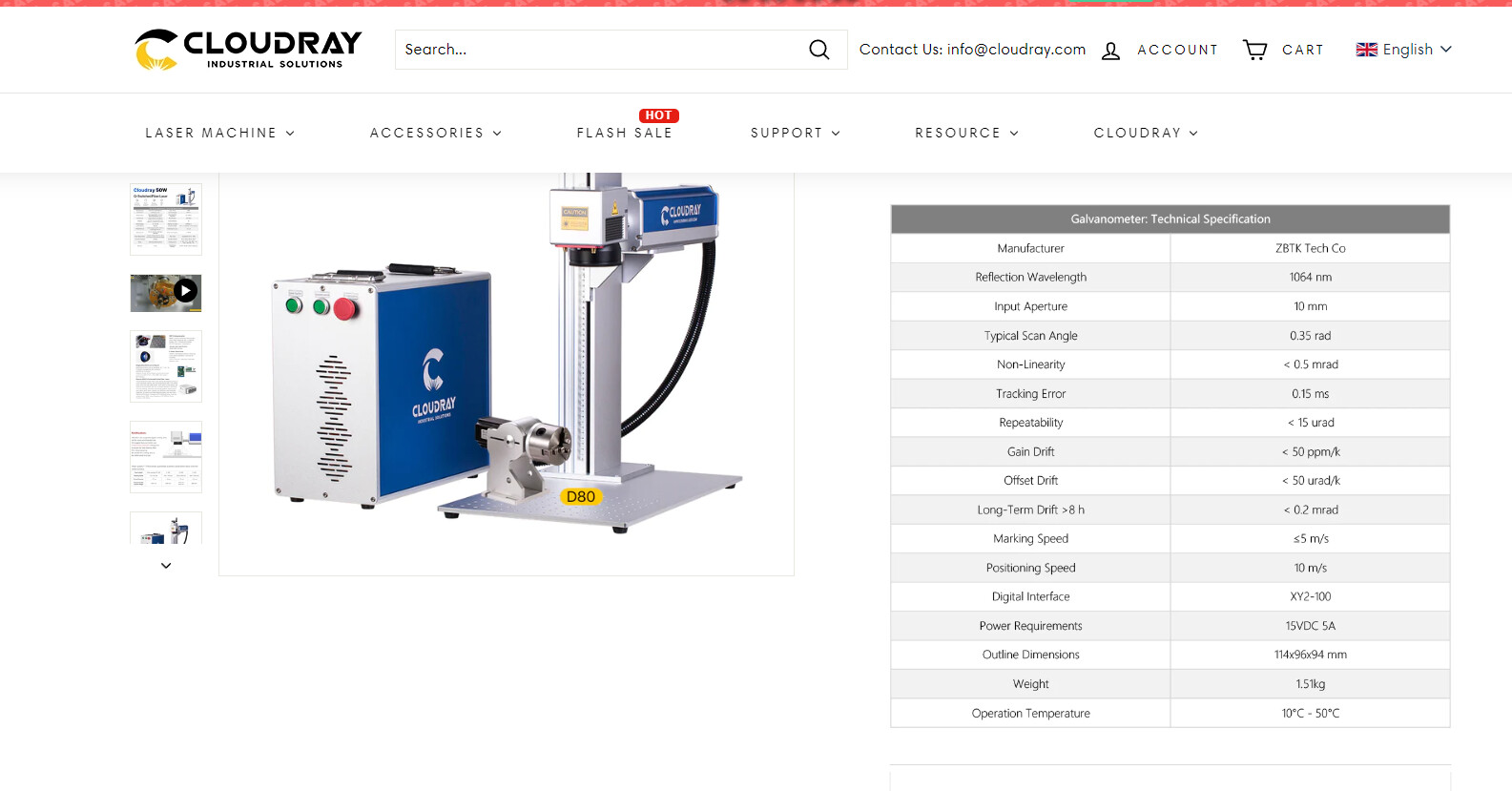
They differentiate between marking speed and positioning speed.
Most of us have no way of know how fast they are going anyway, so we are at their mercy.
I find I rarely go over about 4000mm/s and that’s about my galvo limit.

Ah, that makes sense. Thanks for that!
I’m glad it does to someone.
Their Chinglish translations are sometimes not what they appear to be… If I knew I’d be doing this, I’d have taken Mandarin Chinese in school. lol
Madarin Chinese Classes should have a sub-title “How to RTFM”
I’ve done a lot of testing and (when timing and jump are calibrated properly) I can fill up to around 5000-6000 mm/s with surprising accuracy, even with tiny text. In line mode however polygon corners start loosing it around 2000mm/s. YRMV.
2 Likes
This topic was automatically closed 30 days after the last reply. New replies are no longer allowed.