3D Slice shadows

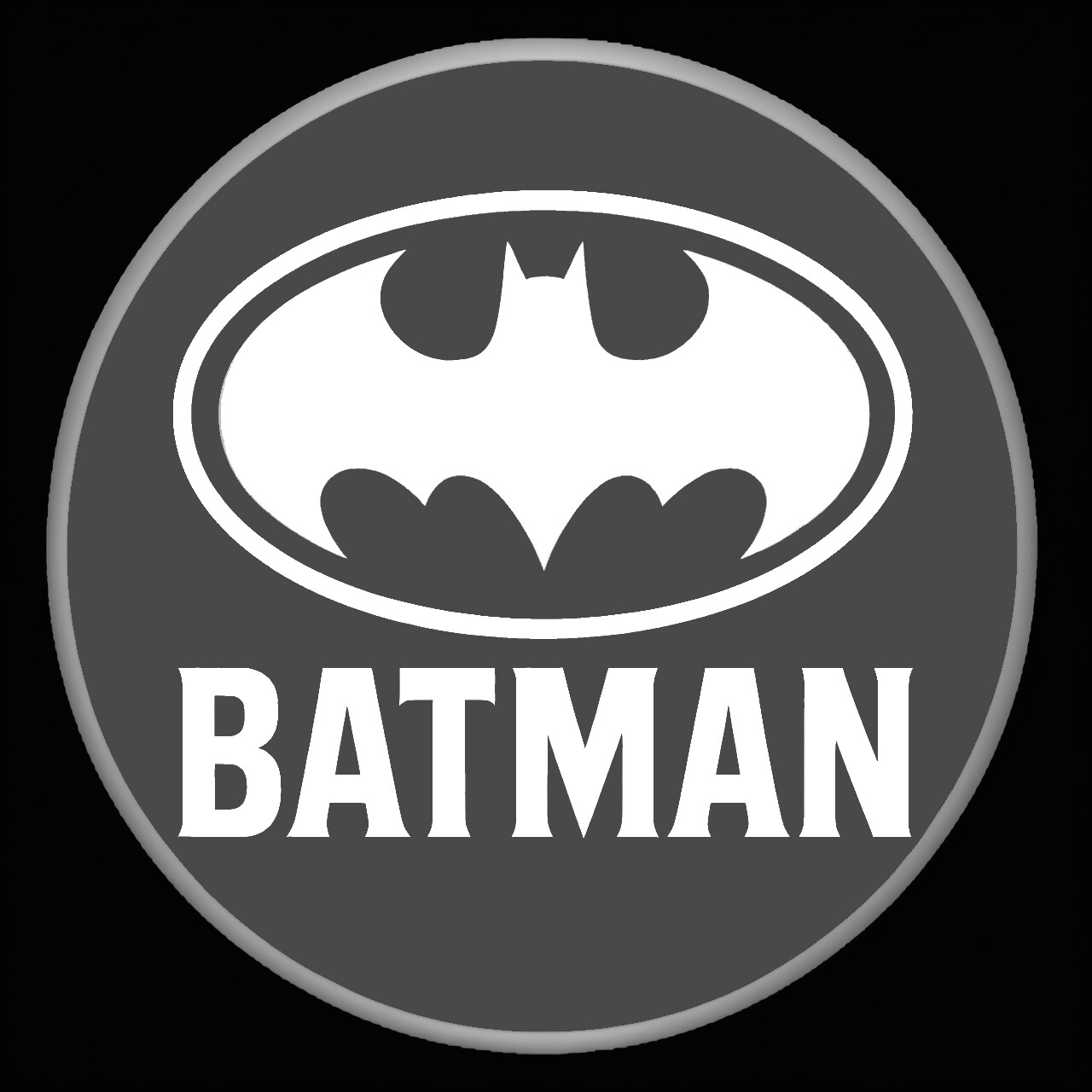
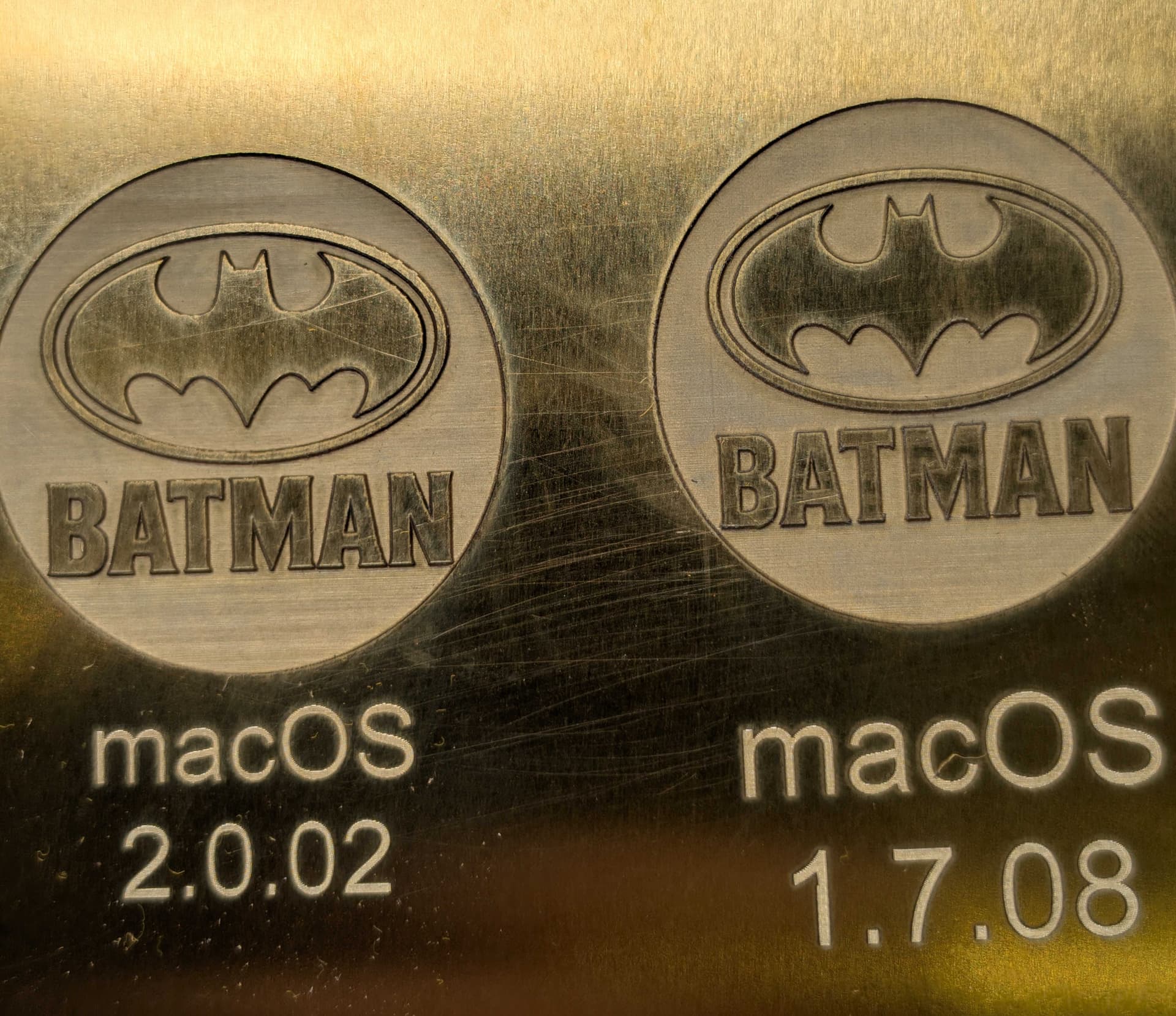
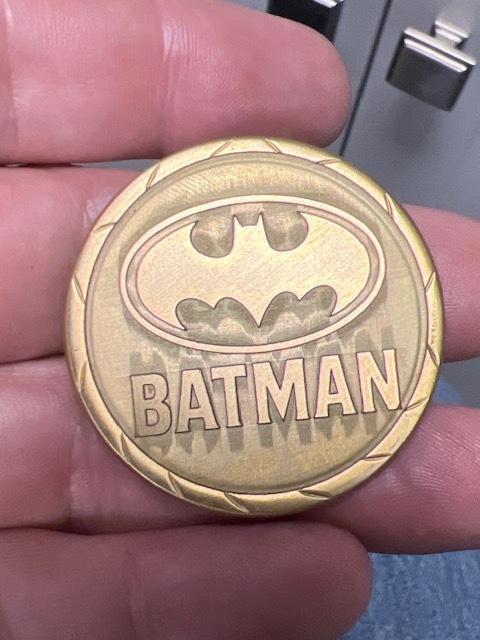
I searched for answers prior to posting gut didn’t have much luck. I’m attaching two photos - one (Batman) showing the issue I’m having and the other (Spiderman) showing that 3D slicing works fine with a different file. (I DO NOT believe the issue is related to the file as it’s basically only dark gray and white - 2 colors - in the Depthmap for the Batman so it’s not really 3D relief style but what causes this?)

The issue should be obvious from the photo of the Batman logo - the shadowing on top and bottom of the letters and logo.
Laser: Gweike 50W
Settings: 3D Slice, Speed 2200, 80% power, 256 passes, clean every 10, 0.03 line spacing

I’ve tried several things but haven’t figured out the cause.


2 Likes

When you do 3dslice, it needs to be a depth map, not a visual representation of 3d.

It would be nice if you could possibly supply the original images?

:smiley_cat:

Thanks Jack. Yes, I am familiar with depth maps and have made several from scratch as well as used various apps to make them as well. This one is very simple, just two shades of gray as you can see. I don’t see how the file could be an issue but here you go - thanks for jumping in to help.

Looks like jpeg artifacting; try using png from start to finish, which uses lossless compression. What does the preview look like?

It is a PNG, but I can’t say for sure it was never a JPG so I can recreate it to exclude the file being the issue. Thanks for the response and suggestion.

I see what you mean. When we have issues that need a look, written documentation leaves a lot to be desired when a photo is available. I couldn’t imagine what you have there.

I’ve had mine about 2 and a half years and have seen it do some strange things.

Sometimes you can get a Moiré pattern created by interval and original dpi. I’ve seen it and corrected it, and made it worse by small changes in interval. I’ve seen this a lot and it’s similar to your issue.

Not knowing what lens or interval you’re using, I can only speculate.

It may seem odd it’s only on the Y axes, but I’ve seen this on my own projects, it doesn’t really surprise me.

I think this is what @fins may be suggesting but based on how jpeg and png data represent.

There are a number of people that may be able to help. Be gone Monday afternoon through sometime Wednesday, so I won’t be of any great help.

Maybe @Albroswift has some input for us.. it being a long weekend, I don’t know what others are doing.

Hang in there, we’ll do what we can to help you fix it.

:smiley_cat:

Here are more details.
Gweike Fiber Laser G2 Pro, 50W with 150mm lens
Lightburnsettings: 2000mm/s, 80%power, 25k freq, 0.03 line interval, Scan angle 0, 3D Slice mode, 128 to 256 passes have been tried.
Cleanup: Tried with and with out. 2400mm/s, 15%power, 30kfreq, 0.03 line interval, 45 degree angle, 30 degree angle increment

Hi Chris!

Since the Batman picture in use is not a “real” depth map, 3D-Sliced might not be the best-suited mode in this case.

With this image, I recommend using the Trace Image feature to move each of the three colors to an individual layer.
This way, you have more control over the desired depth effect.

Nonetheless, 3D sliced should work, and I’d like to investigate what might be causing the artifacts.
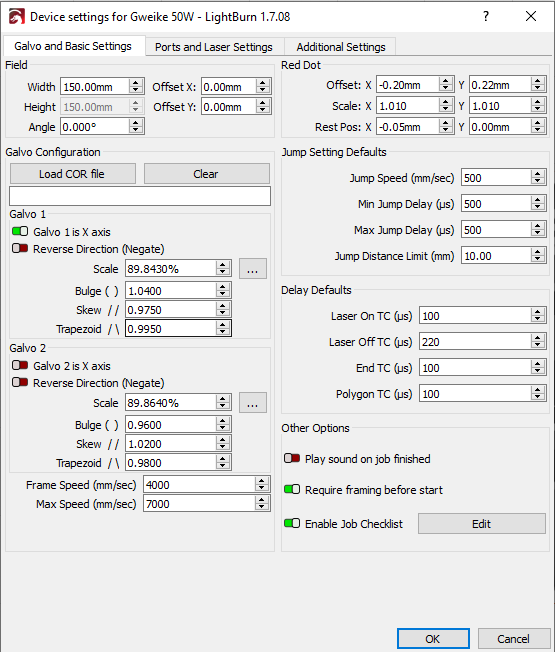
Please send us your .LBRN2 project file and post a screenshot of your Device Settings (specifically the Delay Defaults).

1 Like

Aaron - Thanks for your reply. I agree that 3dsliced may not be the best suited. I also agree that it should work though. I’m not an expert so I appreciate your help and at the end of the day, I just want to understand what causes this, how to fix it and avoid it in the future. I’ve seen it a few times with other designs but this one is very consistently doing it.

I’ve attached the lbrn2 file and the settings

BATMAN-BOTH.lbrn2 (643.1 KB)

Thank you for the file.
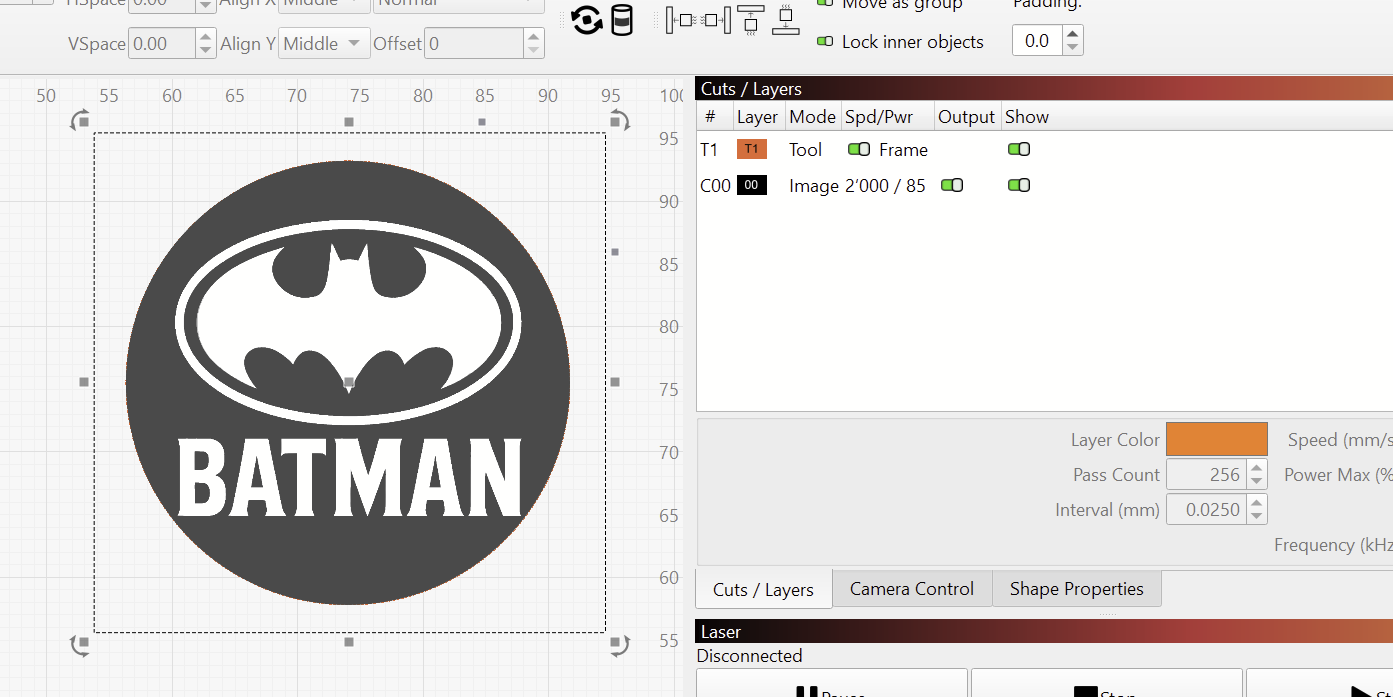
The way you’ve set it up with the masking, your image is basically one color only:

I definitely recommend using a classic Fill mode in this case.

I’ve seen cases, where masking an image could throw off something, and it’s worth a try to Flatten the mask first: Select the image and the circle of the Tool Layer, right click and select “Flatten Image Mask”.

I still don’t have an explanation for the vertical ghosting effect in your picture. Your timing values look in range and you are only scanning horizontally.


There’s really no benefit of using 3D Sliced here.
You can do the following:

  • Select the image
  • Right click and choose Trace Image (Alt + T)
  • Adjust the sliders if needed, to get smooth shape, and hit OK.
  • This will generate vercors of the design, allowing you to use the Fill Mode

Aaron,

Thaks. I can try to flatten the mask - but for reference, I do this with every single file I engrave and haven’t seen this issue with other images. But, I’m here asking for help and if that’s your suggest, I’m happy to try it and see if that helps.

I also understand that for this particular image, there’s no reason to use 3D Slice over Fill. But it should work in either mode. Since it has this issue in 3D Slice mode, it makes me curious as to why – it doesn’t appear to be the image and the timing is in the acceptible range. So I’m still holding out hope to figure out why it happens.

Me too!
I’m asking a Dev and will update when we know more.

In the meantime, let us know, if you can do what you aim for with the suggestions.

Thanks. I created a new file to try just to rule that out. I’ll test when I can today or tomorrow between orders.

We all agree that this shouldn’t be happening.
I will run your file on a Gweike G2 Pro 30W later this week.

I now see that this happened on LightBurn version 1.7.08.

Can you download the latest version and let us know, if it still happens there?

(If your license key has expired for free updates, you can temporarily deactivate the license and use the trial.)

I think the initial photo was done using 3dslice. I think it only does a 90 degree rotation, so I’d assume he was scanning in 0 and 90 degree directions.

Can you change the 0 and 90 degree step in 3dslice?

Either way it doesn’t explain the aberration.

Agreed, 3dslice isn’t really the best choice. That’s why his posted photo surprised me.

I still think it goes back to some anomaly with the mixing of scan and pixels results in a Moire effect occurring. IMHO. I’ll be waiting on a developer report..

Thanks.

:smiley_cat:

Not much to add, but I would definitely convert it to an SVG with trace or one of the online converters, or just find a free batman svg on the net and add your text. I’m sure there are 2 or 3 out there. .

batman2

My galvo head started making an audible whine and one of the axes started shaking. At first I could only hear it, then had quality probs, then it was oscillating back and forth at max speed in like a 1/2" line even while idle. The red dot was a line and any attempt to fire the laser would have that movement added to it. I contacted the mfg and they sent me a new galvo head, it was only a week old or so. I don’t know the exact nature of the problem but it’s in the galvo head which contains a driver board and the galvos.

I suspect you have the same problem, because it looks specific to the axis.

With your 150x150 lens, that should make about a 0.04mm spot. Your LI is 0.03, so there’s some overlap there. I generally shoot for LI=spot size.

But, your movement direction. 25KHz @ 2000mm/s means it’s firing with a 0.08mm interval. That’s putting standalone dots really far apart.

I don’t know the performance charts for the G2, I have an M7 300W MOPA. But I’d recommend you adjust speed and/or freq together so that speed/freq=LI=0.04 (for a 150 lens).

A 110x110 lens is more conventional for small stuff like coins. It will get you a smaller spot size while keeping depth of focus and lens height reasonable, and the beam angle won’t be problematically high. For a 110x110, speed/freq=LI=0.03

Choose a nonuniform number for angle increment so that it will NEVER line up again. I ran this one through ChatGPT and it went through number theory and coprimes and got 42.7 deg, it’s near 45 deg steps but won’t line up again until 1800 passes. And after 20 passes it’s drifted past the first orientation too.

Or, if you want to do a 90 deg advance on each pass (basically cross-hatch), then 90.7 or 89.3 deg. So any pass is “basically” 90 deg cross-hatch against the one before, but then the third pass won’t align with the first.

I had to think this one through- ok, I’m looking at 0 and 180 deg as “aligning”. Even if you’ve got bidir off that’s still mostly the case. If it were a very small object, then using 90.7, the third pass is only 1.4 deg from the first which may not be very far apart, esp in the middle. But then you’d look at using 42.7 deg and cover all the directions every 4 passes while never repeating.

Thinking through that, yep, these are the only 2 choices that make sense. 42.7 would be my first choice unless I thought ~90 deg (90.7deg) cross-hatching was somehow going to be a different effect.
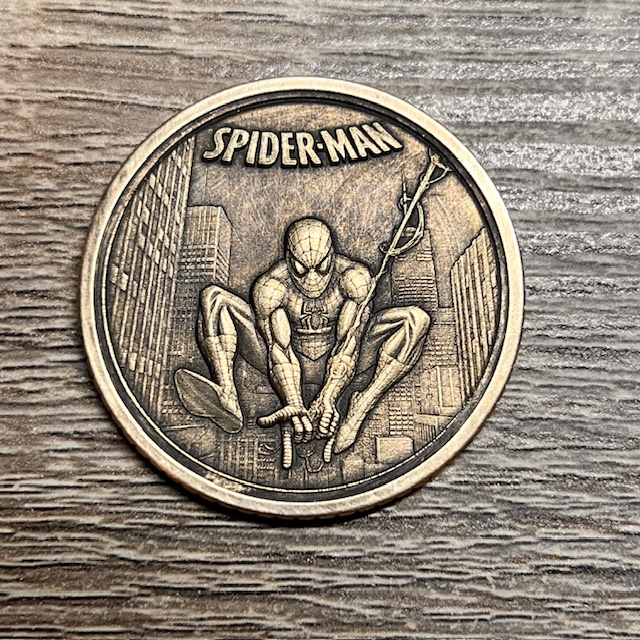
The version he was using (1.7.xx) didn’t support rotation for 3D Slice because I hadn’t rewritten the resampler yet - slices at different rotations would misalign, sometimes by quite a few pixels, and it wasn’t stable when you changed scale, so doing cleaning passes with a different interval or angle could give weird results.

The new one in 2.0 is pixel accurate while varying scale or angle, uses significantly less memory, and is faster to boot.

Just a note to say that I sincerely appreciate everyone commenting and making suggestions. The community support on this forum is great!
The action plan that I see is:
1 Aaron was going to try to reproduce the issue
2 I will upgrade to v2.0.02 and try again (Will take a few days b/c I have a job I’m completing)

2 Likes

I ran your file on 2.0.02 and 1.7.08 and was unable to reproduce the shadows in your picture.
Also tried with a 30-degree Angle Increment on the Cleanup Passes.

I learned that version 1.7 and earlier always did a Cross-Hatch with 3D Sliced because LightBurn didn’t yet support Angle Increment on every pass.

So, the design did in fact scan vertically too, but still didn’t show any ghosting in my case.

Curious to hear how the latest version performs for you.