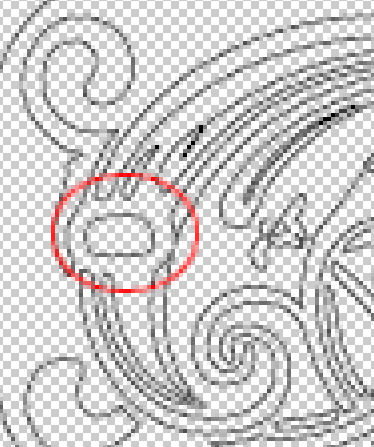
I’m having a problem with this oval. I need to make it a tad larger and a true oval shape. If you do a close up, it looks like a malformed jelly bean. I have tried the node edit tool but I’m still not very good with curves. Straight lines, no problem.
I have tried to delete it by selecting it with a red or green box, but it ends up deleting the whole thing.
If I can delete it, can I draw an oval with the circle tool and make it part of the whole design?
First make sure the graphic is ungrouped then you can delete that shape and replace it with a new shape.
Actually, I take all that back. It looks like a raster image rather than a vector. You would need to trace the image first, then you can manipulate it.