ALARM:9
Homing fail. Could not find limit switch within search distance. Defined as 1.5 * max_travel on search and 5 * pulloff on locate phases.
ALARM:9
Homing fail. Could not find limit switch within search distance. Defined as 1.5 * max_travel on search and 5 * pulloff on locate phases.
In all, fixed, cnc machine controllers are dimensions of the machines work area. When it powers up, it move in a direction specified in it’s configuration and expects to find the home switch within the defined operational space. This identifies the quadrant it’s operating within.
It’s complaining it did not find one or both of them.
Most of the time, if it’s been working, it’s the switch itself, a wire to it or something relatively simple.
I’m sure @misken can probably help you better as this appears to be a grbl machine and mine uses a DSP type of controller…

@jkwilborn is correct. The one it could not find is in the Rotary. A rotary has no limit switch because it can rotate multiple times. So what you get is infinite (so to speak) rotations, or Yaxis travel.
Turn off Auto-Home on Startup, Home enable ($22=0), and Soft Limits ($20=0). [I created a couple of Macros to turn these off and back on for my machines.]
Then you use Current Position (instead of Absolute Coords) and center your laser aligned with the item in the rotary.
I have auto home turned off. How to I edit the values to enable home and soft limits and or create a macro so that I can turn it in and off is there an edit option in the machine setting. To use the laser bed I’m still learning as well but was able to figure alot of that by trial and error..the rotary totally sends my head spinning lol
Macro = A series of text commands you can send direct to the controller.
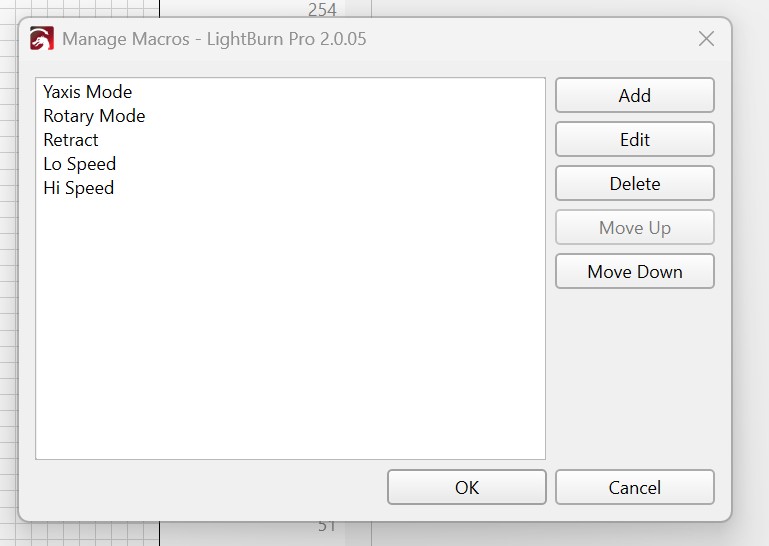
In the Macros window, click on Manage. The bold text below is the name of the Macro. Use your own names if you want. Be sure to click the Ok button when finished.
Rotary Enable
$20=0
$22=0
Yaxis Enable
$20=1
$22=1
My Macros for my SF-A9 laser. “Retract” moves the laser out of the way to a back corner for loading and unloading stuff.
Let us know when you get it calibrated and ready to burn stuff. 
So I type in the values in that window like u showed above the photo you sent or do I type in the same as photo shown
Photo does not show the code assigned to the Macro. Create 2 separate Macros as shown in the yellow boxes.
Ok I’ll try that