I updated Lightburn to 2.1 and now my artwork is rotated and flipped when I send it to my Monport Fiber Galvo. All of my Galvo and Basic Settings are still set correctly before the update. How do I fix this?
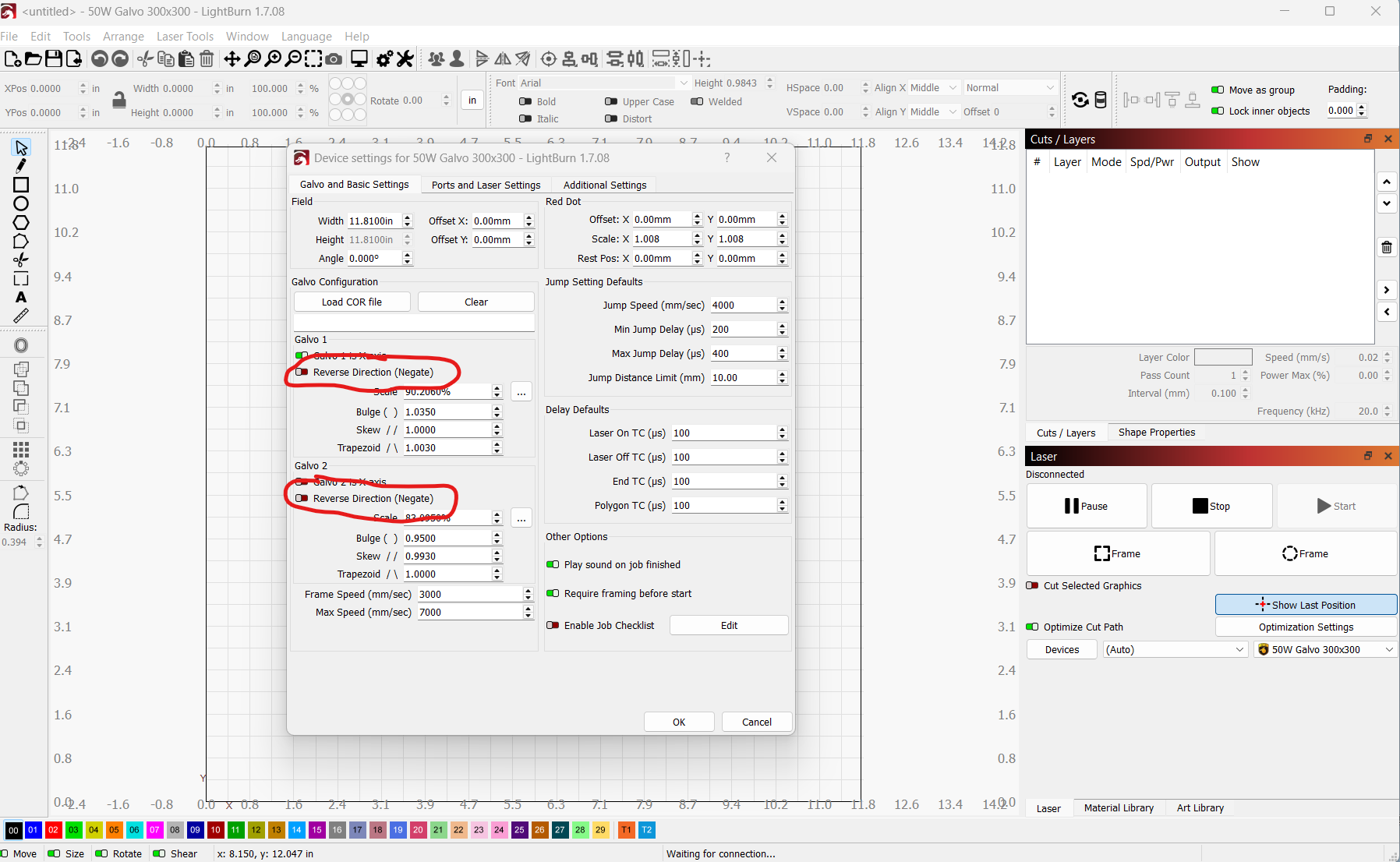
Thanks. I tried that but it didn’t make a difference.
I am using the ComMarker Omni X 6W unit and am having the same issue. I attempted to use a backup preference from a time that it was working with no improvement. I wound up uninstalling 2.1 and reverted to 2.05, all worked well. I wrote to support and posted the same under a different topic heading Version 2.1 and ComMarker Omni X Galvo Calibration and Engraving Orientation in this forum. I have included it here to save confusion.
It may only be me and my user error, but I am writing to report a technical issue encountered with Lightburn version 2.1 when used in conjunction with the ComMarker Omni X 6W laser galvo.
During my setup, I utilized the 9-point calibration option, but the orientation failed to register correctly. It appears that all objects are being rotated 90 degrees to the right on the X-axis. Specifically, elements that are positioned at the top of the workspace appear on the right side of the laser bed. I attempted to engage the “Reverse Direction” on both the Y and X axes individually and together. The orientation changed, but not correctly.
To troubleshoot this, I removed Version 2.1 and reinstalled Version 2.05, which immediately restored the correct orientation. Consequently, it seems that I am currently unable to use Version 2.1 due to this calibration discrepancy.
The Omni X motherboard/controller board was replaced several months ago through ComMarker support. Following the replacement, the machine functioned correctly in LightBurn 2.05, including proper orientation and calibration behavior.
The orientation issue only appeared after upgrading to LightBurn 2.1 and was resolved immediately upon reverting back to 2.05.
I wanted to provide this information in case there may be compatibility differences involving newer controller revisions or firmware.
I did not attempt to reinstall Version 2.1 because I have jobs that need to be completed and did not want to take the time to set it all back up.
I would appreciate any guidance or patches you might have regarding this matter.
Thanks. I’m glad I still had the previous install. I just reverted back and it works fine.
Hi Henry, could you email us directly with some screenshots/photos of your results so we can try to track this down? Support@lightburnsoftware.com
Export bundles from the working version and import to new is worth a try. Delete the lasers from 2.1 however before you do this else you will have duplicates. Also import only the lasers first and run a test on orientation. I’m not seeing what others are with my two lasers but I did do this for another reason to be able to unlink some material libraries and wonder if this was also what helped me out to not run into this issue.