Anyone have a link, a direction, or a suggestion on where one can purchase replacement stepper motors for an Atomstack X30 Pro laser? I have checked my belts, my tension, and every possible alternative to correct the issue of it not completing circles, squares, or rectangle - not finishing or ending up where it started in the cut. I have looked at the software, I have done everything possible to address the issue with delayed start and end timing, and also cutting optimization, but no help. So I’m thinking that possibly my stepper motors, not sure which one, are an issue. So I might as well replace both. Any idea where I can buy them? And specifically, what specific stepper motor I need for both the X axis and the Y axis. Atomtack.net and Atomstack.com offer no assistance or direction, nor do they sell individual stepper motors. Unbelievable.
Really doubt if it’s your motors.
Do you have a picture of the problem?
And pictures of the motors so we can look at them to possibly see what replacement you would need.
I concur. Stepper motors are pretty tough. When you run them to a limit and they chatter (called cogging), Even that does not hurt them.
Two possibilities here"
- You have a loose coupling or pulley on the stepper motor drive.
- You have a USB communications problem.
Without a picture like @Dskall requested, it is difficult to decide which is more likely.

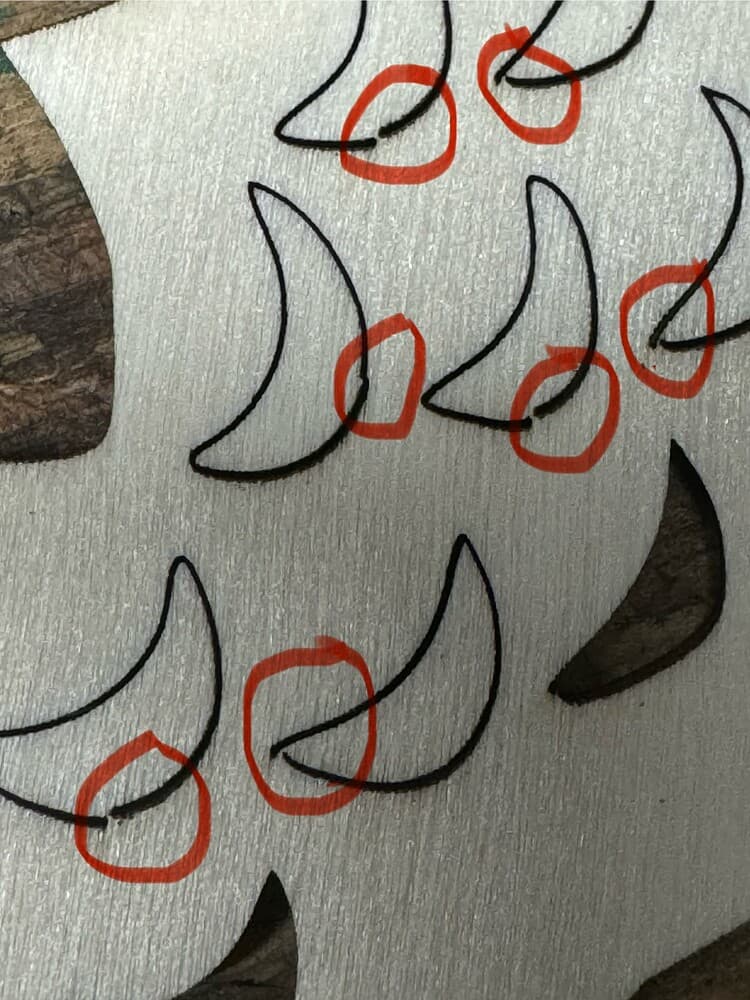

Here are some pics from my previous topic life started. I went through the process of checking my belts, checking the tension, making sure the laser module was secure on the X gantry, even went into LightBurn software and checked “Hide Backlash,” as well as going into the Cut Setting Editor and did a Start Pause Time & End Pause Time value add [150ms]. It only helped a little and not in every single type of cut. Some cuts were clean, and some others, based on the type of cut [rectangle, square, arc. circle, etc.] had the either start or end mis-alignment. So I just figured it might be the stepper motors. But based upon feedback, not likely. I’m not sure what else I can check. I even checked to make sure there was no dirt or other contaminant on the X & Y belts. Any thoughts and feedback to further assist in my detective work to correct this issue would be appreciated.
Also, I don’t know what a pulley on the stepper motor means.
Although Sculpfun machines, this applies to a majority of the table-top machines. Everything you need to know is here…
I went through this already in the previous post and this is where it said to hide backlash and pause start and finish cut via milliseconds. Only helped minimally, but it helped. There must be something I’m missing.
Let me just add that I went through my machine 2 or 3 times and was “sure” there were no mechanical faults. A few days later I checked again and found a loose set screw on my X motor shaft. Tightening that solved my issue. Give everything another, more thorough check.
And this is most likely your problem. Whatever is attached to your motor shaft has set screws to keep it from moving on the shaft. You need to physically check them for tightness with an allen wrench.
This topic was automatically closed 30 days after the last reply. New replies are no longer allowed.