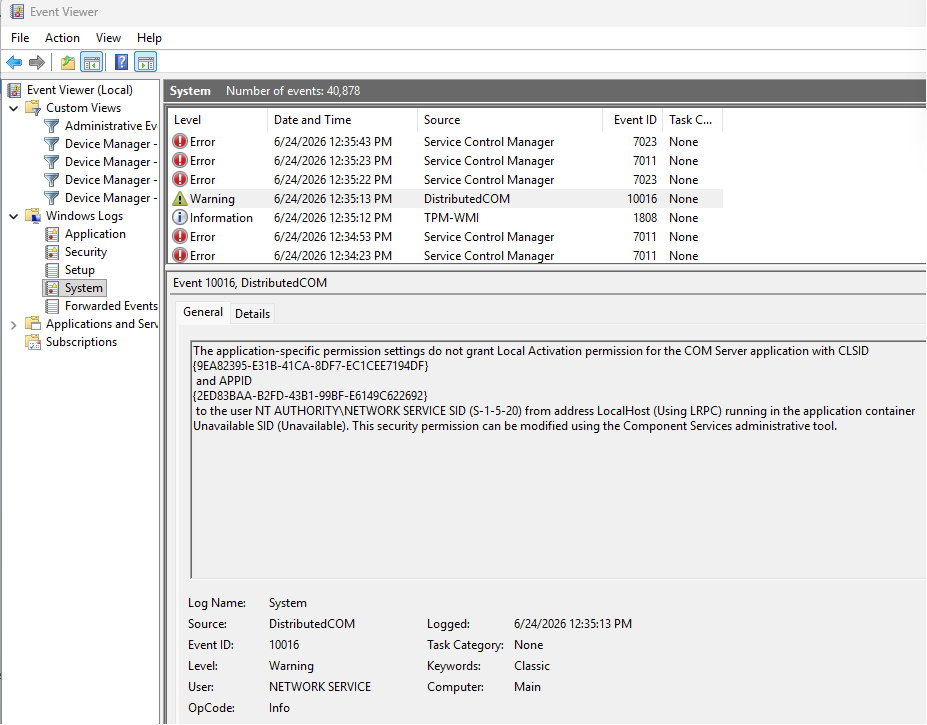
Just followed your instructions to find that mine was already off for some reason that I can’t remember doing now. I’ve never had a problem with this driver before, so it must have been for another issue in the past.
Now, I wonder what would break if I switched it back on, LOL. (I ain’t gonna try and find out though.)
The info on the link you posted doesn’t match your description.
It says Windows installs the latest driver and gives instructions for installing an earlier version if problems occur.
Reading this description, it seems reasonable to me to leave Memory integrity turned on.
There are thousands of CH34X driver downloads on the internet.
The original source of this driver is WCH-IC, the manufacturer of the USB-Serial chip on many PCBs.
That’s this 16-legged IC here: (Makerbase controller board):
Or shut it off. Some of us air gap our laser and cnc mill machines. Most of the IT guys where I work don’t use Windows, they moved to Linux because of constant crippling that Microsoft has been rolling out for recent years. I have the latest version of Windows, with my TPM module disabled, core controls off, all the stuff intended to protect people that have no VPN, dont scan stuff, and surf questionable sites and have a poor technology ISP provider. Less Microsoft control the better. Just because a driver is unsigned doesn’t mean it’s a risk, common sense still applies, but Microsoft basically shut off any legacy driver that wouldn’t update to use Microsoft code they were happyto sell you. It’s a revenue stream for Microsoft, not an intent to protect people. If they cared about that they would firewall their suites and servers better. I didn’t have CHnnn driver issues until a Windows update, like the OP noted. Removing all the Microsoft bloat restored functionality. And some updates should never be installed. I check update by update and only choose ones that make sense. Downloading a driver (or an update) and not scanning it isn’t best practice. I need my machines running, I want to burn and machine materials, not waste time undoing unnecessarily restrictive OS bloat.
What if: The Windows Update wasn’t the actual cause..
When Fast Startup in Windows is enabled, it keeps some system data in memory when you shut down, so the next boot is faster but not a full power-off.
If something else replaced or messed up the driver, it’s possible the issue only surfaced when the system performed a proper restart due to the update.
Also, I believe the AI was hallucinating here:
Ask it to double-check its statement in the first sentence. I’m genuinely eager to see the answer, because the KB5095093 changelog doesn’t say that. (so far) the changelog doesn’t show any known issues related to any external devices.
It’s possible I’m wrong, and it wouldn’t be the first time that Windows updates caused driver issues.
Yo he tenido problemas en otros equipos y desinstalando el parche de Windows y restaurando en un punto anterior volverá a funcionar casi con seguridad.
I hear ya on that, but in my own case am not convinced. Simply because I had just been using it, and noticed there was a Windows update scheduled to run later in the evening. So, since I had some free time during the afternoon, I told it to “update now” and began the process. Immediately afterward, I could not connect to the machine anymore.
I am a commercial embroiderer and use the machine to do patches mainly. Two of these I had just cut out while others were still running on the embroidery machine (takes forever). After the update, I was unable to cut out the last two because I could no longer connect, and the saga began.
The only thing in the middle was the update. You’re right about the Fast Startup though. I had not had that enabled until a couple of weeks ago. Having that in the mix probably made things infinitely worse. What a mess I made for myself.
As long as this machine continues to come up in the Device Manager under Ports instead of USB, I seem to be fine now.
So, I installed KB5095093 and tested every USB serial device I had at hand, including boards using CH340, CH343, FTDI, ESP32 native USB, and a Sculpfun C1.
All of them enumerated correctly, appeared under Ports (COM & LPT), and I was able to open the COM ports successfully.
So I don’t think this is a general issue with KB5095093 and USB serial devices.
That obviously doesn’t prove the Windows update wasn’t involved in your case. It could still be a regression that only affects certain USB host controllers, firmware, or specific hardware combinations.
Let’s keep an eye on it.
Hopefully it also keeps working well for you from here on .
If anything changes, please let us know.
Computer manfacturers can customize Windows for their specific brand, or even model, of machine. I have 2 Dell machines and they do not always get the same updates. One is Win11 compliant, one (the more expensive one ) is not.
this is something with your machine. Being a 40 year IT Manager, I am Microsoft’s worst enemy when it comes to updates however this update had zero effect on any of the 6 lasers I have, 2 of those are OMTECH Co2 gantry machines.
unplug your laser from the machine
Go into device manager
remove the troubling device
restart your computer
DO NOT open anything else at login
go straight to your lilghtburn installation file you downloaded
run it
make sure to install the drivers needed
restart machine
when you log back in, plug USB cable cable back in
Oh brother. You have six machines, and Aaron has six machines, and the only person to have problems is me with my ONE little laser, which kept coming up under USB instead of Ports in the device manager. I am insanely embarrassed at this point. Imagine what I could have wrecked if I had multiples like the rest of you. (Shudder)
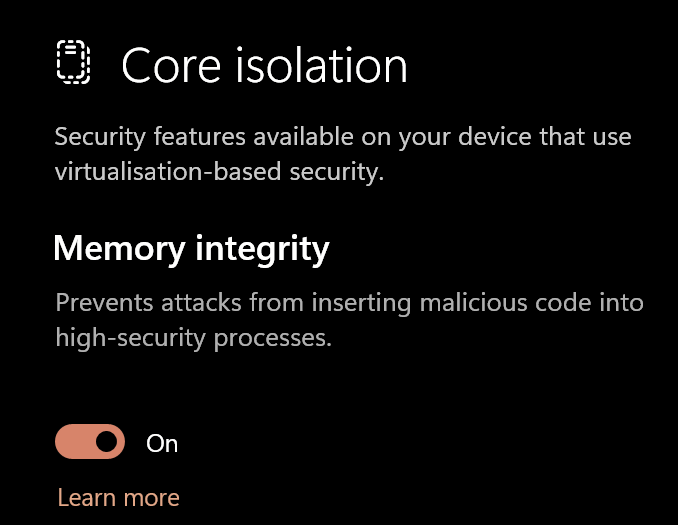
Not really. So, now that you mentioned it, I went and looked. Bunch of warnings and errors for about 15 minutes or so during the update. Does this look like it might point to whatever was causing this? It’s the only one that says COM. Whatever it was is fixed now, though. The device was showing up under USB on the first day, and failing repeatedly, then the next morning (or whenever) it suddenly showed up under Ports, and all was fine from there on out. No idea how this happened.
I have way more than six machines
Most of them use the same driver. (The LightBurn installer only supplies the FTDI driver used in many DSP devices, and the one for EZCad.)
Don’t be embarrassed. You solved the problem in the end. I believe it was just a hiccup that could have happened to any of us.


 .
.
 ) is not.