Boolean Functions / Assistant - Greyed out -- How do you activate?

Brand new to Lightburn along with our new Thunderlaser Nova Plus, so still learning.

I have a need to trim off some external pieces of a shape and I’m sure the Boolean functions / assistant will fit the bill.

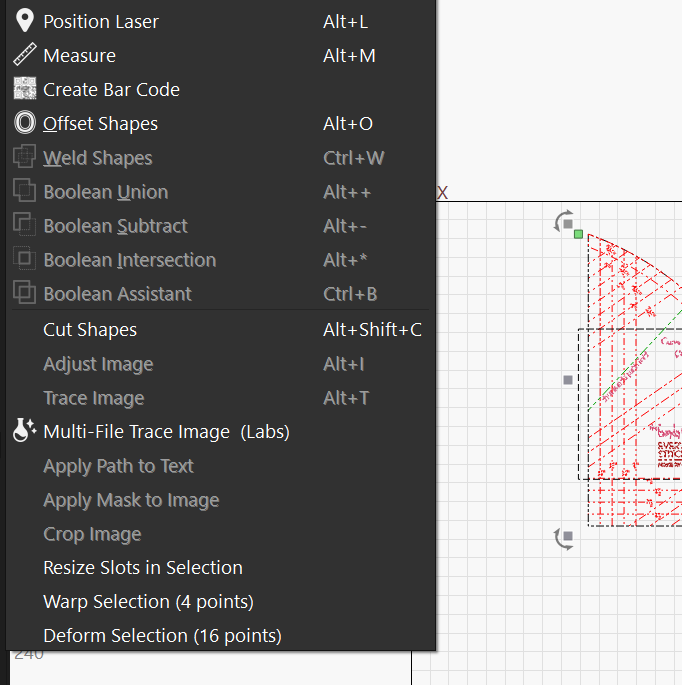
Unfortunately, when I select the shapes and go the tools menu, all the boolean shapes are greyed out. Beginner mode is NOT active.

The Boolean assistant button one the left-hand side is lit up, but nothing shows up when clicked.

Version is 2.0.02

I think I may have figured it out – I had a fairly complex shape (you can see on the side of the screen shot above) and wanted to trim everything outside the rectangle.

After some further experimentation, it appears my use case was too complex for boolean operations, since I was able to get the boolean assistant when I selected just 2 rectangles off to the side.

I’ll do the trimming in the original illustrator file, unless there is some other way to skin this cat. Appreciate any recommendations.

1 Like

With a boolean operation, it must be two closed objects.


Maybe it would help if you could describe, maybe with your lbrn file, what you’re up to that’s causing the issue.

There are lots of people here, besides the developers and support that know this very well and might be able to suggest something.

:smiley_cat:

3 Likes

Use the scissors tool to trim lines.

Boolean only works on 2 things at a time.

All items (for Booelan) must be “closed” shapes - it helps me to have the shapes on a FILL setting to make sure they are Boolean-able.

1 Like

Boolean only works with 2 objects. They can be grouped objects, but only 2 at any one operation.

2 Likes

Tried the scissor tool, and it does work. The scissoring was a little too tedious due to the shape, so I used the shapebuilder tool in Illustrator to cut down the shape to what I needed. Thanks for the suggestion.
2 Likes

This topic was automatically closed 30 days after the last reply. New replies are no longer allowed.