I’ve been having random issues while runing some engraving jobs and using the computer while the jobs were running. This began after installing the lastest version of LightBurn (LB) and I wanted to aski if anyone else was having similar issues. It began after installing v2.0.05 (installed on 12/3/25). I’ve been watching the forum to see if anything related poped up, but I haven’t seen anything yet. So I guess it’s not a wide spread problem.
System: Windows 10 Enterprise v22H2.
The last quality update was 2025-11 on 11/16/25.
Hardware: Intel i5-4250 Quad-core with 16GB memory.
Issue: internittent stops. Seems to be related to using the computer while the job is running.
To me, it seems to act like a BUFFERING issue. Whenever I’d try to do something on the computer while the engraver was running (internet seach, working in another graphics program), at some point the engraver would stop, or begin to run but only engrave across a small area, or sit and burn in one spot. Although it didn’t happen every time, I finally realized it always happened when I was using the computer while the laser was running. So once I stopped using it when the jobs were running, they all ran without an issue thereafter.
I was always able to continue using the computer while an engraving job was running. But now it seems I can’t take the chance. This job was a bunch of Christmas ornaments, but the jobs were short. The engraving file wasn’t very big or take long to run (less than 12 minutes total). The pattern was a short line of text (Merry Christmas) and four inticate snowflakes. The only other somewhat complex part of the job was running six passes of each graphic (I was piercing [cutting through] a wooden tube). I don’t like to run the entire job at once, so I’d run each individual graphic one at a time, which would take less than 3 minutes each. But even then some glitch could occur.
You could consider my computer an older system, but it still has plenty of processing power and memroy to run a small LB job and run other stuff while a job is running. I look into the update relase notes to see if anything changes were made relating to buffering, bu there wasn’t anything listed..
Anyone have a suggestion of what could be causing this issue? or how to investigate it?
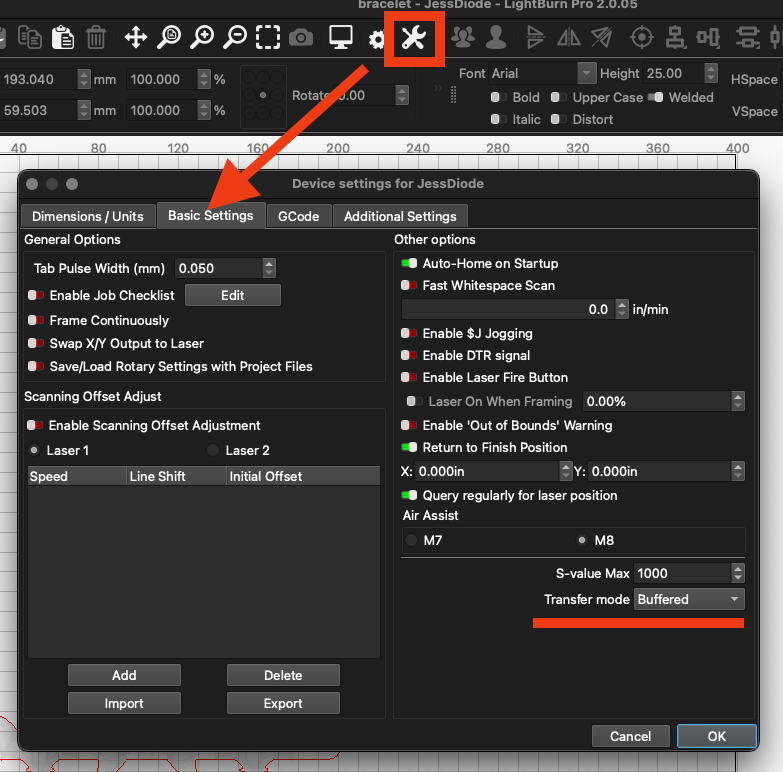
I think in device settings there is an option for the serial communication for setting it to buffered or synchronized or so. You might try to change it, no matter what it is now set to. Worth a try.
Thanks for the suggestion! However I didn’t see anything in the LightBurn Device Settings relating to serial communication settings. Couldn’t find it in any of the other settings panels either.
That’s an easy fix you have a corrupt download for some reason. Sounds like a Windows process. All you need to do is totally uninstall and reinstall the program that will fix your issue.
Yes, Jessen, that’s all I could find in the Devices panel. Bottom right under Air Assist called Transfer Mode. Options are Buffered and Synchronous. Mine is set to Buffered. I’ll try changing to Synchronous, then later change it back to see if that fixes it.
Uninstall/reinstall sound like an easy fix at first, but kind of drastic if you think about it. Unless you use LightBurn with all the defaults, there’s a lot of stuff to reset: I’d have to export and import all my saved settings, and libraries. Also have to save snapshots of all the panels so I can reset everything back the way I want it. Plus recreate all the Devices. And I’ll probably miss something in the process.
I looked for an option, but I guess there isn’t an EXPORT ALL feature in LightBurn, is there? Can I make copies of all the files/folder in the LightBurn folder (all the preferences saved), then copy/paste them back into the new LightBurn folder after reinstalling?