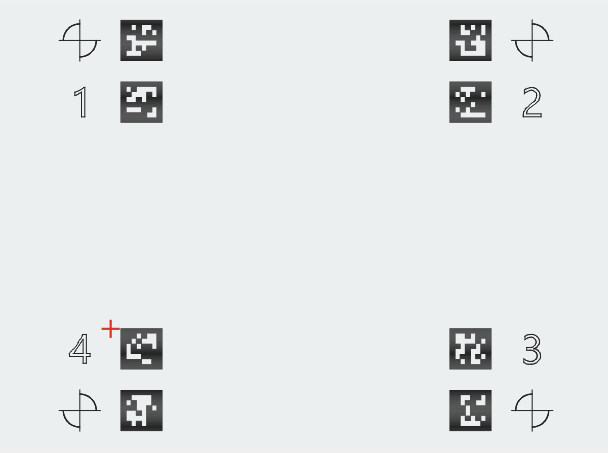
After capturing image with the 4 targets, I zoom into the image to target marked 1, double click, get the small red cross, showing position. Problem is I get no movement to that target. this is a new HP OmniDesk Desktop AI PC M03-0054. I have done this procedure several time with a couple of my other laptops with no problems. Laser is a Thunder Bolt.
Good morning, Nope tried that and I wasn’t getting any movement at all. The only reason I purchased the new desk top was for the added Type-A USB hubs and larger monitor. My little $300.00 HP with a 14 inch Diag. only as 2. One is being used for my wireless key board and mouse and, amazingly enough, the non-powered 4 in one USB 2.0 Type-A works great for both my 50 watt fiber and the Thunder Bolt. I use one of the 4 ports for the fiber, and the other two for the Thunder Bolt. That affords me the ability to use the forth port for a thumb flash drive for Lightburn files. Originally I set the new desk top up using the 4 USB 2.0 Type-A ports that are located on the back. All was well until thy issue with the Camera aliment wizard. I also have 2 USB Type-A @ 5Gbps and 2 USB Type-A @ 10Gbps on the front. Used these front USB’s in different configurations to see if that helped. Well…it didn’t. Ugh…. Switched back to the small laptop set up and all is well again. I would really like to use the new desk top, any help with this issue would be really welcomed. Also, I use the one HDMI on the small HP to a second monitor for viewing comfort.
That is exactly accurate. Its a bit confusing to me also. My only thought is that the new desk top PC has more updates to install on windows. Both the new PC and small laptop are running windows 11. However, I have checked for new updates a few times with no new updated needed and restarted the new desk top several times. Again, going back to my old configuration with the small HP laptop is working fine.
It may sound strange, but try changing the resolution of your new computer/monitor, try going up and testing and if that doesn’t work, go down in resolution.
Going up in screen resolution, above “default setting” has strangely helped me with my one computer (MacBookPro), which has also had some strange behavior with the LB camera function. I still have some problems with my Mac’s and the LB’s camera part but that’s another story.
Interesting, the only time I encountered that issue was with a newer version of LB. That was on the small HP laptop. That was from going to Min. and Max. size on the screen. Easy to investigate and try. Never have had issues with the Thunder laser camera. Works great and a valuable asset.
I’ve also had the screen resolution phenomenon with one of the last versions of LB.
Something else, 15" or even 14" displays are not suitable for serious work (construction/design) with LightBurn, to the best of my knowledge and experience.
Resolved, user error! I had not completed all 4 targets. I thought I had recalled in the past that the laser moved for every red target placed. I have to admit, I was a sheepish to share my mistake. All is well in the laser shop. If this helps anybody else, then there is profit.
The QR-code-looking tags are AprilTags, which can be detected automatically by the camera.
The UI and usability need some more testing, but we can look forward to auto alignment
Nice! Truly very kind of you to reach back and give me the heads up on your newest version, looking forward to getting it. Keep up the amazing work! Cheers and wishing you all a great new year.