Cant get my start point to match home

Just starting out. Day two with my Genmitsu 4040 pro and somehow when i home my machine it goes bottom left but the software shows it is top left. I have been searching the instructions, watching videos and nothing.

I know it was something i did because it was correct yesterday. Sigh someone please help my sanity!
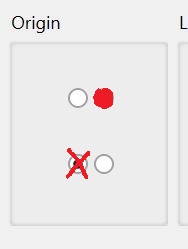
Does this button in your settings match where it Homes?

I have searched my settings and can not find that setting!

Laser Tools, Device Settings.

You need to explore the Lightburn menus more. There are 2 general zones, design and control.

Edit, Settings = design.
Laser Tools, Device Settings = control