Numeric value format is not valid or missing an expected value.
On or near line 1:Job halted
Stream completed in 0:00
ok
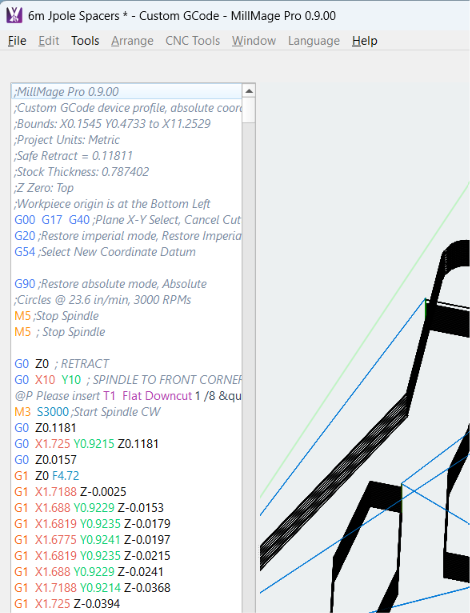
I didn’t create the G-Code, the Millmage software did. Here are the first few lines.
M5 ;stop spindle
G20
M3 $1000
G0 Z0.7874
G0 X3.5231 Y5.3735 Z0.7874
G1 Z0.0394 F236.22
G1 X3.5238 Y5.3732
Any ideas to help me out?
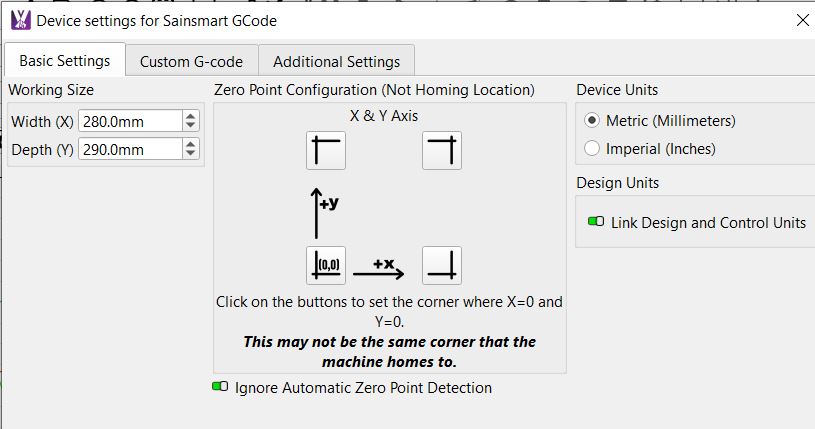
I think this should be an “S” not a “$”. Do you have a spindle? You might want to check the device settings that it is sending the correct G-code. The command sets the spindle speed.
Also, make sure you selected the correct G-code flavor.
Mike, thanks for answering my post. I zero at the front left corner, and my device settings show the 0,0 just like your picture. My working size shows my deck as 400.0mm for both X and Y. In the setup I show my board as being 12"W x 8.25 "D. When I run my preview it runs perfectly and puts the letters right where they’re supposed to be on the board. I tried creating a simpler program by just using an image of a small star, and got the same results. I’m beginging to wonder if my machine is compatible. I’m totally lost and frustrated!
Sainsmart machines are pretty compatible. I have a 3018 Pro I extended to 3040 with the extension kit.
H O W E V E R , my table is about 360mm and the $131 parameter is 303mm. 303mm is 11.93 inches, so I would not be able to run your part.
What is your GRBL $131 parameter?
I just noticed you wrote “Error 2”, and not ALARM 2 like I thought. If it is Actually Error 2, then in the Job Control window, click on Control Mode. Then screen capture (SHFT+WinKey+S) the top left quarter of the screen. This is so we can see the GCode generated.
Mike, I tried over and over, changing different settings to no avail. I then loaded the software onto a Windows laptop, and it ran the first time . I was using a MacBook Air before. I’ve made several carvings, without and issues at all. Thanks for your responses.
Bob
Glad you have a PC so you can do stuff. Is the MacBook Air an ARM processor? Lightburn has recently includes ARM in their development, but I suspect it has not migrated to the MillMage code yet.