This is my first time trying my hand at laser engraving. I bought this little 3018 pro CNC a couple of years ago and it’s been collecting dust. I volunteer for an organization and we wanted to do some metal water bottles as gifts this year. I thought I could save us some money and engrave them myself so I got a rotary roller.
I just can’t seem to get a good result. The engraving starts out OK but then turns into a huge jumbled mess all over the bottles by the end. It also takes forever, about 4 hours. The engraving is just a 4" x 4" badge which is mostly lines with not really any large areas of fill.
I think I have the roller set up correctly. I have it set at 5mm per rotation which feels wrong based on the video’s I’ve watched but it makes exactly one rotation.
I would welcome nay advice for getting this to come out nice and on getting it to be faster. I have 40 of these to do in 7 days, 4 hours each just won’t do.
As I mentioned it’s just a 3018 pro GBRL CNC. It has a 450nm 20w laser and a generic roller I got off of Amazon. I know it’s a bit of a joke but I gotta swing with what I’ve got. I’m engraving on black painted steel bottles, though all lthe testing has been on paper wrapped around them.
This is your first problem. Line mode on a roller rotary is not recommended. The bottles slip on the rollers as it changes direction causing the “jumbled mess”.
You also need to get it set up properly. 5mm per rotation is almost assuredly incorrect. The setup for a roller is one rotation of the roller, NOT the bottle. I don’t have time to get into more now, but there are several good videos on roller setup on YouTube.
If you can get us a picture of your results and of your expectations we have a lot better chance of giving you guidance.
I used a roller setup for almost 10 minutes before I ordered a chuck-type rotary. More than half of the products I have made have come off the rotary chuck.
Believe it or not that’s the mm/rotation that I get. I put tape on the roller and the body of the roller and put a line across both. 5mm gets me one perfect revolution.
Ok, then that part should be good. Now, change your graphic to be all engraving rather than any line mode and you “should” be good. A graphic that size should take maybe 20-30 minutes with a 20 watt.
Edit: are you sure that you have the roller diameter set correct as well?
So what I did was trace the image and then use fill instead of line. Is there something else I should to make it work better?
I used a caliper to measure the roller diameter so I’m confident it’s fairly accurate within .05mm since it’s rubber.
Is it normal for the progress time and progress indicator to be completely wrong, not correspond to each other and in no way be an indication of actual progress or time remaining?
Perfect. Use the preview to see how it will engrave.
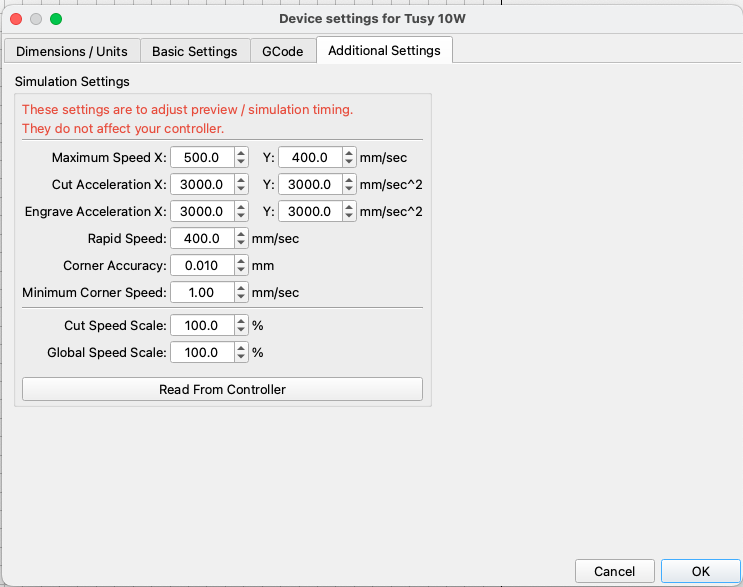
Did you load the settings from your laser into Lightburn? Device Settings(Wrench & Screwdriver icon) Additional Settings tab. Click read from controller button with laser connected. This loads actual parameters from your machine into Lightburn for it to be ble to caculate times. If you didn’t do this step Lightburn uses default values which are probably not correct for your machine. The times given are usually close to actual times, bt 100% correct is not possible.
It’s this one here. The rollers are 15.6mm in diameter. I know, it doesn’t make sense to me either, there got to be something wrong. I will mess with it a bit more later.
I have a very similar rotary for my diode laser. The diameter of my rollers is 15.25mm and my mm per rotation is 40.
I think we need to back away from the rotary for a couple minutes. I believe you mentioned that this is your first time attempting to use this machine. Let’s make sure your machine is calibrated for flat work before trying to use the rotary.
Remove the rotary and reconnect your Y axis. Draw a square in Lightburn 100mm x 100mm and run it in line mode on some cardboard. Set the power low enough so it doesn’t catch the cardboard on fire. Measure the results. If it’s not 100 x 100 or at least very close your setup needs work. Report your results.