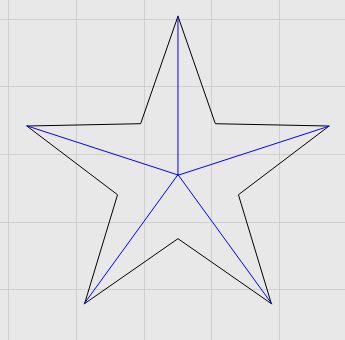
Is there any way to carve out a star like the one above in MillMage? I tried several different operations, but when I do the preview, they dont come out like this.
any help is appreciated.
Is there any way to carve out a star like the one above in MillMage? I tried several different operations, but when I do the preview, they dont come out like this.
any help is appreciated.
You need v carve which is currently unavailable.
Do you know if this is something that will be available in future releases?
Yes, in the Pro version when it comes out.
It’s possible to do this now, by drawing the five center-lines, either from the same point outward, or vice versa, and using a fluting operation on the lines to produce the shape.
It’s not automatic, and would take a bit of effort to get the exact shape, but not especially hard. If the star is the only thing you need it for, it’d be relatively straightforward.
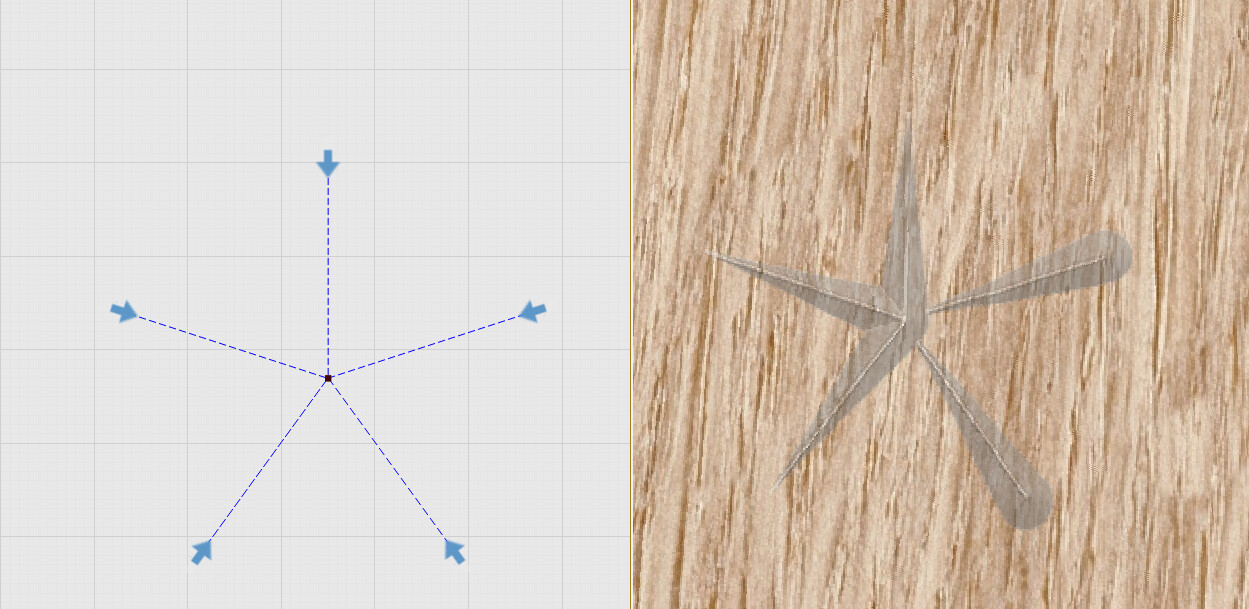
Tried this yesterday, not finished but something with the flute… , I broke the lines at the cross point and even changed shapes start point…
Later I’ll post the files, I am not near the PC right now.
Why I didn´t posted the file, I have found something strange so tried again and the same happens:
Construction of the sahpes:
After seeing the output at left:

I go back checked the Marching ants and simply flip (rotate) the “offending” lines and get the output at right.
Even if I set a Start Point as yesterday the output is the same buggy one.
Something not right. I can replicate this behavior:
Star_forum.mage (27.3 KB)
The same happens with RC-3.
I swear this was working. I’ll make a note to check.
Edit: Found and fixed, but it’ll have to be the next RC.