Is there any video that explains in detail how to change tabs and slots
There is a short video included in the Docs. But you have probably already seen this:
No video will show you what the slot resizer is looking for: perfectly rectangular corners.
I wrote up a project with some gnarly problems:

Unfortunately, slots made by the invaluable boxes.py site have gently curved entrances that elude the resizer.
Are there a way to take away all the rounded corner together
instead of one by one
Kristian
Optimize Shapes → Fit Shapes to Lines with a generous tolerance will help, but it won’t get all the errant nodes.
Basically, if the design was laid out for a specific material thickness with pretty = non-rectangular slots / tabs, you must fix them by hand.
Which is why I have boxes.py produce a design for a specific thickness with the cutting tolerance matched to my laser, rather than try to adjust the slots after the fact.
After using Boxes.py for a while, you will figure out what settings give you the fit you want.
When I do a new box, I will just test with a portion of the design to check the fit. I use rectangles and the Snippit tool to create small sections rather than cutting out a whole panel.
Sir, Please tell me what the box in the bottom of the
downloaded pattern means
100,0 mm burn
If it’s this one:
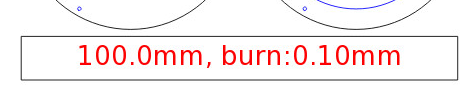
Then it’s set by the Reference value:
It should measure exactly 100.0 mm after cutting. If it does, then the cut shapes will have the correct sizes.