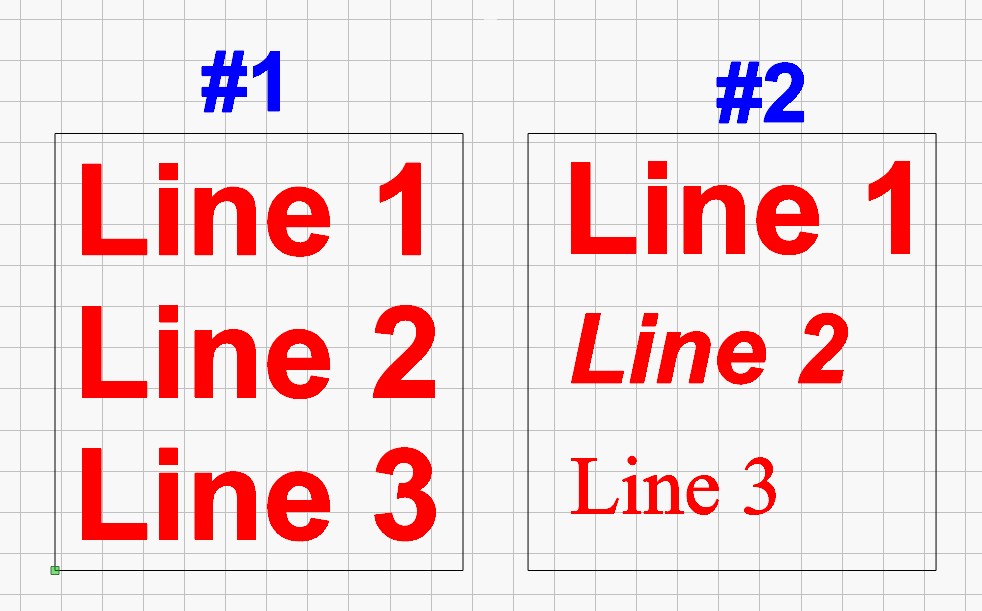
Is there a way that I am unaware of to change a singe line of text within a multi line text box without breaking it into separate text blocks?
What I trying to do is change the text in Box #1 to something similar to Box #2
Vers 2.0.05 and 2.1.03
short answer - no
That’s really sad, I was afraid that was going to be the answer.
Just another of many reasons why there are better programs than LB to design in.
I can’t follow your problem.
If you only have 3 (or more) lines, write and format them one line at a time and make a kind of template, you can even use “Variable Text” on the lines and group the whole block afterwards…
That’s obviously true, because LightBurn is a laser control program, not a graphic design program.
There’s no penalty for using the right hammer for the job: design using whatever program gets the job done, then import the layout into LightBurn to set the laser parameters. With a bit of forethought, you can have LightBurn automagically put the design elements on separate layers with appropriate default settings, so you need do nothing more than import the layout and Fire The Laser.
A recent project involved programmatically creating dozens of SVG files and feeding them into LightBurn using a Windows batch file, with just a few mouse clicks triggering the laser and stepping through the files.
Expecting LightBurn to produce replica IBM punched cards from a text file seemed unreasonable, but ya never know …

You’re right, LB started out as a laser control program, and it does excel in that. But if LB is going to have a text editing window it should have the ability to change attributes to different parts of the text. This should be fundamental.
Over 40 years ago, on a Commodore 64 running geoWrite, (a 64k machine with only 32k available for programs to run), I was able to edit different parts of text with different attributes. Why can’t LB?
And here I thought I was the only one doing that.
I’m not sure what you are trying to say here
I do all my design work on a professional vinyl sign program where I created a color library using the colors LB published for their palette. In LB I have the different colors set as default to do different things, such cut at a different speed and/or power for different materials or different setting to do different types of engraving. So when I export a file, then import to LB, all the layers with settings are in place all I need to do is run the laser.
In this case I needed to change something I thought would look better on one line of text, that’s when I found the problem in LB. I made change in the design software then brought it back to LB before I posted here.
All this said, there are many many LB users that claim they only use LB for ALL their design work.
LB may have started out as a laser control program, but for many it has grown as their main design software. Maybe LB should catch up with them.
Funny!!! The fact that Lightburn can do more than any other laser control package out there, and you still say that is not enough? Fair statement. That is what the Fider suggestion page is for.
Just so you know, I have also run into this situation multiple times. I have resorted to what @bernd.dk suggested. Inconvenient, yes. Show stopping, no. Post it on Fider and report it back here. Do that and I for one will vote for it, assuming it does not involve a major code rewrite…
Often it is the old LB users who defend LB as if it were their own piece of software, which is why there are sometimes reactions to criticism that not everyone understands or agrees with. This is due to the fact that many of us have been on the bandwagon since it started in 2017 as a one-man project. In 2021, version 1.0.0 was released and beat all (comparable) other laser software that existed at that time.
Something that constitutes the development and the great success of version 2.2.00, which is the current beta version and has just seen the light of day, is the input, testing and support of us - the many LB users.
I am one of those who use LightBurn exclusively for the entire construction and design process and I find it really easier to construct in LB than to open, export, import a project in a CAD program, than to fix even minor problems such as your formatting problem in LightBurn. I have worked for more than 20 years with CAD and GIS programs, in my best opinion those programs are overkill for 99.5% of all laser/LB tasks. Not to forget, AutoCad LT, for example, which is somewhat of the cheap end, costs about 600 $ - per year, if you can’t settle for freeware.
LightBurn was never intended as a CAD program but with the development they have, it wouldn’t surprise me if it becomes a CAD-like software with the main focus on the laser operation part.
It is also noteworthy that the biggest criticism most (larger) laser manufacturers in the “SOHO” market encounter is that they are not LB compatible, even though some of them have extensive and certainly not bad software for their machines.
Get involved in the development as a user with your suggestions, criticism and enjoy the many advantages LB and this forum have instead of only looking at what is missing (yet  )
)
You are also welcome to post your challenge here as a lbnr2. and we can try to find a solution together. I also think the LB people who are always here might also be interested in this task and to help you with it.
An ironic comparison:
The Pareto Principle surely applies: LightBurn is Good Enough™ at what it does. With a bit of effort, it can accomplish a bit more, whatever “a bit” means.
Now, with Python (heck, even Lua) scripting built in, they’d have it goin’ on …
If a LB user is willing to purchase a seat of Cuttle, you can easily create parametric designs with some built in logic and a bit of java skills. The latter is helpful, but not necessary. I am a bit biased, because I have been developing parametric files in Cuttle for a few years 
Well Said Bernd.
I’m happy that your analogy makes sense to you.
I loved working with these programs, including MapInfo and QGIS, but my point is that it’s a cumbersome detour to design LB files with these programs, nothing else.
Yes, Ron there is. Open a word document in windows and type the lines you want. Make a text box in words and enter the lines you want. In words there are over 220 fonts to choose from. Save the document as a PDF file, then import it into LB.
Done That, Did That