I have an Atomstack A30 Pro laser. I saw something about changing the S-value from 265 to 1000 so I sent an email to Lightburn and was told yes and how to change it but my worry is, what is this going to do? I’m still struggling to learn thislaser stuff and I do not want to create a problem for myself. Also on here, I read that if I change this S-value I also need to change another setting. This one is uner machine settings, the I click Write. Is anyone on here familiar with this? Will I be doing the right thing or making a mess for myself?
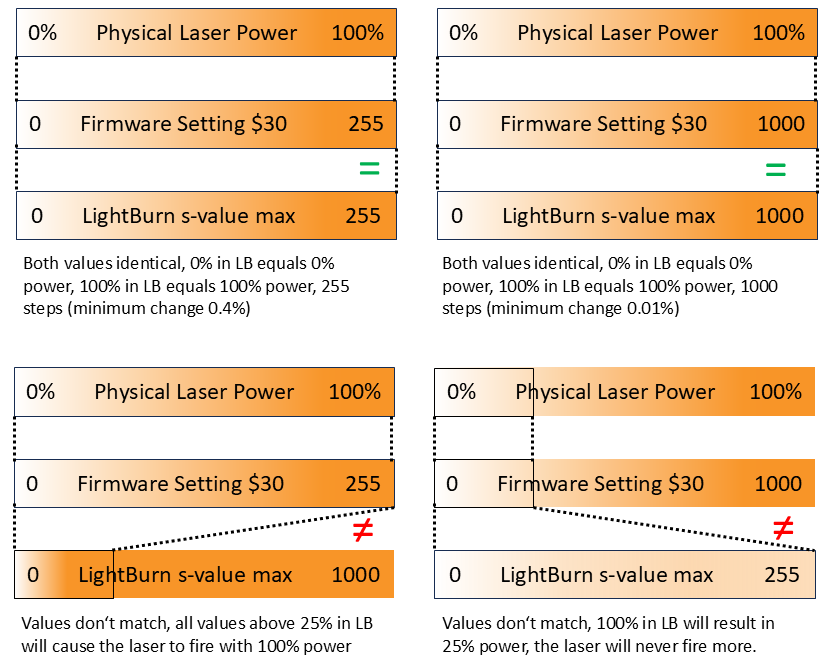
Your settings in LightBurn need to match the firmware on the controller. These are the instructions for checking your firmware to make sure LightBurn matches:
The “S” value sets the spindle speed or laser power. A mismatch harms nothing. You will typically just see lower power outputs from the laser.
I do not know what instructions you received, but it is not a complicated process. In the Lightburn Laser Tools, Device Settings, Basic Settings tab, look for the S-value Max box. It should contain 1000.
In the Console window input box, enter $$. Then look for the $30 parameter. If it is 1000, you are done. If it is $30=255, then enter $30=1000 in the Console window and you are done.
Keep asking questions, that is a good thing.
The unusual spelling of your name is the same way as my wife had spelled hers.