Commarker B4 slowing down raster sweeps inconsistently

I am having a weird issue.

I am marking, as an example, plastic. My settings are 1000mm/s, 20% power, 100ns pulse, 30khz frequency, 0.03 line spacing.

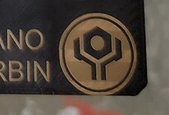
When the laser is etching a fixed width, it seems to maintain a power density. Then, when it sweeps further up and hits a wider section of image, it slows down and delivers too much power to the surface. Then, when it hits a thin section where it only has to move a little, it speeds up and delivers the correct amount of power.

Another weird test, I included a rectangle fill at the top of the image to induce a negative text fill effect, and that cause the ENTIRE job to slow down, even though it had not filled up to that point yet, even with the same settings.

It almost seems like the dsp controller in this laser is being overwhelmed with data, but.. how? I’m not doing anything crazy, and it’s not even a dithered image, it’s on or off.

I literally just followed the instructions for install from commarker, so I am at a bit of a loss.

What kind of settings should I check for this?

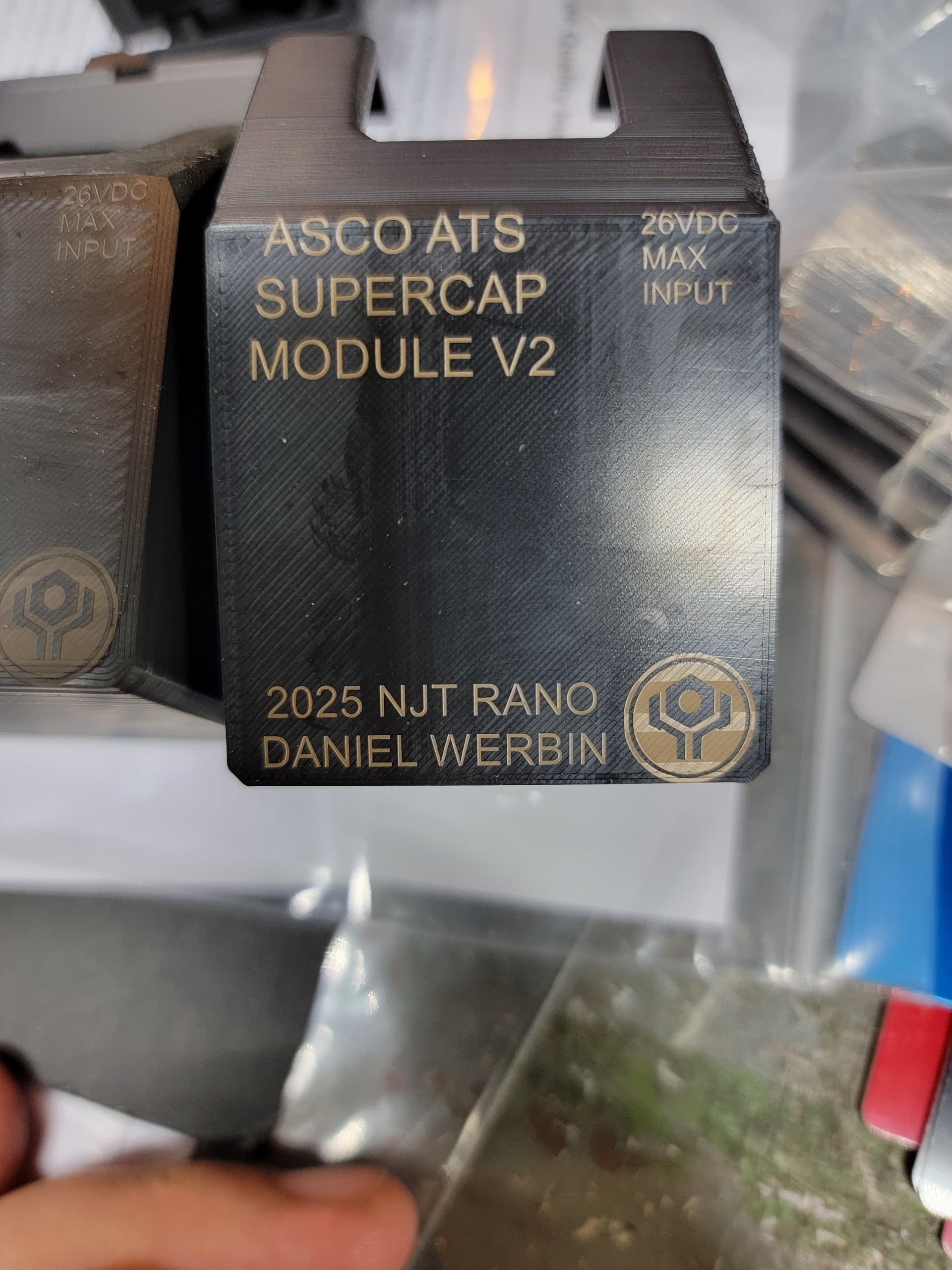
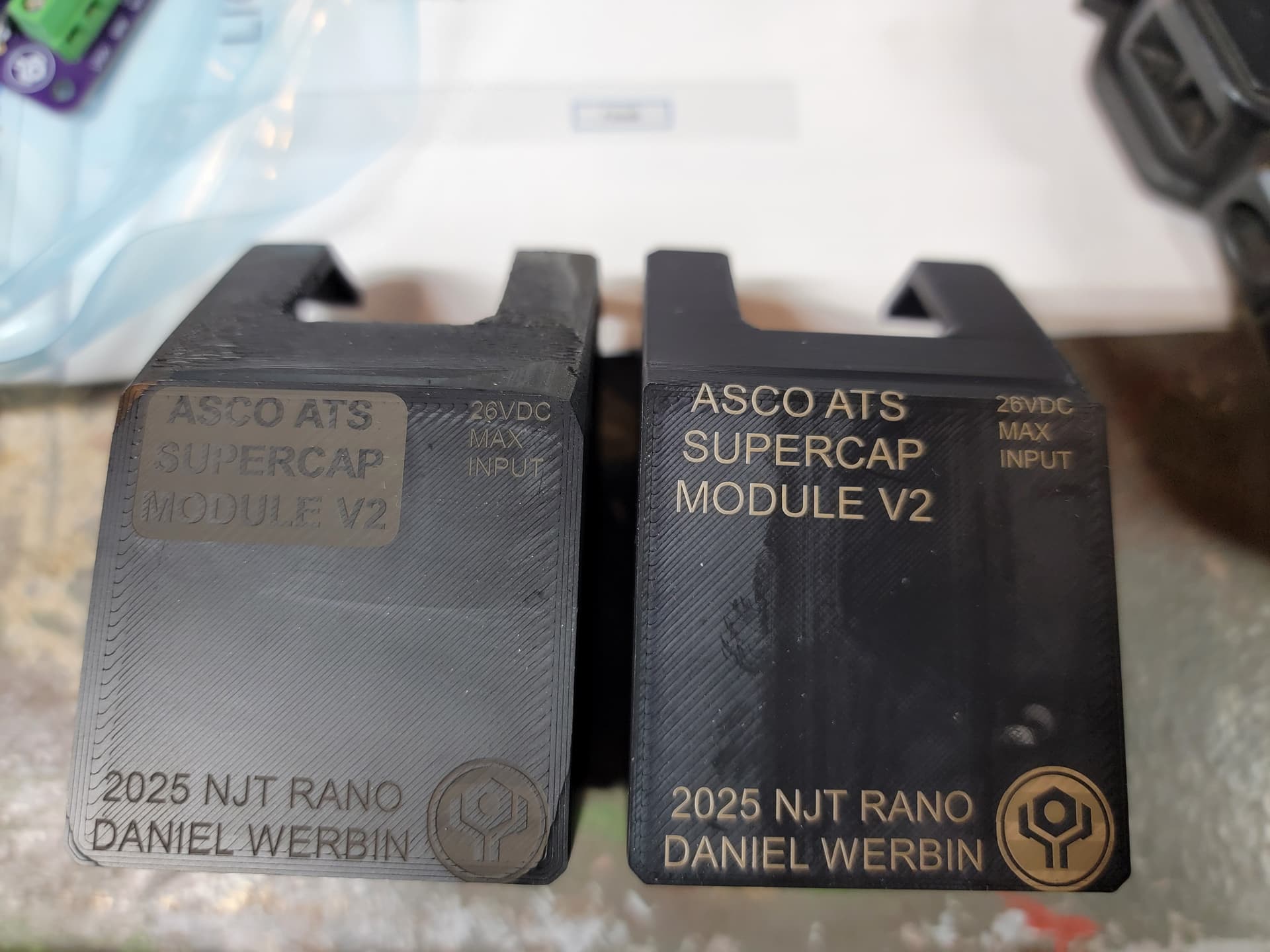
See attached image for an example, on the wrench logo, see how the marking density changes depending on if it has to sweep the text? And the one on the left, it’s very dark because of the rectangle fill on the top left corner (out of frame of the shot) somehow slowed the ENTIRE job down. I have used lightburn’s tracing tool to trace the images involved, so everything is on the same fill layer. There is not a separate image layer.
In your fill settings you can try enabling “fill shapes individually”

This will likely increase your burn time, but it might make your burn more consistent.

I would simply try burning the text and the image separately. Try breaking your burn into two separate fill layers.

So this is normal behavior? I was not expecting that at all, I just assumed it would be capable of maintaining a fixed speed across variable widths of images.

Also, that doesn’t explain the total job slowdown by more image data being at the top. See this image, same settings, the only difference is the rectangle. But it took almost twice as long to burn the one on the left, which over-burned the plastic. How could the rectangle cause the entire job to change?

The manufactures settings on the laser itself will have a large effect on the image.

That is also dependant on the geometry of the shape you are engraving.

You can clearly see in the areas the laser scanned the text and the areas it did not.

So the laser spent less time moving across the areas between and you can see that effect in the logo.

You could use different strategies to minimize this effect, like a second pass or a different scanning angle. I prefer the multiple path approach myself.

Just remember that your galvo has moving parts. The mirrors, although small, do have mass and they do take some time to accelerate and decelerate as they go back and forth. So you can imagine that on a longer pass there is more acceleration and deceleration time. You can clearly see that effect in your engraving.

I am aware roughly of how the physics of the machine work, which is why I don’t understand why it’s having these issues. Once it accelerates up to speed it shouldn’t care how far it has to go, why does it slow down its ramping speed for wider sections of engraving? Shouldn’t the acceleration ramp be a fixed distance vs speed and then it maintains that speed for as far as it needs to go?

Especially the issues regarding the whole job slowing down when the rounded rectangle is up above, despite doing a horizontal scan and it not getting anywhere near it. That makes absolutely no sense to me, given the context of physical mirror movements being the problem here.

There may be some truth to that, but the scanning distance is different In the areas in between the text on the logo.

It could be that your frequency or pulse rate isn’t set ideal for that situation.

If you were to look carefully with a microscope at the actual burn, you would likely see that the dots are farther apart In the areas where the burn isn’t as dark.

There is a lot of interaction going on between your pulse rate and your scanning frequency. That can create different effects.

Try first using a different scanning angle, one that doesn’t go parallel through all of the logo and the text at once.

My solid recommendation is just to burn the logo on its own and avoid the whole situation.

What lens are you using? An F160mm has a spot size of just under 30 microns, the same as your interval.

I think I’m following you, but am not sure.

:smiley_cat:

I am using a F=163mm 110x110mm lens that it came with.

I also noticed that this effect can be dramatially induced by the interval. If I set the interval to a more dense number, it causes the sweep speed to be incredibly slow, taking almost half a second to go from right to left.

It seems like there is some kind of data issue in the control system??

Here is a slow motion video I took. Apologies for the poor lighting.

You can see when it is sweeping over the logo, it goes one speed, and when it sweeps over everything, it slows down it’s top speed. It’s almost like the controller is throttling down or something. But you can see when it jumps back, it’s capable of way faster movements, so it’s not like I’m saturating it’s ability to move.

In addition, setting the speed from 1000mm/s to 5000mm/s did not cut the job time down from 10 seconds to 2 seconds, it only made it take 8 seconds. So it seems to be restricting it’s speed…??

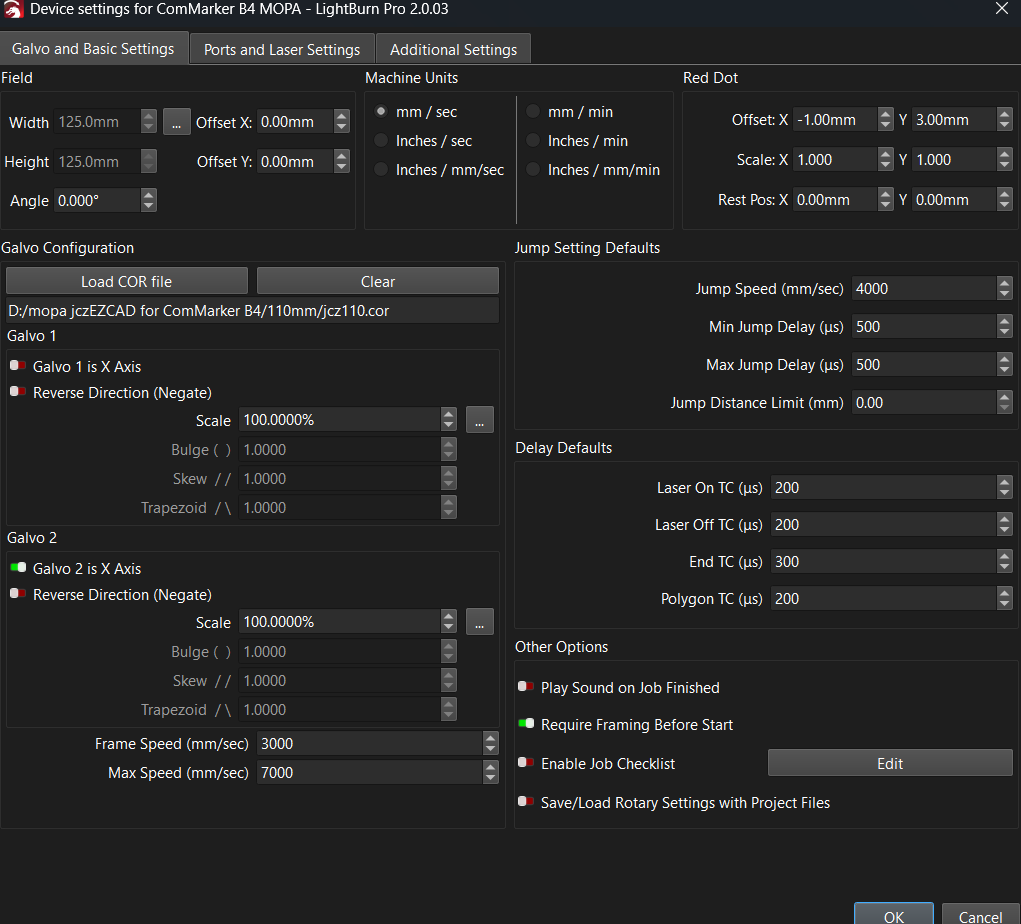
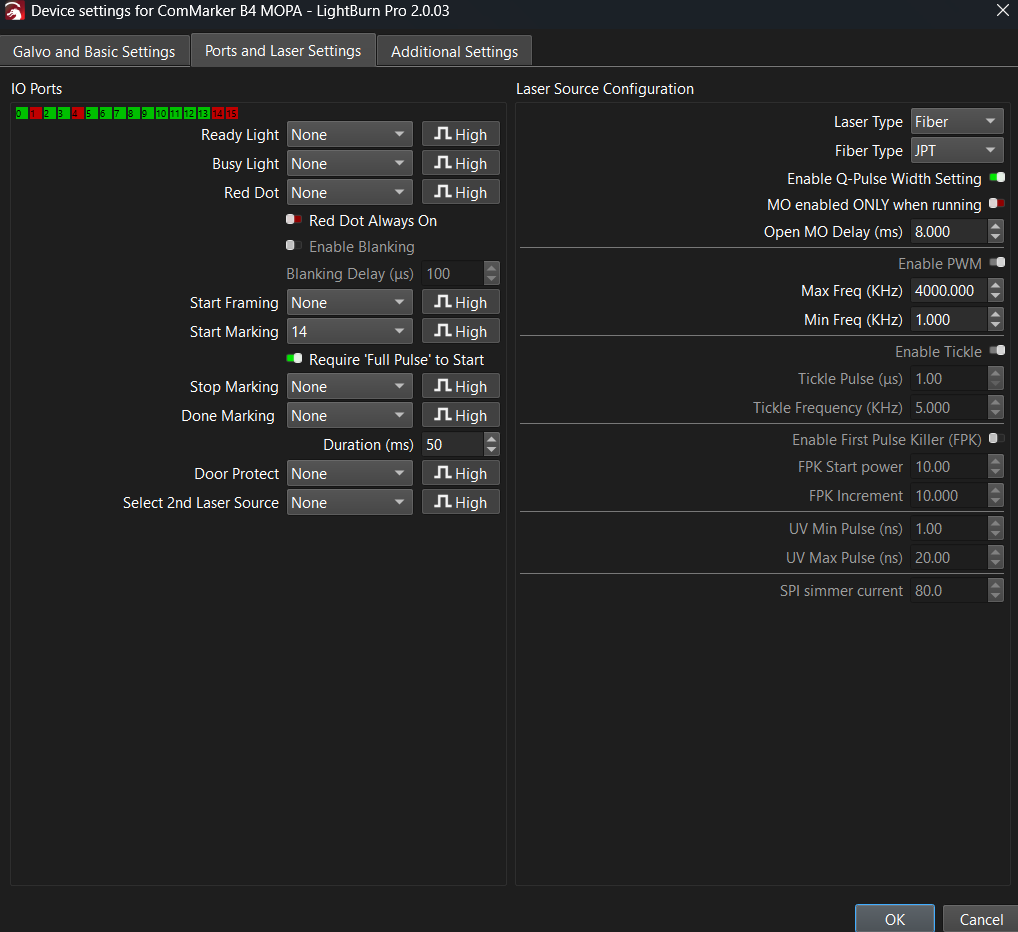
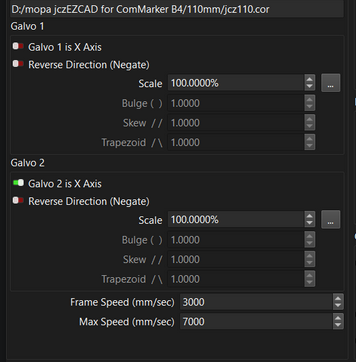
It may be worth taking a look at your galvo settings,

Can you show us the Galvo and basic Settings" ?

Maybe also attach your lbrn2 save file so we can see your layer settings

Mine works similar, it’s an M60 JPT M7 MOPA.

These work so simple… then the further down the rabbit hole you go, the more you need to know the electronics and how the optics work together.

Let me speculate for discussion purposes. When I got my machine, Russ Sadler had built a spreadsheet of pulses/mm. I used it a lot when I first got started.

Wasn’t long I started questioning many things.

Keeping in mind this is a pulse machine, you can’t draw a line but turning it on (assuming not in CW mode) it produces pulses based on the users entry of frequency.

The machine doesn’t know which lens you have mounted and those parameters are specified in your lens configuration file, control board information is also somewhere in this stuff.

Say I want 100pulses/mm, will it be the same if I change lenses? Or is everything fixed at pulses/s and it’s up to the user to determine.

If I ask for a smaller interval, the machine will have to pulse more often to create that interval…

Hope this make sense…

A lot of this is speculation as we can’t really measure most of what’s going on and the time frame in nano seconds are not really conducive to human visual measurement.

The control board has to handle different lenses, does this affect scan speed?

It can also be your machine can’t move that fast.

:smiley_cat:


laser debug testing.lbrn2 (93.9 KB)

that all does make sense, but the machine is advertised as capable of 10000mm/s, which, yeah, right, but I’m only asking it to do 1000mm/s, and it seems like its unable to even do that, which is baffling to me.

I gave it the .cor file which I believe tells it all that info, and the markings are accurate..

I have a friend with a non mopa version of a commarker B4 and it does not have this issue at all. Very similar setup to mine, but a lesser machine. Something has to be wrong here, but I cannot figure out what it is..

Did you also import the markcfg7 file during the device setup ?

It looks like you may be using some default settings.

Try creating a new device profile, but this time use “Import EZCad Config”, and select the markcfg7 config file. Provided to you with the machine.

I did as you said and the settings are the same, I believe I did this last time too. Same issue still happening. Do you have access to a fiber laser to try my file on and see if it has the same issues?

Post the markcfg7 file so we can at least take a look

Ok!
markcfg7.markcfg7 (10.2 KB)
Here it is. I had to change the extension to .markcfg7 for it to let me upload it.. Normally it was just extensionless.

Also need the cor file. sorry, can you also post that as well.

jcz110.cor (33.0 KB)

So, interesting development. After taking a break from using the machine and then coming back to it last night, I found that if I bump up the interval from 0.03 to 0.05, magically everything behaves perfectly. Why would an interval of 0.03 and lower cause the machine to freak out and completely be unable to maintain its set speed, but 0.05 makes it behave?