Comment decouper une forme que l'on a créé sous millmage

Bonjour, j’ai créé une forme type planche à découpé dans Millmage, mais j’ai systematiquement un message d’erreur lorsque je demande une preview.


Tous mes points sont fermés je ne comprend pas le message d’eereur.

Merci d’avance si vous avez une solution.

I do not know what the alert box says, but if you upload your .mage file with your reply, I will examine it.

Are you also a Lightburn + laser user?

Your shape looks like closed shape, but the vector is not closed.

Ungroup the shape and highlight all and press Alt+J or go to the Edit menu and pick “Auto Join Shapes”

Merci, voici le fichier et oui, j’utilise lightburn laser avec licence.
planche.mage (28,9 Ko)

Merci, j’ai essayé votre conseil mais ça n’a pas fonctionné.

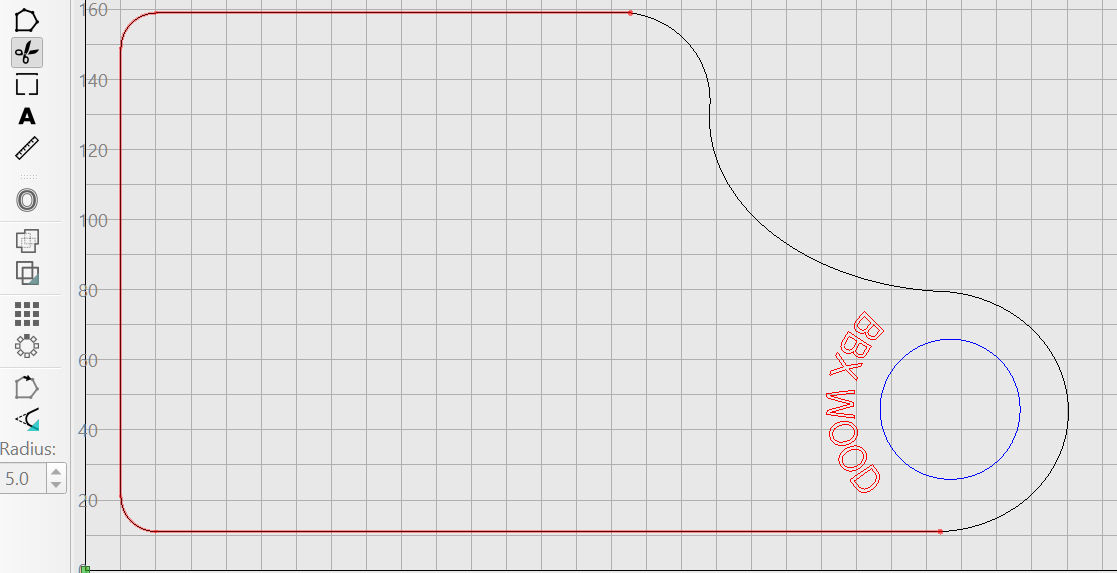
An easy way to check is with the Trim-Shapes tool to check for “wrong” points, Zoom in and correct, when your shape is continuous red it is a closed shape.
Ungroup and check your shape, your shape doesn´t highlight Red:


planche_edit.mage (43.5 KB)

1 Like

When you click on the outline, you will see the traveling lines (“marching ants”) do not go all the way around your path. This indicates it is not a closed path. Zoom in while in the Node Edit mode and you will see why.

ok, merci pour vos réponses, j’ai trouvé effectivement ou la ligne était ouverte, j’ai modifié mon tracé et tout est rentré dans l’ordre.
merci le problème est réglé.

3 Likes