Hello, new to this forum. My computer will not connect to my laser - xTool MD1 Pro, GRBL, 2.0.05 version, windows laptop running windows 11. Have run my laser in the past with no issues, but a few months ago I had to re-install my windows driver. I think I lost my com 7 driver also (should be CH340/341SER). In device manager, details tab says that driver is “unknown”. I downloaded the driver (CH340/341SER) and when I try to install it, I get the message, “drive is successfully pre-installed in advance!”. My laser used to run on com 7. How do I get the com 7 driver to work? Thanks for any help.
The USB COM port is assigned by Windows, at random. It is not determined by either Lightburn or the attached laser.
- When you connect the laser, does Windows sound a tone indicating it had been seen?
- In Windows Device Manager, do you see a Ports line like the one in the image below? If so, that is your COM port number to use.
- Do you have any other software open at the same time that will use a COM port, like XCS or LaserGRBL?
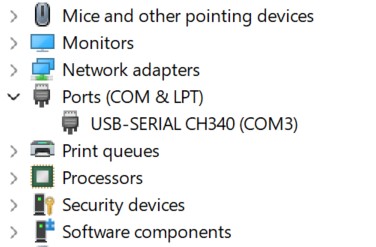
Hi, thanks for the response. I didn’t know about the assignment of com ports. My laptop does make a beep when I either connect or disconnect the USB cable to my two ports. I do not have any other software running while using lightburn. Here is a screen shot of my com ports from device manager:

Soooo, maybe my problem is not with the drivers?? I thought the two com ports (com 3, com4) were for Bluetooth connections, on my computer. I use a cable (original that came with my laser) for connecting, could it be a cable problem??
Well, it isn’t a cable problem, laser problem, or connection problem. I can connect and run the laser using the XTool Creative Space software that came with the laser. So is it a Lightburn problem, settings??
What port is it connecting to with the other software? What is the console message?
Which of the 2 CH340 ports disappear when you unplug the laser? THAT is the one you want to select in Lightburn.
Not a Win Guru, but having a COM 3 on both Bluetooth and USB might be a conflict.
Windows controls the USB, not Lightburn. Lightburn only sets the baud rate and the DTR option.
This topic was automatically closed 30 days after the last reply. New replies are no longer allowed.