What is the actual difference in actual vs designed measurements? Can you confirm both X and Y dimensions?
for the actual difference i have to do a burn , and i’m a work at to moment but i can login to my home

i will draw abox of 200mmx200mm and do a test burn and compare what is the actual burn size in about 1 hour
I think you missed this question earlier.
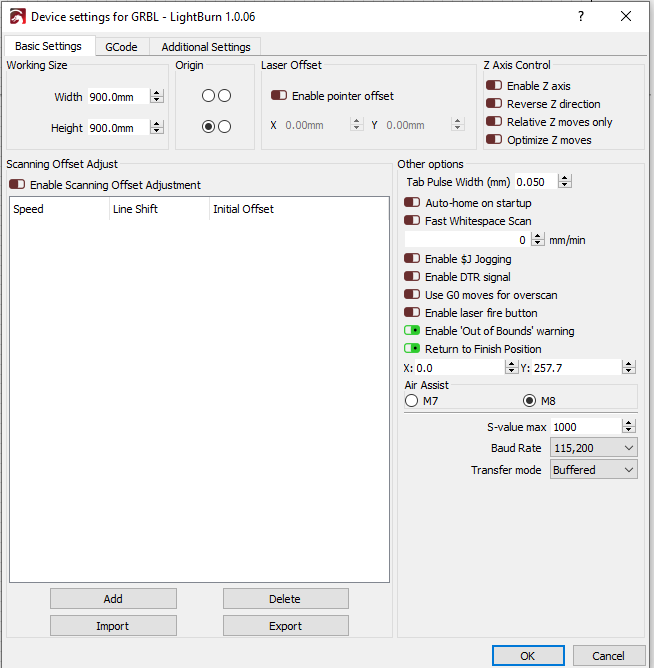
Also, is there a reason why you’ve set “Return to Finish Position” as 0,257.7 in Device Settings?
No, there is no reason why that is set, i’ve set it to 0
yes i have mis said my statement about 32 micro steps, it’s only 8
Okay, thanks for inputs. I’m still interested in the final dimension comparison but as of right now I don’t see any reason why you’d have a scaling issue based on current configuration.
The only thing I can point to is step/mm being incorrect. I have to think that one of your input parameters is incorrect in the calculator. But let’s see where you end up on the dimensions check.
What I don’t understand is why you’d have different behavior in LaserGRBL. Did you make any specific changes on the LaserGRBL side to accommodate this? That part is not making sense to me.
When you do your dimension check can you also save the gcode and upload here? You’ll have to change the filename extension to .txt in order to upload.
Outside of the dimension issue I suspect you’re having a coordinate issue based on the unknown offset you have set.
Can you check the coordinate positions at each corner of your machine and let me know what those are?
i will come back to the problem in a few day’s, the parts to change my printer size have arrived, so i will start upgrading my printer
ok back online machine has been upgraded size wise…
in the picture below i have made a box of 100mmx100m in DXF format and in Laser GRBL it burns a perfect square of 100mmx100mm but in lightburn it makes a quare box of 26mmx26mm:
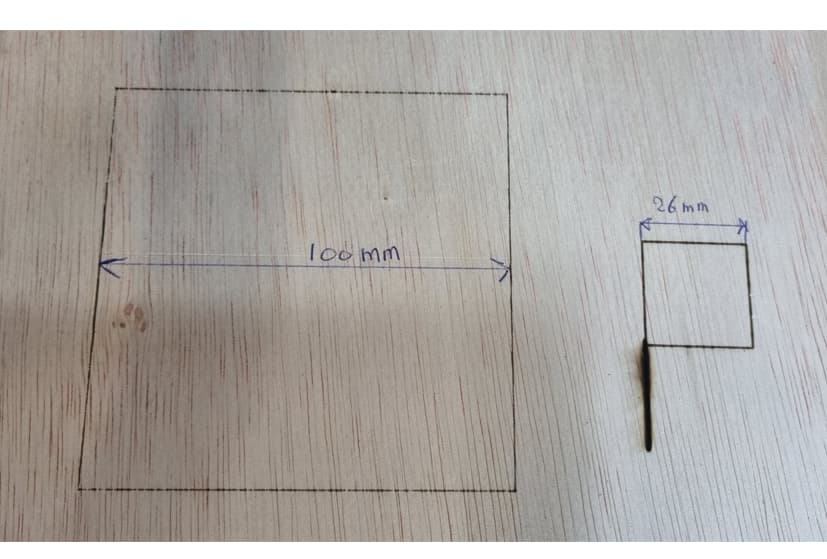
there is no way to make a specific changes in laserGRBL
Can you attach both the DXF file that you used and the LightBurn .lbrn file that you created to do this please?
You may need to change DXF extension to TXT in order to upload.
100x100mm.lbrn2.txt (4.8 KB)

Can you save the gcode for this in laserGRBL and LightBurn and post both files here?
incscape100x100mm_0001.gcode.txt (498 Bytes)
Lightburn100x100mm.gc.txt (287 Bytes)
i create it with incscape plugin
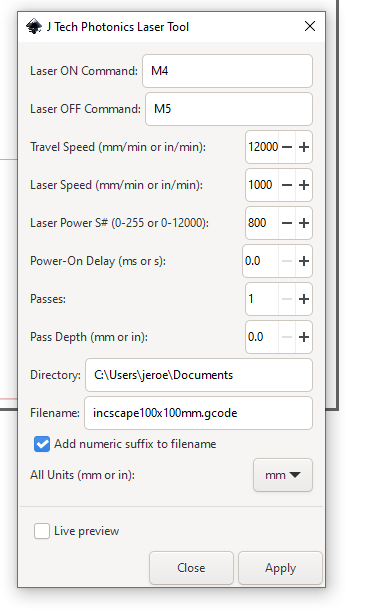
I’m confused now. How exactly are you doing this?
Can you walk through your workflow exactly please? For both LightBurn and LaserGRBL.
draw a box of 100mmx100mm and select the plugin :

you will get the box in the picture :

and press apply
you can get the plugin at this URL: https://jtechphotonics.com/?page_id=2012
How are you going from the generated gcode to LightBurn and LaserGRBL? Are you loading this gcode into LaserGRBL and directly running it?
If so, you have a tuning issue.
I’ve reviewed the gcode. Here are the relevant parts:
“laserGRBL” from Inkscape:
G90 ; absolute moves
G1  X16.0055 Y14.2853
G1  X16.0055 Y392.238
G1  X393.9583 Y392.238
G1  X393.9583 Y14.2853
G1  X16.0055 Y14.2853
This results in dimensions of 377.9527mm x 377.9528mm.
LightBurn:
G91 ; relative moves
G0X0Y100
G1X100S100F1500
G0X0Y0
G1Y-100
G1X-100
G1Y100
This would result in dimensions of 100x100mm.
The instructions in gcode are “correct” for LightBurn and “incorrect” out of Inkscape for a 100x100mm square. That means something else is going on.
The difference in your measured dimensions (100/26 = 3.85) is very close to this difference (378/100=3.78). I suspect your machine settings are off by this factor.
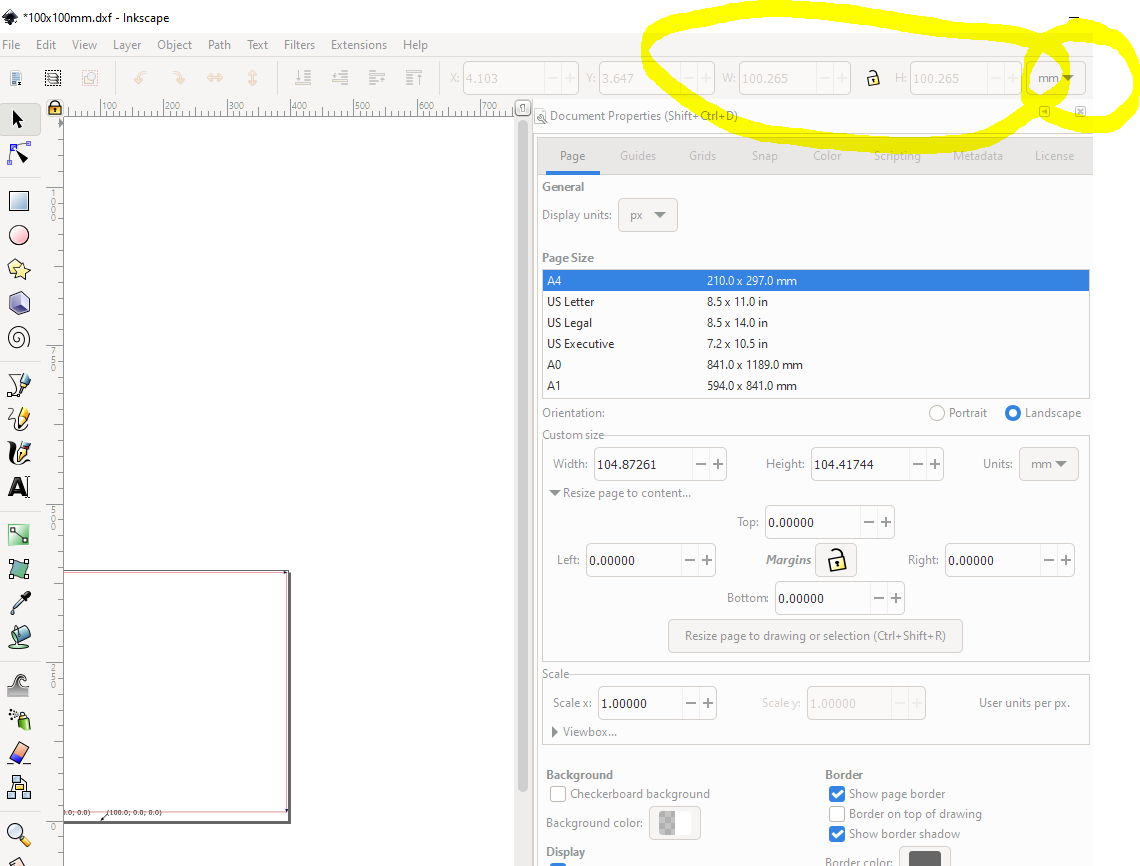
I’m looking at your screenshot in Inkscape and even there I can see that the dimensions are 378.953x378.953mm.
That are units in PX not in mm
Switch display to mm and check please. Either way, it’s exporting as 378 mm.
Is the g-code that you sent the gcode that you ran to get the 100x100mm burn?