I want to configure OUT1 to go low for a pulse when the laser is done marking but I do not know which IO port in software is mapped to OUT1 on my controller?
I found I needed to add a shunt to the control board to power the outputs. I now get a high all the time. I just need to know what port drives OUT1.
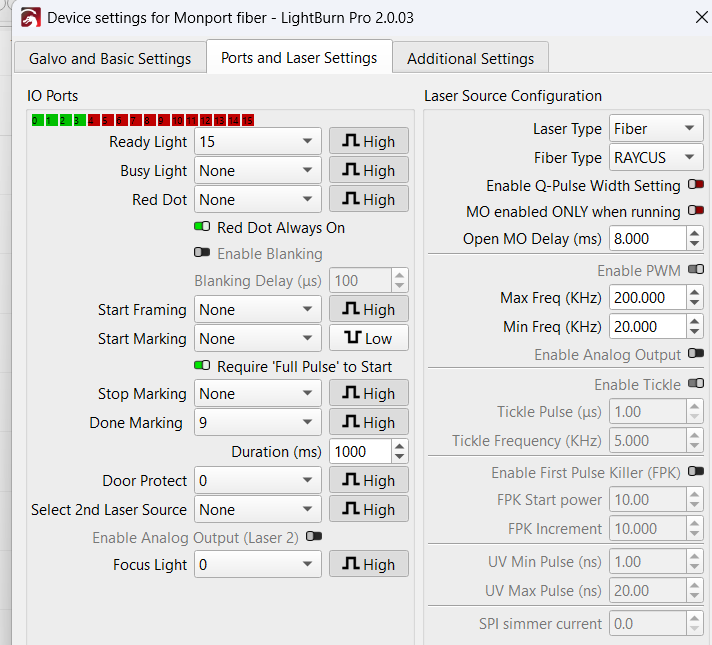
Maybe you can clarify what you mean? Usually strapping something to ground or power isn’t usually a good solution.
I have a BJJCZ card in mine.
You’ll probably have to wait for one of the @Lightburn people to come to our aid. I know some of these are flexible and configurable.
I don’t know how you handle an output compared to an input and/or what ports can be programmed.

Jack,
The I/O connector has two pins labeled 5V.
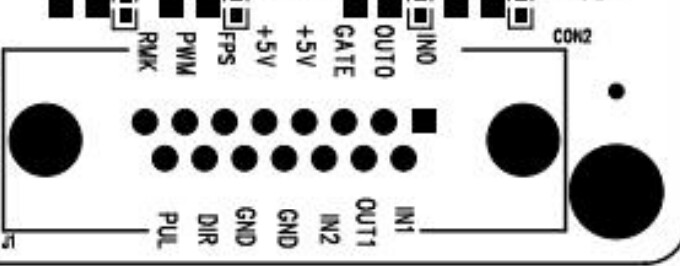
The output IC on the controller is powered from these two pins. So either I need to feed an external 5V into those pins or place a shunt (jumper) that was not plugged in on the board to connect my USB power to those pins and power up the driver. After doing so my OUT1 remains high so I believe my hardware is set up right, I just need to know how to control it in software.
Thanks for clarifying what you did. Seems odd you have to do this. Hoping one of the Lightburn devs could clarify how to handle your issue.
I don’t think I’d hack my board without some kind of instructions on how this works.
I’ll be monitoring…
1 Like
Well I am disappointed that after several weeks LightBurn has not responded to my request. I figured it out though. The IO Ports indicator is only for the the inputs not the outputs. So even though Inputs 0 and 1 are used to read the IN0 and IN1 you can use out ports 0 and 1 to control the OUT0 and OUT1 pins on the board. You just need to ether provide an external +5V source to the connector or place the shunt to power it from the USB port. All works for me now.
This topic was automatically closed 30 days after the last reply. New replies are no longer allowed.