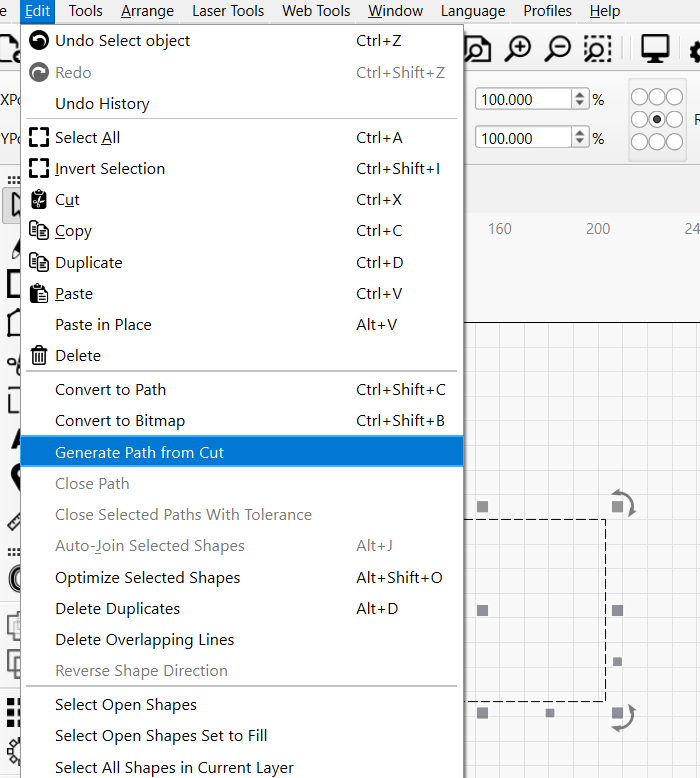
been still there in 2.1 Convert to Cut (debug) - LightBurn User Guide
.. and an essential tool for my ancient (unsupported) machines - but just can’t find it anywhere anymore in 2.2, nor it’s docs..
DId Lightburn support ask you to try this? Here’s the document on it, so I’m curious.
Convert to cut (debug) is an internal tool for LightBurn developers — it converts selected shapes into the cuts that would be sent to the laser, and makes a new shape from the result.
This is not how you produce GCode / cuts for your machine — it’s just a debugging tool for the LightBurn developers.
Do not use this tool unless directed to do so by a LightBurn developer or support agent.
I’ve never used it …

Dear Jack,
many thanks for your - as always - helpful replies.
What you cite is the content of the link i posted above. Exactly this function is what i’m missing in the new version, and to rephrase - my question was if it really is gone for good now, or if it got moved to somewhere else again (as, i think, it did back with 2.0).
Exactly this function is what made me buy a Lightburn license years ago - even without having a supported machine. And yes. Back then it was the officially suggested way to get the finished ‘rendering’ of paths exported as vector data.
all the best,
markus.
Check if this doc is the solution:
It works in my v2.2.00…
Thanks for your question, I’ve made this clarification in the docs to help anyone else who might be looking for it.