convert lettering to path so outside could pocketed and fine lines in letters done with a V bit as profile
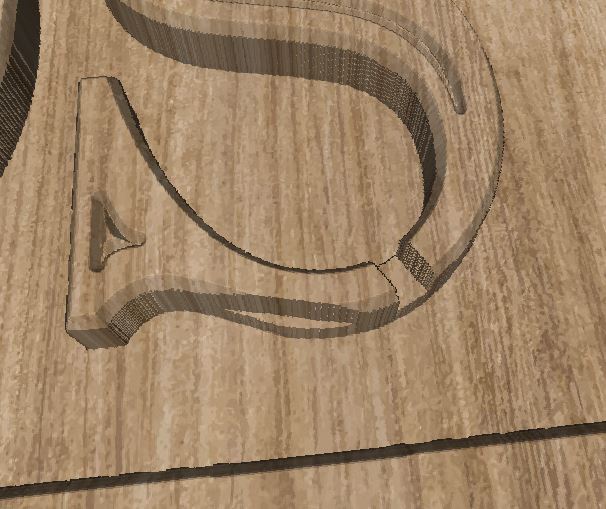
converted all letters to path , found no breaks in each preview all looks good, mid job it cuts through middle of a different letter ::(checked preview and found cut , recreated file 3 times even rolled back to RC7 same issue
I believe I know what’s causing this, but I’ll have to check to be sure.
My suspicion is that it’s not retracting to full height because the start depth is set quite low. Setting the start depth to 0, and setting it to run 11mm per pass does the same number of passes, but retracts correctly.
It actually ended up being a glitch in the part that figures out whether we need to do a full lift or not. The code checks where the bit is and where it’s going, and if it doesn’t touch any boundaries of the shape, we don’t have to do a full lift, and use a “pocket lift” instead.
It needed a teeny bit of “fudge factor” because the numbers were extremely close in a couple spots. It’s not the “convert to path” that’s doing it - it just happens to be the way the nodes in this shape line up with the path that was generated.