I have been practicing with the Edit functions. I can copy objects from one window to another but the Operations do not copy into the new window. Is there a way to copy/duplicate an object with operations to another project? Is there a way to copy an operation from one window to another without copying the object to which that operation is attached?
…I don’t really understand that, can you explain it with an example.
The “normal” copy function is possible here for me, across projects and different instances of LB.
If you mean the history of a task, the answer is no, IE you cannot undo/redo copy content from one project to another or from one session to another.
MM allows you to open 2 or more projects concurrently by opening each project in a separate window. The COPY/PASTE function allows you to copy some or all the figures in a source window between 2 or more destination windows. All figures have to have an OPERATION/toolpath attached to be able to start the milling process.
My issue is that MM does not copy the OPERATION associated with a figure from the source window to the destination window.. My experience is that I have to manually re-create the OPERATION from the source window in the destination window.
I have also tried the DUPLICATE functions. They do not function between source and destination windows.
ok, I didn’t realize that they are MM you have this problem with. If I copy something from one to another LB session/window, the layer properties from the target window are used in LB. So it’s a similar situation.
When you Copy from one Lightburn window to another (2 open instances), the Layer properties go with it. This is because the design IS a Layer.
In MillMage, the Operation is only loosely coupled with a Layer. You can have a Layer (drawing) with no Operation attached. So when you CTRL-C/CTRL-V a drawing, you are only copying the drawing with its Layer color. This is the major difference between MillMage and Lightburn. This is because the Operations properties and Layer properties are vastly different.
I too would like to be able to copy Operations with a design between 2 MillMage instances. Sounds like a Feature Request to me.
1 Like
Correct, but only if there is no process with active layer running otherwise the existing properties will be taken over…I think
Not sure how MillMage handles it, but once Lightburn “Runs”, I can edit freely without affecting the run. In MillMage, I can duplicate an Operation, but not copy it. I tried.
New software keeps the brain working!
I misunderstood the problem, I thought it was the layer property of the specific layer when copying to a new session / window, which was unclear.
We are too used to (spoiled?) how Lightburn does it. If I have a “close the path” issue, I miss the Line/Fill choice to show me when Close with Tolerance is enough tolerance. Lightburn to the rescue! 
1 Like
IF im reading this correctly you want operation not the file ?
The only way I can think of, is right click which operation you want to transfer, click save to library (bottom of tab ) once you save it it always there, saves so much time when do repetive materials
in new window open operation library tab, click on said operation , highlight item you want operation to be assigned to and click apply
I give each saved operation a name and save in files like below
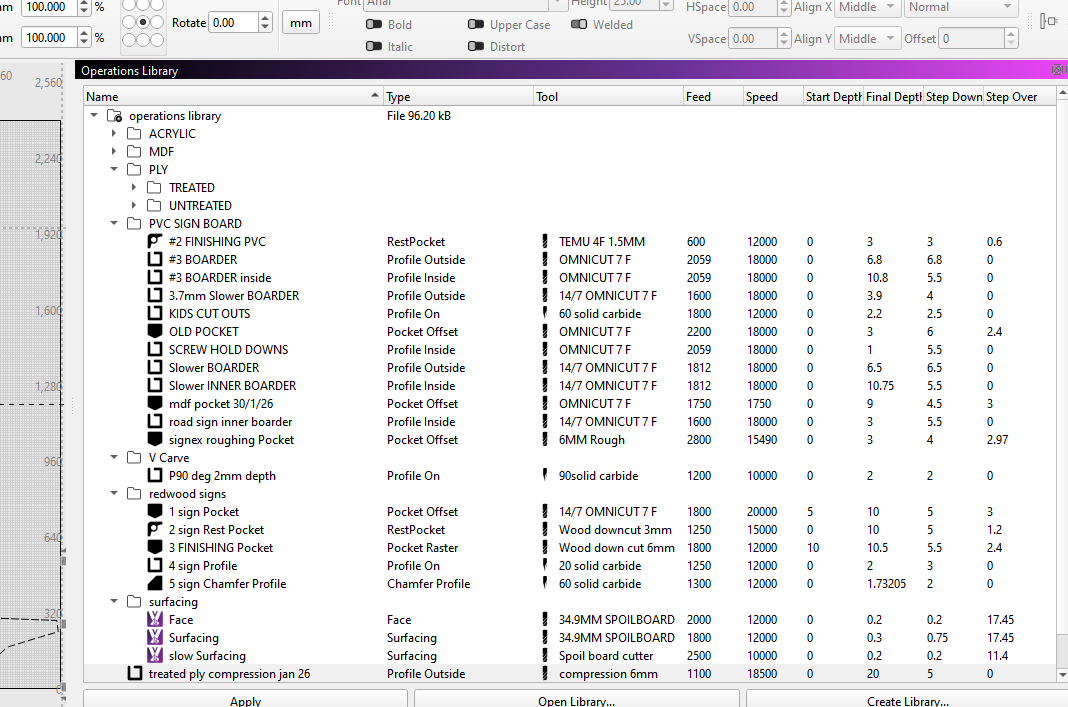
after typing this just realised operation tab is assign. operation library is apply ,never clicked till now they are not the same , doesn’t bother me being different I’m used to it, but may be confusing to others, there will be a reason behind it I’m sure 
1 Like
Operations are not put onto the clipboard, but I’ll log that as a request - it’s reasonable.
4 Likes