Hi ( likely wont be my last post here as i get into engraving etc )
I have bought a Creality Falcon A1 to get me started 10W Diode.
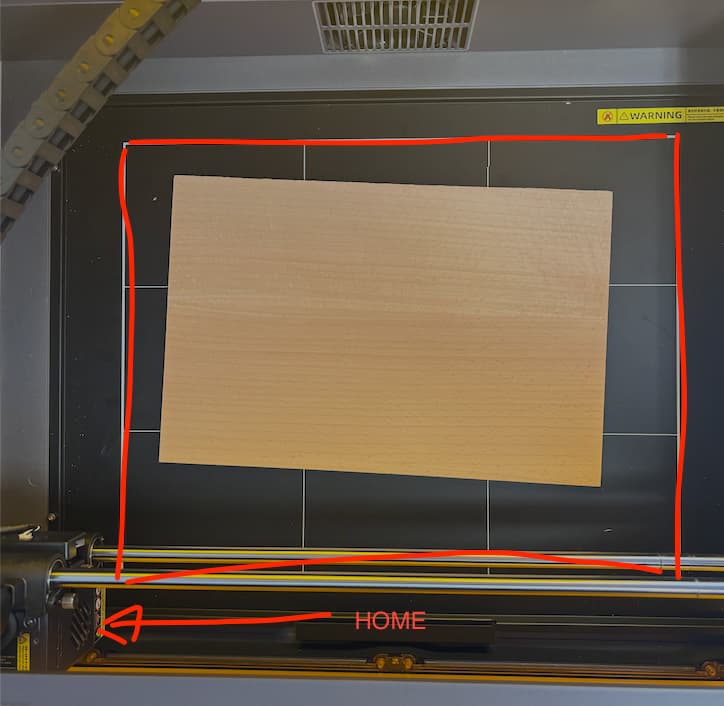
Lightburn has picked it up, set it up, read the workspace etc etc, it homes it moves it does what i would expect to start. However it has the workspace listed correct at 387 x 305mm but thats the centre of the workspace ( red box in image ) not including the entire bed so when its home it thinks its at the edge of the workspace when it isnt ( Image below )
Would you recommend that i either reset the workspace in light burn to include the entire bed and then just make sure that i always start with a file that has a tool outline for the actual work space
or changing where the laser thinks is home ( if thats possible )
Yea i believe it takes into account the space for the trolley and laser head - but the gap that is around the “workspace” in the picture i would have assumed is unusable or shouldnt be engraved in so i would surely want it to take the corner of the red box as the start point.
Should i just change the work space - measure up the inner box and make a tool outline so i know and thus the machine will always work in that space?
Home the machine. Record X & Y. Jog the laser until it is about 1/4" off the frame. Record the new X & Y values. Put the difference in X (no sign) in $130, and the difference in Y in the $131 parameter. This should keep you from bouncing off the frame.
 I shall give that go