I need some advice getting started with the Rotary Roller for my Falcon 2 22w laser, I think I am almost there but if I try to frame a object the Laser module crashes into the right hand frame, or if anyone can direct me to a good tutorial on the correct setup via lightburn I would be very greatful.
Regards
Trevor
1 Like
After a quick look at the engraver I don’t see Limit switches which is great because it allows us to skip some steps.
Is ‘Home’ on the laser front Left? Is that generally the ‘repeatable place’ from where the engraver is powered up each time?
Perhaps this video?

Yes the home position is front left, thr Falcon 2 auto homes on startup, unfortunatly the video you kindly sugested was not very helpful, I have had the roller connected with as far as I know all the appropriate settings set, but I have been unable to find when I try to frame the glassware the module head on its gantry just crashes in the laser frame on the right hand side, I have been unable to find any tutorian’s or txt files that describe the correct setup, groping in the dark so far i’m afraid
1 Like
How is your design setup in LB? Why is the x-axis going completely to the right?
I do have the Falcon 22W as well, but not that rotary roller. I use the Sculpfun Rotary (link), which is similar but does not need any setup changes to get it working.
It uses the same steps amount as the y axis. I did not use the lightburn rotary settings for it at all. Just use the correct cable type to attach it to the y-cable going to the control board.
You would only need to setup the correct steps for the Creality Rotary as explained in their video linked above.
I only turned off hard stops and auto homing when turning on the machine.
This video explains it (from about 5m in he discusses the need for rotary setting in LB):
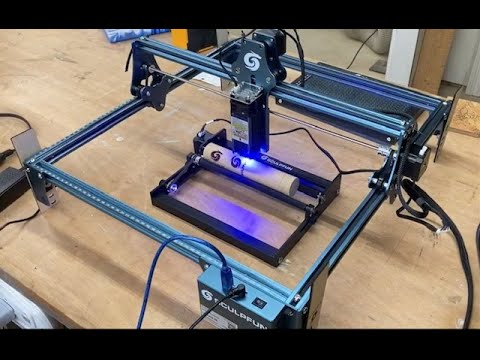
I did some description on how to set the LightBurn parameters here: Rotary roller - Diode Laser Wiki (in the middle of the page somewhere).
Usually, you have to turn off homing if you use a rotary because you can’t home the y-axis. If you frame your project, make sure you enabled “current position” as start and not “absolute coordinates”.
Hi Thanks for the input I have started reading the info you pointed me to, it may take a while to digest it all but have found a few points already of errors on my part and some things that are new to me, if I may take a little time to understand ( Hopefully ) the info and then I’l get back to you with any sucess of failiure, for now at least thanks for you help.
Regards Trevor
1 Like
This topic was automatically closed 30 days after the last reply. New replies are no longer allowed.