We’re getting closer! There is a really odd bug with the < character. I’m using the GRBL flavor (with FluidNC gcode) with ^ as the escape character.
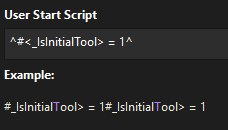
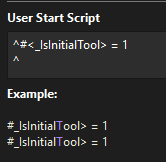
I have a user start script of: #<_IsInitialTool> = 1
The Example preview in the Custom GCode window gets rid of the < but it gets added to the gcode correctly.
If you wrap it in the escape character, it gets rid of the < in the preview and duplicates it. The gcode also duplicates it but does include the < character.
An interesting quirk is that I was trying to include the tool number and name in a comment, but it wouldn’t do that unless I escaped the “(“ so it didn’t think it was a comment.
This doesn’t work. It outputs the literal text.
(Tool {tool}: {tool_name})
This does work with the variable replacement:
^(^Tool {tool}: {tool_name})
I’m fine with the workaround.
Another thing I noticed is that at least for Tool On and Tool Off, I don’t really want it to output anything. I have a router that I manually turn on and off and set the speed. If you leave it blank, it outputs the defaults. It looks like I could set it to a space. This isn’t a big deal since the M3/M5 commands aren’t hurting anything.
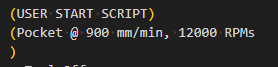
I also noticed that when it outputs details of the operation, the comment closing parenthesis is on the next line:
I don’t think FluidNC cares, but that’s unexpected.
Either way, it looks like I can do what I want to now.