Hello Aaron.f
Yes my board is genuine i have two the same they both have the same issue.
The firmware was installed from there website with no issues.
I will try the reset USB connection.
Tf
Hello Aaron.f
Yes my board is genuine i have two the same they both have the same issue.
The firmware was installed from there website with no issues.
I will try the reset USB connection.
Tf
Do you have DTS and hardware flow enabled in the connection settings? I believe that’s required with the ESP32, where Arduino-based controllers would fail with it enabled.
Hello Goeland86
yes that has been tried.
Hello Aaron.F
So with the FluidNC board powered up, I load LB with the default JCZ profile, switch to standard GRBL — all functions well.
With the FluidNC board powered up, I restart LB and switch to custom GRBL — open console window and the FluidNC startup message is shown. I now select “Show All.” Entering commands into the console are ignored.
A right-click of the Devices button shows: "Waiting for connection… Port failed to open – already in use?"
No further activity is displayed, and FluidNC is unresponsive to console input.
Pressing the reset button on the FluidNC board, the console shows a complete startup message string from FluidNC. However, it remains unresponsive to console input.
I have tried all combinations of power cycling, switching profiles, restarting LB — all result in arriving at a state of no response.
Can I ask what is going to happen now?
Hello goeland86
Aaron mentioned you were using fluid nc with a custom gcode profile
may I ask what special gcode feature you require for your machine.
my assist gas is bottled so I want to turn off in between cut moves.
Tf
I’m going to try and understand what’s happening and fix it 
I don’t really have any special gcode features enabled, that’s why I’m a bit confused by what’s happening.
Does your controller have the ESP soldered to the board, or do you mount it on using pins/sockets?
Hello Jon
I’m using a genuine 6X board manufactured by FluidNC, with the ESP32 processor permanently soldered to the PCB.
I have two of these boards, and both exhibit the same issue.
As an electrical engineer with embedded systems experience, feel free to get technical in your responses.
I’m currently investigating FluidNC’s built-in debug system to determine where the controller might be getting stuck. I’ve noticed that LightBurn is sending some non-printable characters, and I’m wondering if FluidNC is failing to properly trap or handle them.
Based on all the testing I’ve done so far, it appears that the serial port is halting. However, the fact that resetting the FluidNC processor only reboots the ESP32—without affecting the serial port—and that the startup message is re-emitted afterward, suggests that the serial port and its connection to LightBurn remain operational.
Regards Tf
Hi Tom,
Thank you for the confirmation. I have a 6x with the esp32 Dev board mounting sockets. It shouldn’t be a problem, given that they use high end suppliers to make their boards.
Our fear (@Aaron.F and I) was a cheap esp32 mounted. That’s not the case, so hardware is not the issue.
As far as non printable characters, I’m not entirely sure this is the case. From memory, only when you press the stop button would it send 0x18 over, ss that is the grbl stop command. If fluid is seeing non printable characters, could it be a baud mismatch between Lightburn and fluidnc configurations?
Hello Jon
I have checked both LB and fluidnc are set to 115200 baud in the working standard profile and the custom profile.
doing some research on the backwards ? character has reveled some terminals use that char to indicate i received something but i don’t know what it is. i used the arduino terminal to capture that signal. so it is probably out of the scope of that terminal.
Tf
I have a different board, but am also using a 15200 baud rate.
The Arduino serial monitor may be displaying some characters incorrectly.. The terminal from the FluidNC web installer should be the reference.
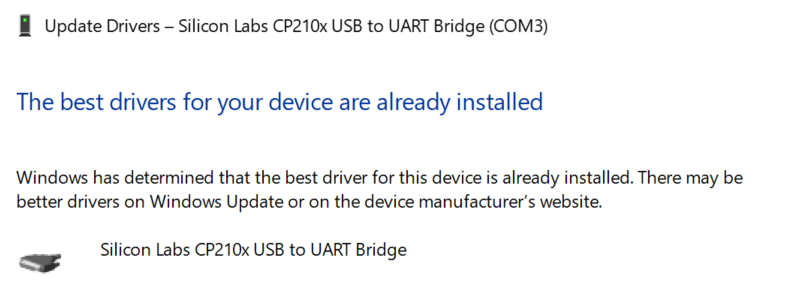
Did you install the si labs CP210x driver linked on the wiki page?
I concur, yes.
You mentioned, that you are switching from a JCZ device to the Custom GCode one. It’s a wild guess, but see if changing the GCode device as the default makes any difference after a restart of LightBurn. (select it in the “Devices” window and hit “Make Default”)
Hello Aaron
Yes i will try setting devices as default the only reason i stuck with that was for consistency.
I just found this program serial port monitor it has a 14 day trial.
simpler than wire shark.
I will upload the session file from both std grbl and custom, i suspect you will need a copy of the programme to read information.
it will need more cups of coffee on board for me to understand- how ever you can see the comms stop.
so i cant send a zip if someone can send me a link for me to send it someware.
so it is late here in ausi land am off to bed now.
Tf
You can upload the zip file to Google Drive (Set access to “anyone with a link”) or WeTransfer and post a link here.
A User Bundle containing the two devices would also be interesting for investigation.
In respect to Aaron’s request to not have the JCZ set as default on load.
Test 1 Start-up order FluidNC then LB standard GRBL as Default.
Turn on FluidNC board. Wait at least 15 seconds.
Load LB, enter ? into console. FluidNC board responds—
?
<Idle|MPos:0.000,0.000,0.000,0.000,0.000,0.000|FS:0,0|Ov:100,100,100>
ok
Test 2 Start-up order LB then FluidNC, standard GRBL as Default
Load LB. Note comm port window shows (Choose). Console shows
Waiting for connection. As expected!
Turn on FluidNC board. Wait at least 15 seconds.
COM window shows COM3.
There is no init string from FluidNC after some wait.
Right-click Devices button—still no init string and no response to ?
Press reset button on FluidNC board and startup message is shown with no errors.
Enter ? into console. FluidNC board responds—
?
<Idle|MPos:0.000,0.000,0.000,0.000,0.000,0.000|FS:0,0|Ov:100,100,100>
ok
This is all understandable and normal.
Test 3 Start-up order FluidNC then LB, custom GCode as Default.
Turn on FluidNC board.
Load LB.
Console shows Waiting for connection…
COM window indicates connection to COM3.
Entering ? yields no response.
Clicking Show All reveals a string of G0’s
Right-click on Devices button.
Console window shows—
G0
G0
G0
G0
Waiting for connection…
Port failed to open – already in use?
Waiting for connection…
Port failed to open – already in use?
Test 4 Start-up order LB then FluidNC, custom GCode as default.
Load LB. Note comm port window shows (Choose).
Console shows- Waiting for connection. As expected!
Turn on FluidNC board. Wait at least 15 seconds.
With COM window still showing (Choose), I select COM3.
Console shows the FluidNC start message with no errors.
A note on validating a connection- if fluidnc dose not respond to ? then it will not respond to any command.
Just as an update as to what I have tried—
Enable and disable DTR.
Transfer mode—
When you select Synchronized, close the settings window and then reopen it, the setting has reverted to Buffered. I have not been able to check Sync mode for this reason.
Given that at the moment a single character is not being processed by FluidNC, flow control is not a likely issue.
Creation of a custom GCode profile my steps—
Select Devices button.
Select Create manually.
Select Custom GCode. Next.
Select Serial/USB. Next.
Create a name / set mm/sec / set X and Y axis length. Next.
Set home location. Turn off auto home.
Choose GCode flavour: GRBL or GRBL M3 ( tried both).
Set COM port options. Have tried all combinations.
I will arrange a data pack with comm captures and download link soon.
Tf
Thank you for the report.
I ran some tests on the MKS DLC32 board, and the comms worked with the default settings of the Custom Gcode device type.
I’d be interested to see what the captures will tell us, but before you go down this rabbit hole, I recommend going over the wiki of the 6x again.
Specifically, the “Power Supply” section. (You’re likely aware of this, but the board won’t connect over USB alone.)
Then, to limit the source of the issue, load the default config.yaml and unplug every cable except USB and power, if possible.
All that said, it’s still odd, that the GRBL device type does work!
Please keep us posted. The board is currently out of stock, but I’m on the waiting list!
I’m going to try and understand what the issue can be, I think I have a cp210x based Dev board. I should know Monday noon swiss time if I can replicate it or not.
The FluidNC board runs off a separate 24V supply, not associated with the machine motion system.
During the editing of the last post, I lost the final line of Test 4. It should read:
Enter ? in console — there is no response from FluidNC.
I found a DLC32 board and created a new LightBurn (LB) custom profile. Without any configuration changes in LB, I get responses to information queries. That board seem to work with the custom LB profile.
This board will require major modifications to run my machine, so at the moment I cannot perform any motion tests.
With my new working custom profile, I attempted to edit the post. I added G64 P0 to the start of the pierce operation and G65 P0 to the end of pierce.
I saved the G-code and opened it in Notepad.
LB did not add the pierce delay to the start of the cut.
I removed the additions made to the post,
but still no pierce commands were added to the file.
I reverted to the standard GRBL profile and saved the G-code file —
pierce code was present.
Please advise if I should start a new forum thread for this topic.
Note: Downloading this link will erase it.
 https://limewire.com/d/i9eF5#2GeodaCmPm
Here is the link to the software used to open the debug captures:
https://www.virtual-serial-port.org/com-port-monitor-download.html
Yes please, let’s focus on the esp32 issue with fluidnc here. Feel free to tag me or @Aaron.F on the pierce issue thread when you create it as well.