Cut Shapes" not converting "Tabs/Bridges" into Geometry (LightBurn PRO 2.0.04 Mac)

Hi everyone,

I’m having some trouble with the “Tabs/Bridges” feature in LightBurn. I need to create tabs for a complex design with many shapes and I need the tabs to be visible. I import the shapes into LightBurn and apply the “Tabs/Bridges” setting, but I don’t see them.

I know the tabs are a command for cutting and are not normally visible, but I need to see them directly on the shape. So I try to use the “Cut Shapes” setting to transform the cutting path into a separate geometry, but the tabs still don’t appear.

I imported pre-existing files and also created simple squares on LightBurn, but the problem persists. I’m using LightBurn PRO 2.0.04 on Mac.

Has anyone else experienced this issue or have any suggestions on how to fix it?

Thanks in advance for your help!

This is the edit tabs button.


A quick search of the docs using the word tabs brings you here.

1 Like

Thank you for your reply, but I already know how to use the ‘Edit Tabs’ button and apply the ‘Tabs/Bridges’ setting to the cut layer.

My problem is a different one: I need to convert the cutting path (which includes the tabs) into a permanent vector geometry so I can see the tabs physically and export the final shape to another program.

The documentation suggests using the ‘Cut Shapes’ command (or ‘Convert to Cut (Debug)’) for this purpose, but when I use it:

  1. The tabs do not appear as actual geometry.

  2. Parts of my design, such as internal holes or shapes, often disappear entirely.

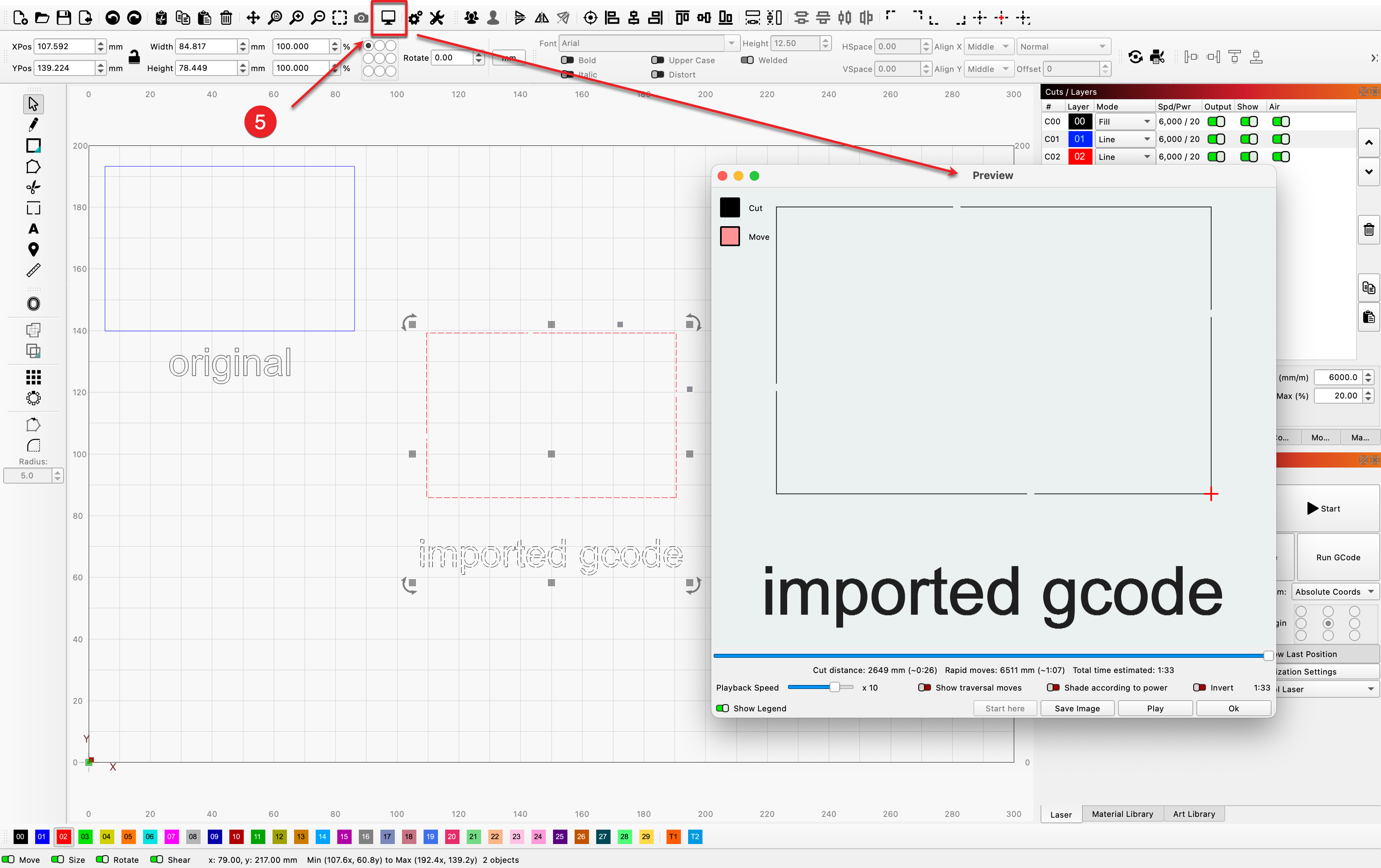
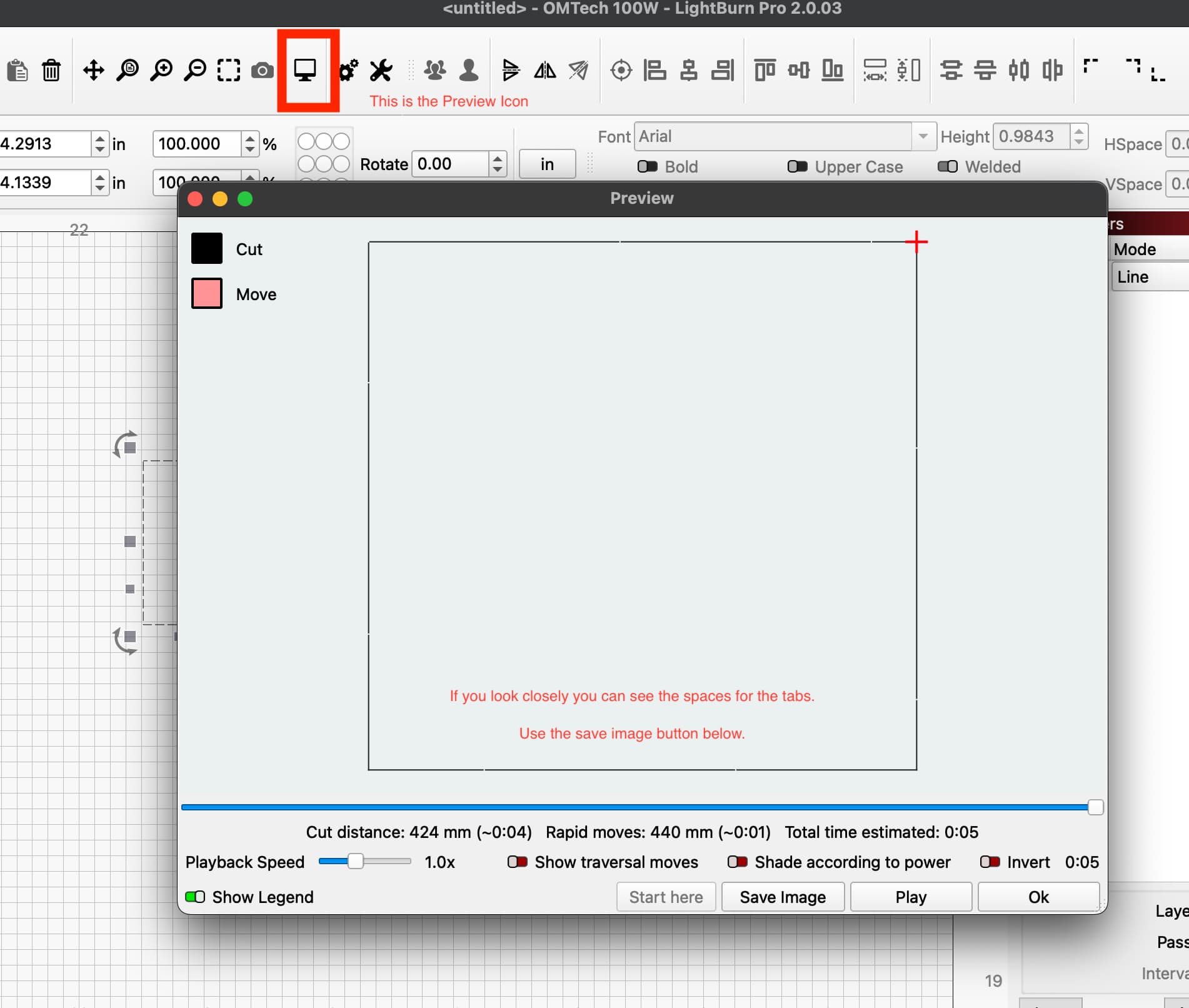
I don’t think that’s possible. Lightburn adds the tab control through the cut settings editor. It’s not part of the geomtry of the shape on screen. They do however appear in the preview window and you can save a .png image from there, but I don’t know if that will help with your “other program”.

Thank you for the clarification about the PNG file! I appreciate it, but I still have one question: where exactly can I see the preview you’re talking about so I can save it, as you suggested?

Also, I must point out that I unfortunately still have to send files to the laser machine using an external program, since LightBurn doesn’t allow me to connect via Wi-Fi

I don’t know how you have connected your machine to your network and what options you generally have with your laser…, but my laser is connected to a small switch with a normal network cable and thus part of my W-LAN (router). That is, I access the laser with my computer over wifi.

Are you not within close proximity to your laser where you can use a cable?

See below for preview info.

Thanks for the photo. That PNG doesn’t really do much good. As for Wi-Fi, I have a desktop PC 4-5 meters away from the laser. I have two closed lasers, and they have a smoke exhaust pipe that blows out, so I can’t move the lasers or the PC. But since I have Wi-Fi, I don’t have any problems. The only problem is that I can’t use Lightburn. There’s certainly a way to connect it to Wi-Fi using third-party devices, but I’d prefer to continue working like this. I just need to generate these bridges/tabs automatically for complex projects with many pieces, and I can’t figure it out with any software.

I know that with a few steps and third-party devices you can connect, but with everything native I was fine. The only problem is that I can’t find an effective way to generate the bridges, because the native program on my machines doesn’t have this setting.

Like I said initially, I didn’t really think it would.

Seems like a LOT of extra steps to me for a normal workflow.

Does your Native software have any design functions? If so, can you not manually create tabs by deleting small sections of the cut lines? It would cut the line and skip the missing sections, leaving the bridges. I realize this would be very time consuming depending on the complexity of the job.

I would work on finding a way to connect your machine to Lightburn rather than continuing on this path. The distance is kind of long for. USB Cable, but some users have had success with an Active USB Cable.

Your WiFi connection, is it connecting directly to the controller from native software or is the machine connected to your WiFi network? If you can get it to connect to WiFi LAN you should be able to connect Lightburn.

From Google AI
AI Overview

To connect your Creality A1 Pro to LightBurn via Wi-Fi, first ensure the device is connected to your Wi-Fi network using the touchscreen or Creality app. Then, within LightBurn on a computer, use the Find My Laser function or manually add the device. LightBurn can then discover the connected A1 Pro, allowing for wireless control and camera access.

Steps for Wi-Fi Connection

  1. Connect the A1 Pro to your Wi-Fi Network:
  • Use the A1 Pro’s touchscreen or the Creality app to connect the machine to your home Wi-Fi network.
  • Ensure the A1 Pro’s firmware is up-to-date.
  1. Connect to LightBurn:
  • In the LightBurn software on your computer, go to Devices.
  • Click the Find My Laser button to allow LightBurn to discover the A1 Pro on your network.
  • Alternatively, you may be able to manually configure the device in LightBurn using a device profile provided by Creality.
  1. Configure Device in LightBurn:
  • Follow the on-screen prompts to select the A1 Pro from the discovered devices.
  • Creality provides a specific device profile to import for the A1 Pro, which will help configure LightBurn correctly.

Key Considerations

  • Creality’s Device Profile:

Creality has released a device profile for the A1 Pro to simplify LightBurn setup, according to LightBurn Software Forum.

  • Camera Access:

The Wi-Fi connection also enables wireless camera access within LightBurn for previewing your work.

  • Troubleshooting:

If you encounter issues, check your Wi-Fi connection, ensure the A1 Pro’s firmware is current, and confirm that no other software is trying to control the laser. You can also find troubleshooting steps on the LightBurn Documentation page.

It would be an extra step, but once done, I can cut the project many times. I buy large projects with many pieces online, and in most cases they don’t have interruptions, leaving me with hundreds of randomly thrown away pieces. As for the connection, I had already considered an active cable, but I would end up with a cable in the middle of the workshop. To run it around the entire perimeter of the wall, it would need to be more than 10 meters long, which seems a bit excessive and expensive. The laser engraver connects to the same network, so not directly, but I spent a whole day trying to connect it, using the AI’s guides, but to no avail.

OK, well I tried to help. Yes, 10 meters is too long in my experience.

It would be an extra step, but once done, I can cut the project many times. I buy large projects with many pieces online, and in most cases they don’t have interruptions, leaving me with hundreds of randomly thrown away pieces. As for the connection, I had already considered an active cable, but I would end up with a cable in the middle of the workshop. To run it around the entire perimeter of the wall, it would need to be more than 10 meters long, which seems a bit excessive and expensive. The laser engraver connects to the same network, so not directly, but I spent a whole day trying to connect it, using the AI’s guides, but to no avail.

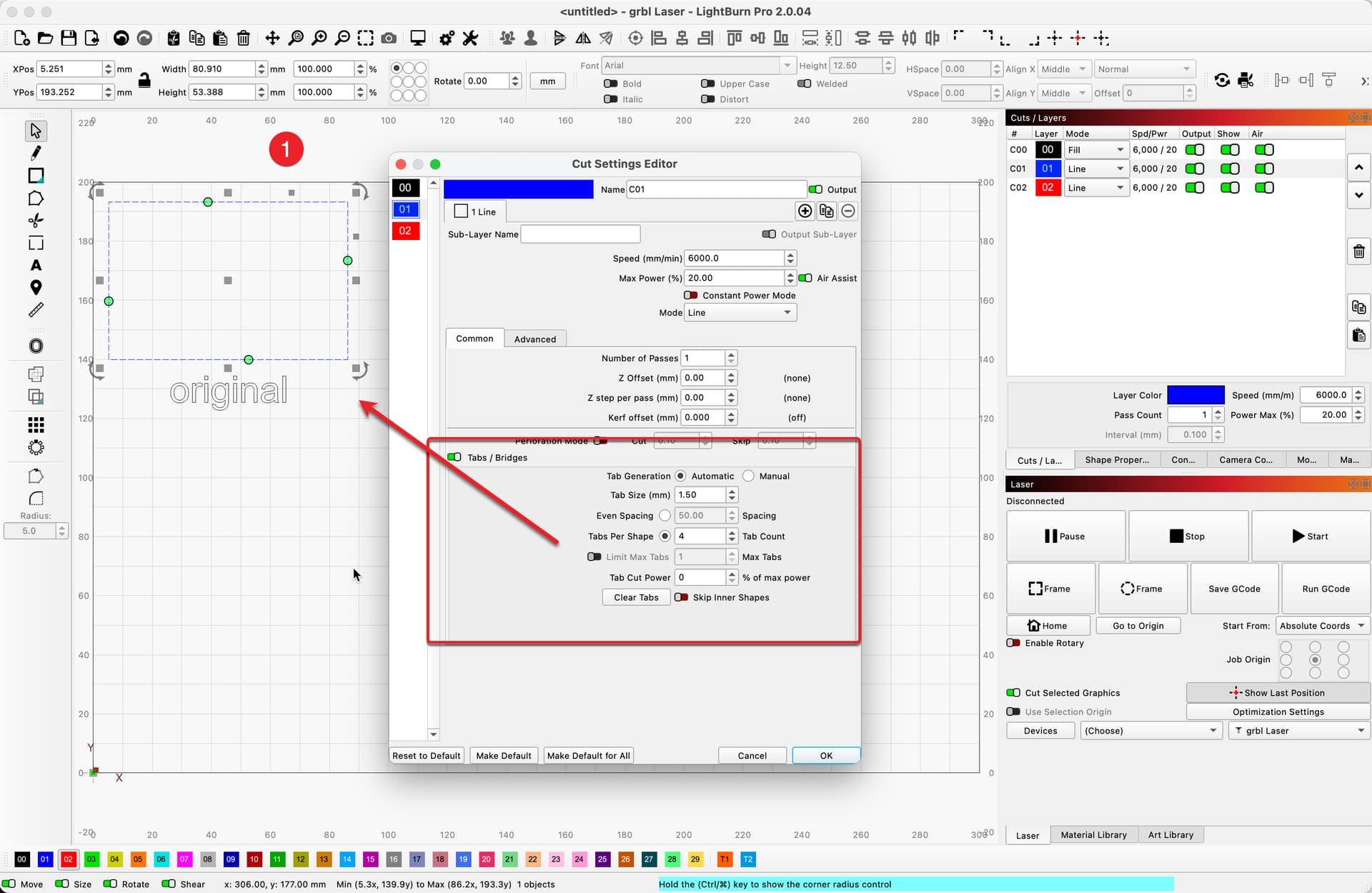
@wolfart, there is a way to accomplish having your geometry show the tabs generated using LightBurn.

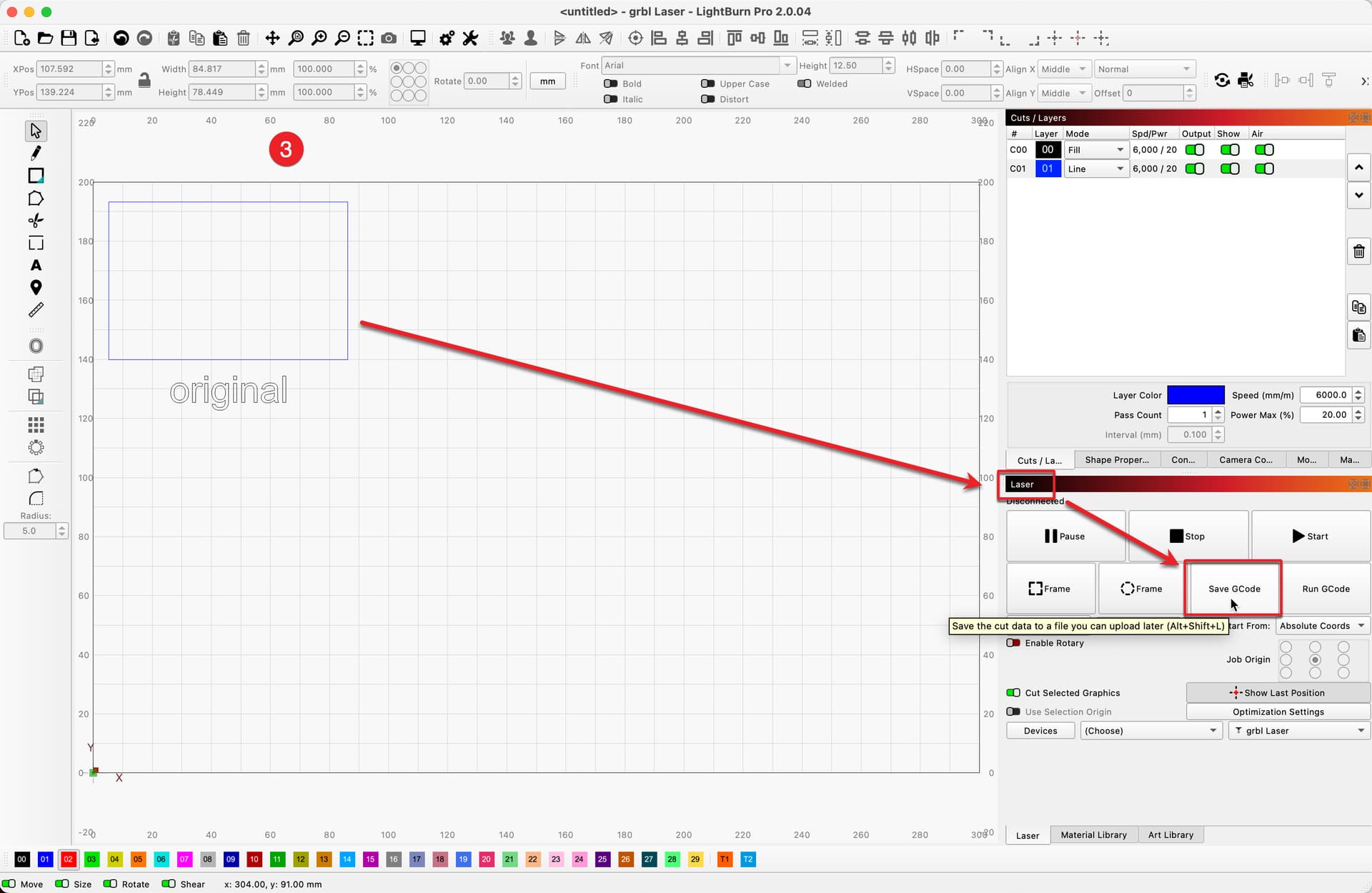
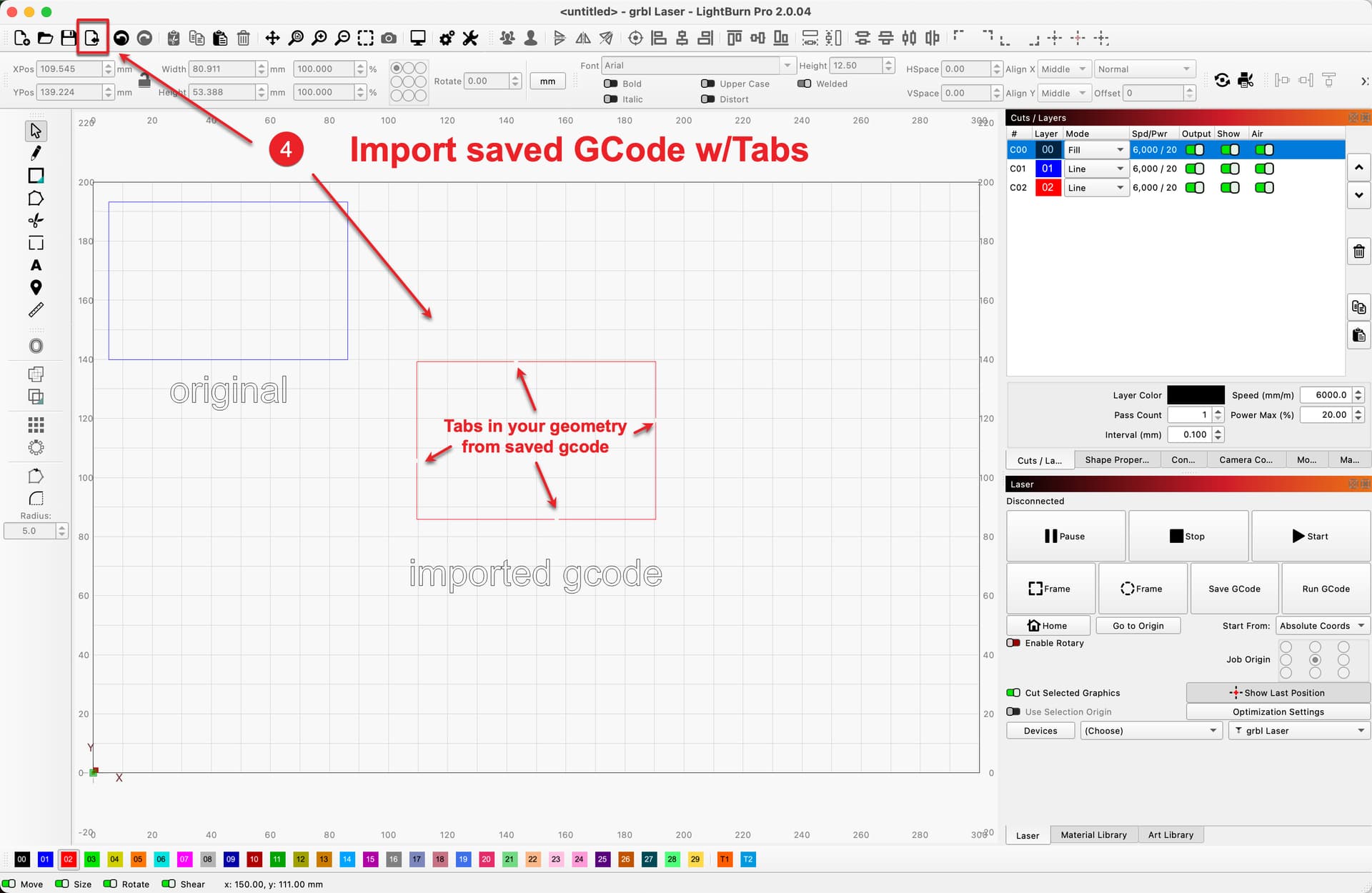
After using the ‘Tabs / Bridges’ feature of the ‘Cut Settings Editor’ to place or auto-generate tabs where you’d like, save the file as GCode (ckick the 'Save GCode button in ‘Laser’ tab) and import that file into LightBurn. You will now have the geometry with tabs. :slight_smile:

Please let us know if this approach will work for your needs.

2 Likes

Thank you so much, that’s exactly what I was looking for. You were very precise, thank you.

1 Like

You are welcome! And thank you for the feedback. Glad to hear this will work for you. :slight_smile:

This topic was automatically closed 30 days after the last reply. New replies are no longer allowed.