Hi there, I am new to this forum. Apologies if this tread already exists. I am trying to get the hang of the speed and power settings for our lazer cutter. We are cutting mostly 4mm plywood veneered birch and oak. Any help or guidance to resources would be very much appreciated.
When you have a new machine, you should use the material tests that are part of LightBurn. In general, all materials must be tested and the optimal settings must be found during trials. Find all the remains of the different materials you want to work with and experiment until you get the desired results.
It is not because people do not want to help, but because the difference between machines and materials is so great that it is almost impossible to give specific figures or values.
Eg. I use 60% at 20mm/s to cut 4mm birch plywood, you won’t be able to use the numbers because you have a completely different machine.
Get started with the experiments, it’s fun and rewarding.
Thank you Bernd. Where can I find those lightburn tests and I’ll get experimenting?
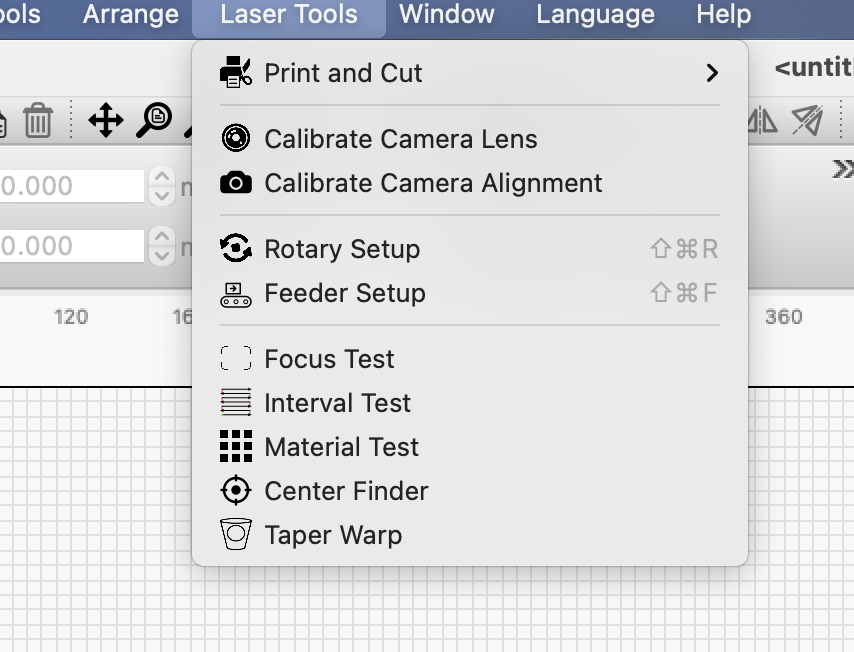
I don’t really use the Lightburn materials test for cutting. The materials test makes boxes and you can figure it out with ranging the speed/power. When cutting vectors, interval is of no use.
I did this before the materials test was available and easy to use, but it seems pretty easy…
Get a piece of scrap. A small width is all that’s needed and in simple terms I cut the end off. Repeat changing values until it cuts through… Minimal amount of materials.
A line the width of the scrap, set the layers for where you want to start and run it. If it doesn’t cut through you can change the speed/power from the machine console very simply…
The materials test might not be a bad idea as it might help you decide a good cut from a poor one.
You can do some simple scaling for power. In theory, you put the same amount of power to the material if you run 300mm/s@80% power as 150mm/s@40%.
In reality, there is more going on than just power and speed, so it can be a starting point, but doubt it’ll be very exact.
If his 60W, 60% power is cutting the same material, then it’s approximately 36W output. The power ratio between the two tube outputs is 60/80 = 6/8 = 3/4 = .75
Then 60% of his is equal to .75 * 80 or about 45% = 0.45 * 80W = 36W
The inverted value and be applied to the speed.
1/0.75 = 1.333, so apply the same conversion to the speed.
1.333 * 20mm/s = ~26.666mm/s
Do you have a mA meter on your machine so you know what current it lases?
You could both have the same cut settings and work. If the machines are not set up so power percentage setting of the layer in Lightburn it actually relative to your output power, you don’t know.
Good luck

This topic was automatically closed 30 days after the last reply. New replies are no longer allowed.