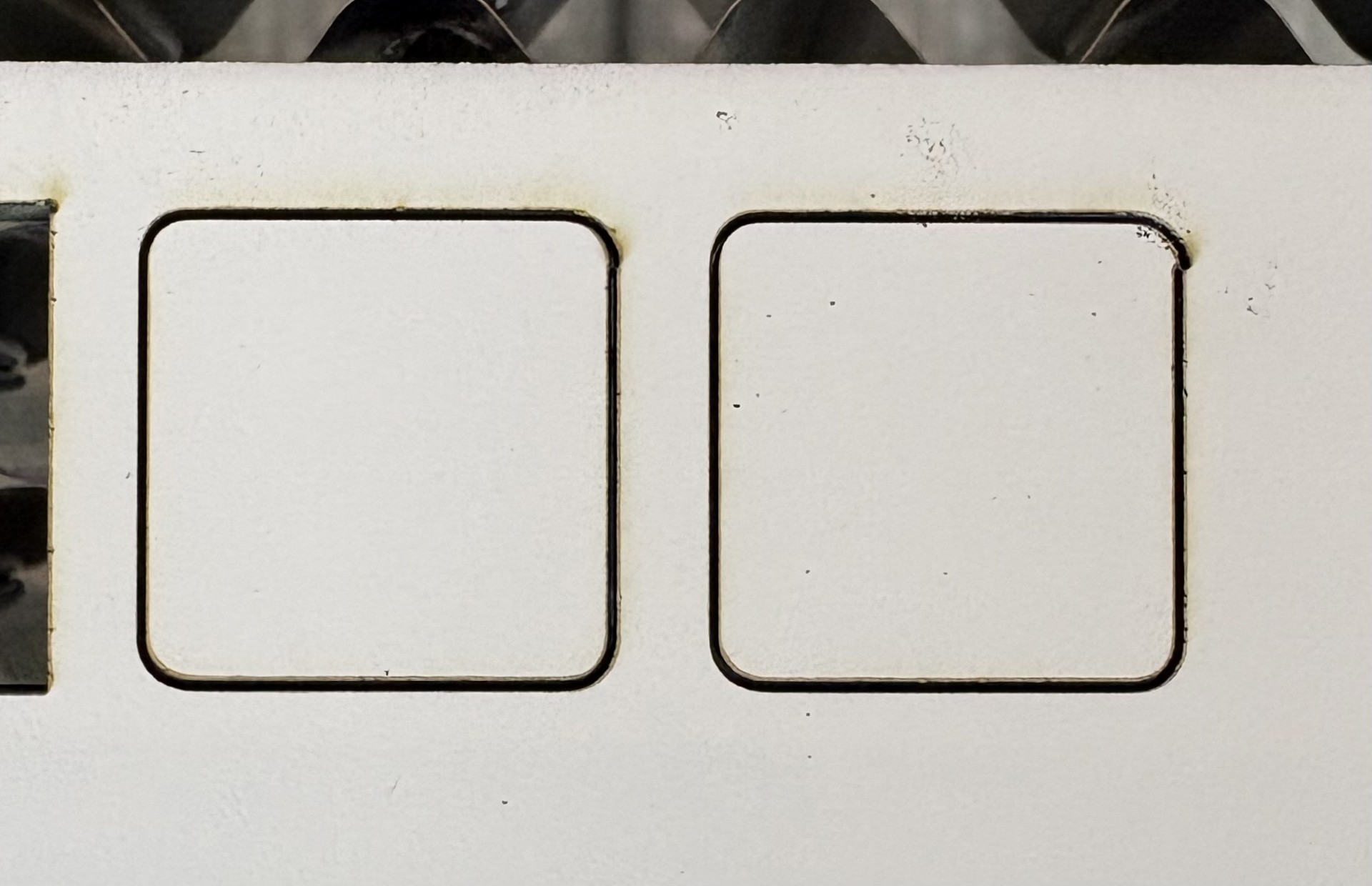
I have a new OLM2 S2 and I am having trouble with shapes being slightly deformed acting like they are not closed shapes. It looks like backlash but there is absolutely no way it is backlash. All the mechanicals are tight; there is no slop anywhere. Here are just two of my test squares. I used the rounded corner because it’s easier to see the deformation, square corner do the same thing.
Both squares start in the upper right corner below the curve and cut counterclockwise, all settings the same. The only difference between the two is where the laser had to move from to start the cut. Left square, the laser had to move from the left rightward to start the cut and it cut fine. The right square the laser had to move from the right of the square leftward to start the cut and the shape is deformed. Basically, if the laser has to move any amount in the same direction as the initial cut the shape is deformed. If the laser approaches from any other direction it cuts perfect. The issue is repeatable, and if you rotate the square 90 degrees so does the issue.
Seeing that issue is repeatable in both the X and Y axis (depending shape starting point) I believe that rules out backlash. All belts are taunt, gears tight, and no slop in the rollers. It’s not an acceleration issue because I enable “pause at start” of cut for 500ms and that didn’t change the results. Nor did slowing the acceleration speeds down to 1000mm/s^2.
Tried swapping out the motherboard with another brand-new one and got the same results. Both boards are running firmware version 190. Swapped computers, both running the latest version of Lightburn, same results. Tried updating the firmware to version 191, but like everyone else I can’t get either motherboard to accept the new firmware. Went so far as to create a windows 10 VM to apply the firmware with no success.
I am running out of ideas. Anyone else have this issue? or an idea on how to fix it? Could this be caused by the firmware or could it be something in Lightburn I’m missing? Thanks
It is relatively easy to rule out one thing for the other, hardware or software.
If I print your file and don’t experience the same problems you observe, then it is the hardware.
Have you tested your steps?
Engrave a square, as large as your machine bed allows and measure the exact length of the sides (X,Y), there should be no difference.
As @MikeyH describes, it is most often a mechanical problem and not always easy to see or find.
For example, the small pinion screws in the pulleys are difficult to check without having to take half of the machine apart.
The belts can also be too tight!, it is the right balance that is needed.
Another difficult to diagnose but simpler problem is loose lenses in the nozzle, it is almost ridiculous how many have spent hours finding these “Error 47”.
Try going through the entire machine again, you will probably find the error.
And you’re welcome to send your file if you want to test the software theory, but the chances are close to 0.
Scale it uniformly to fill the platform and run it as fast as the machine will go in Line layer mode with Enable optimizations turned off and power set to mark a sheet of cardboard. Any differences from the design will be informative; a crisp photo will let us look over your shoulder.
Thank you for the response. The grub screws are tightened correctly. My original statement was correct, everything was tight, too tight. Every was adjusted correctly but loosening the eccentric rollers solved the problem. Apparently, they need to barely touch the rails, seems too loose IMO, but that solved my problem.
Thank you for the response. I’m pretty sure the file is good, it was created in Lightburn. Turns out the eccentric rollers were too tight. And I wasn’t blaming Lightburn for causing the issue, I was just wondering if there was setting that I might have missed that could have caused the issue.
As for the firmware, Ortur actually responded this morning basically saying that the file name was probably wrong and sent me a new .bin file that worked. I can’t seem to post the bin file itself, but the file was named ESP_OLM2_S2_191.bin, which is not on any of their websites.
Glad you found it! Amazing that the 2 softwares reacted different to it.
To upload any file that the Forum rejects, add .txt to the end of the filename (like ESP_OLM2_S2_191.bin.txt) with instructions to strip off the extension, and it will likely succeed.
Thank you for reporting back in detail, it’s good that you found a solution to the problem.
By the way, the eccentric wheels also tend to collect dirt over time from the aluminum profile, which can also cause irritation.