Diode Laser Astigmatism? Blurry Vertical Lines, Sharp Horizontal Lines – AtomStack A24 Pro

Hey everyone,

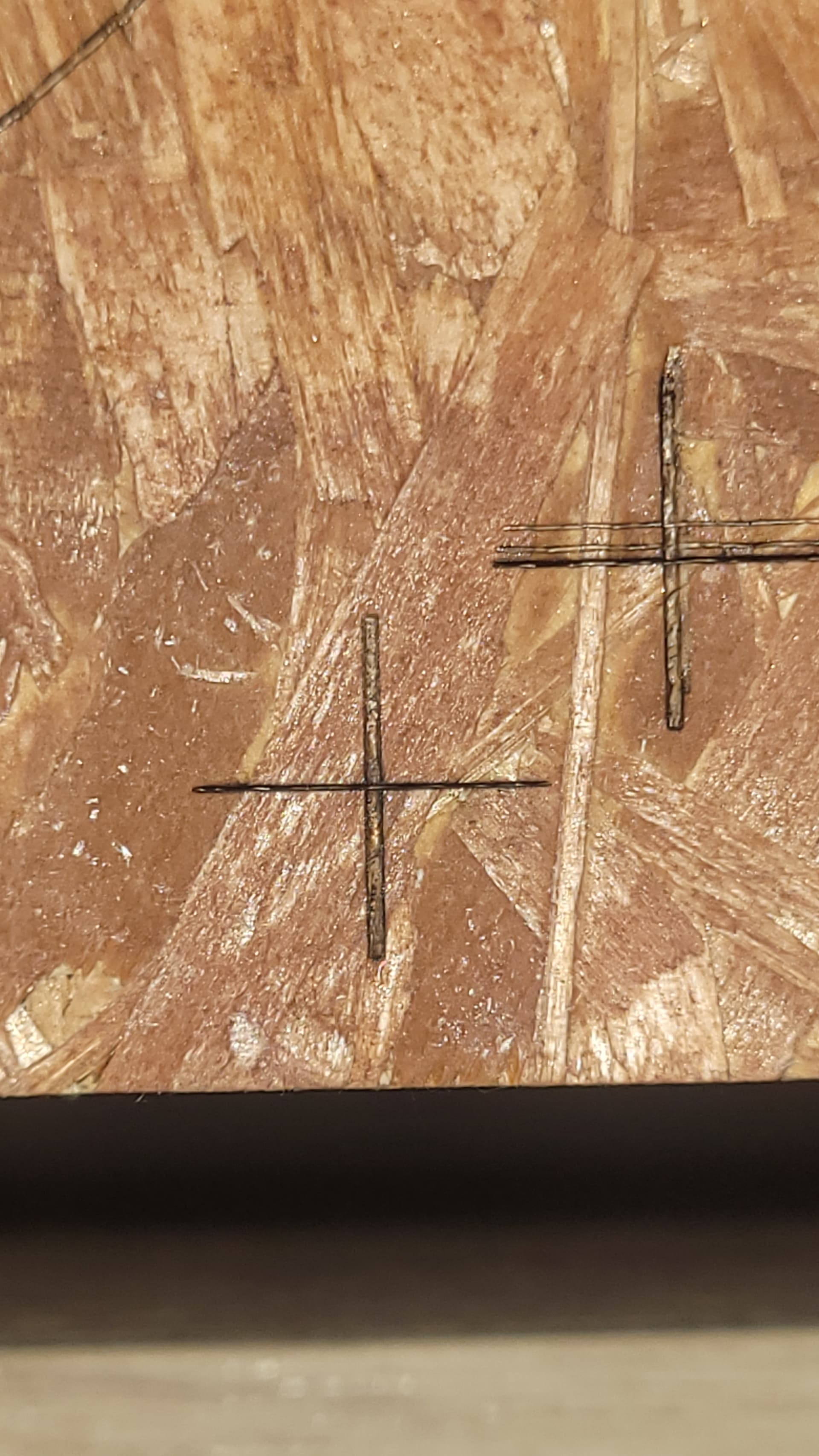
I recently picked up an AtomStack A24 Pro and ran into a concerning issue right out of the box. During a quick test engraving, I noticed something strange: vertical lines were coming out noticeably blurry and wide, while horizontal lines were sharp and clean.

To investigate further, I engraved multiple 1cm x 1cm squares at various speeds and power settings. The results were consistent — vertical lines always appeared fuzzy and significantly thicker than their horizontal counterparts.

When I tried cutting a square in 3mm plywood, the issue became even more obvious. Horizontal cuts went through cleanly at 90% power / 650 mm/min, but to get the vertical cuts to match, I had to slow it down to 90% power / 350 mm/min — a big difference.

I ruled out mechanical issues and checked the lens — it’s crystal clear, no dirt or damage. That’s when I decided to examine the laser spot itself.

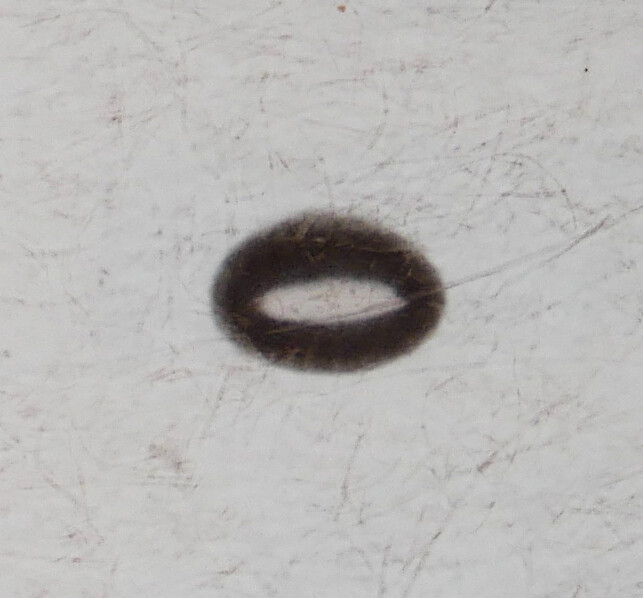
After a few attempts on different materials, I got the clearest laser spots on thermal receipt paper. I pulsed the laser manually at low power (3–6%) and photographed the spots using a 1:1 macro lens. The photos confirmed my suspicion: the laser beam is visibly deformed — more of a long oval than a tight point — which perfectly explains the engraving and cutting anomalies I’ve been seeing.

From what I can tell, this is a textbook case of diode laser astigmatism.

Unfortunately, when I contacted AtomStack support, they initially seemed helpful, but in their most recent message, they claimed this behavior is “normal.” I’ve since asked to escalate the issue and I’m still waiting for their response.

Why I’m Posting This:

To get feedback from the community — I know many of you have far more experience than I do, and I’d appreciate any insights or confirmation on my diagnosis.

To help others — I spent hours searching online for similar symptoms and found very little. Hopefully, this thread helps someone else who’s troubleshooting a similar issue.

To add visibility — Having this issue documented and discussed publicly could support my case if AtomStack continues to push back on a warranty replacement.

I’ve attached the images below for reference. Any thoughts, advice, or suggestions would be greatly appreciated.

Thanks in advance!


Diodes won’t give perfect cuts on both axis, and the higher the power the worse it gets, but this looks excessive to me.

2 Likes

Diode lasers do not produce a round or symmetrical beam; they produce an elliptical. This is due to asymmetrical nature of the PN junction in the diode itself. My laser produces a beam that is approximately 0.1mm by 0.08mm in shape. So along one axis it get I get narrow lines and along the other I get wider lines. Diagonals are noticeable as well. But what you displayed seems excessive as another commenter mentioned.

1 Like

@Bugeyz @Dskall Thank you for your comments — that’s exactly my point. I know that diode lasers don’t have a perfectly square spot and that it’s normal for the beam to be slightly elliptical. But in this case, the distortion seems way too extreme and it’s very noticeable, especially when engraving.

When it comes to cutting, the difference creates a big problem in my view. There’s almost a 50% difference in cutting speed between vertical and horizontal lines, which makes it practically impossible to get clean cuts without excessive charring. One axis always ends up way too overpowered.

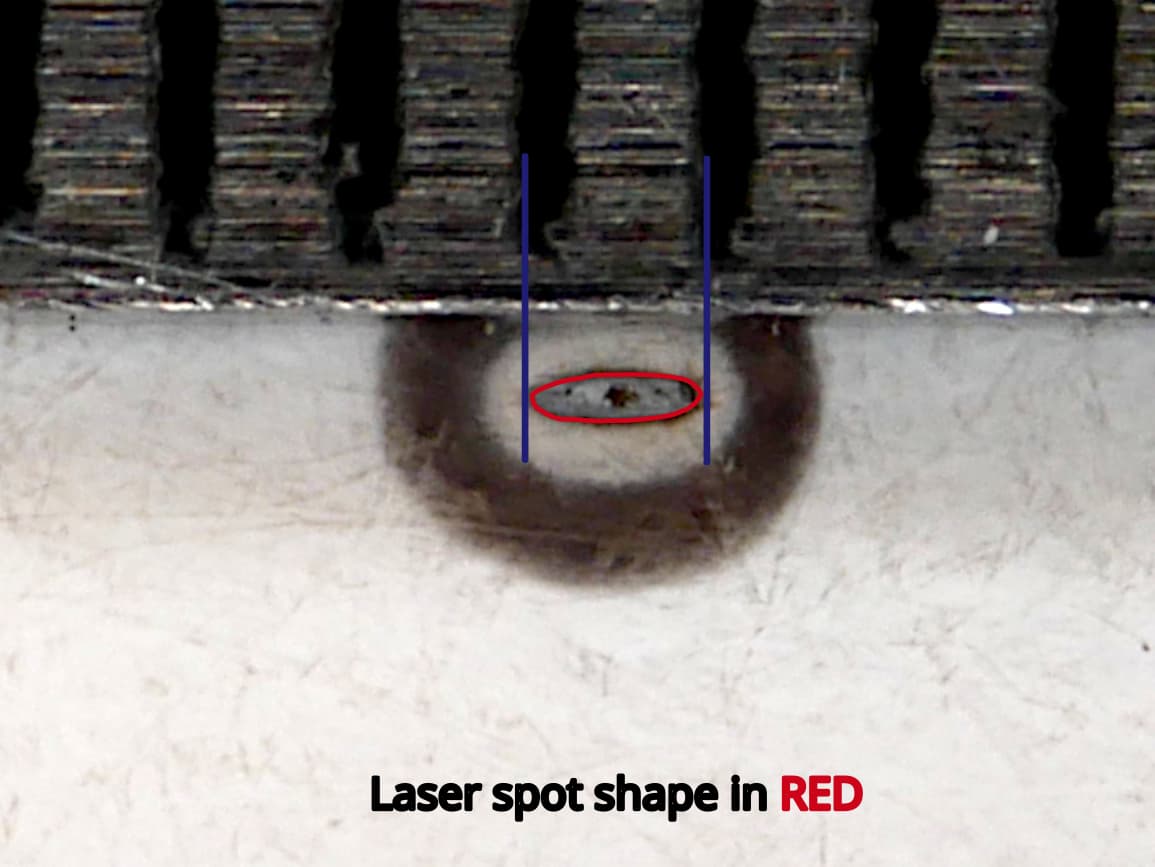
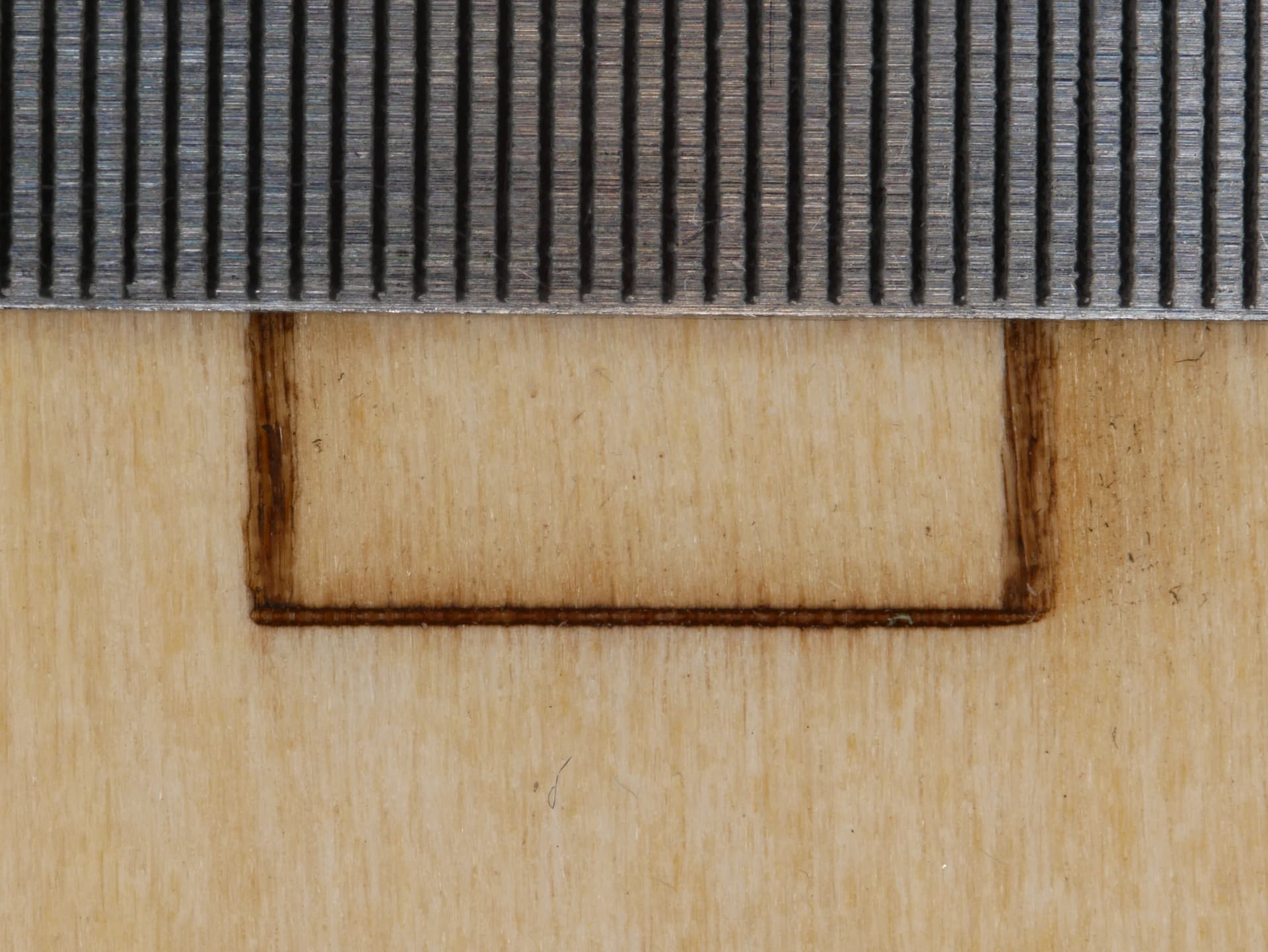
I’ve added two more images to show what I mean — one of the square and another of the laser spot both next to a ruler with 0.5mm markings. Based on the specs of the laser, the height of the spot should be around 0.08mm, but the width looks to be about 5 to 6 times larger than the height, so somewhere between 0.40mm and 0.48mm. That lines up with what is shown in the photos and is way off the specification of 0.06 x 0.08 mm for this laser.


1 Like

Point the laser at a wall and take a picture. Then you can better see the individual diodes.

@misken Thank you.

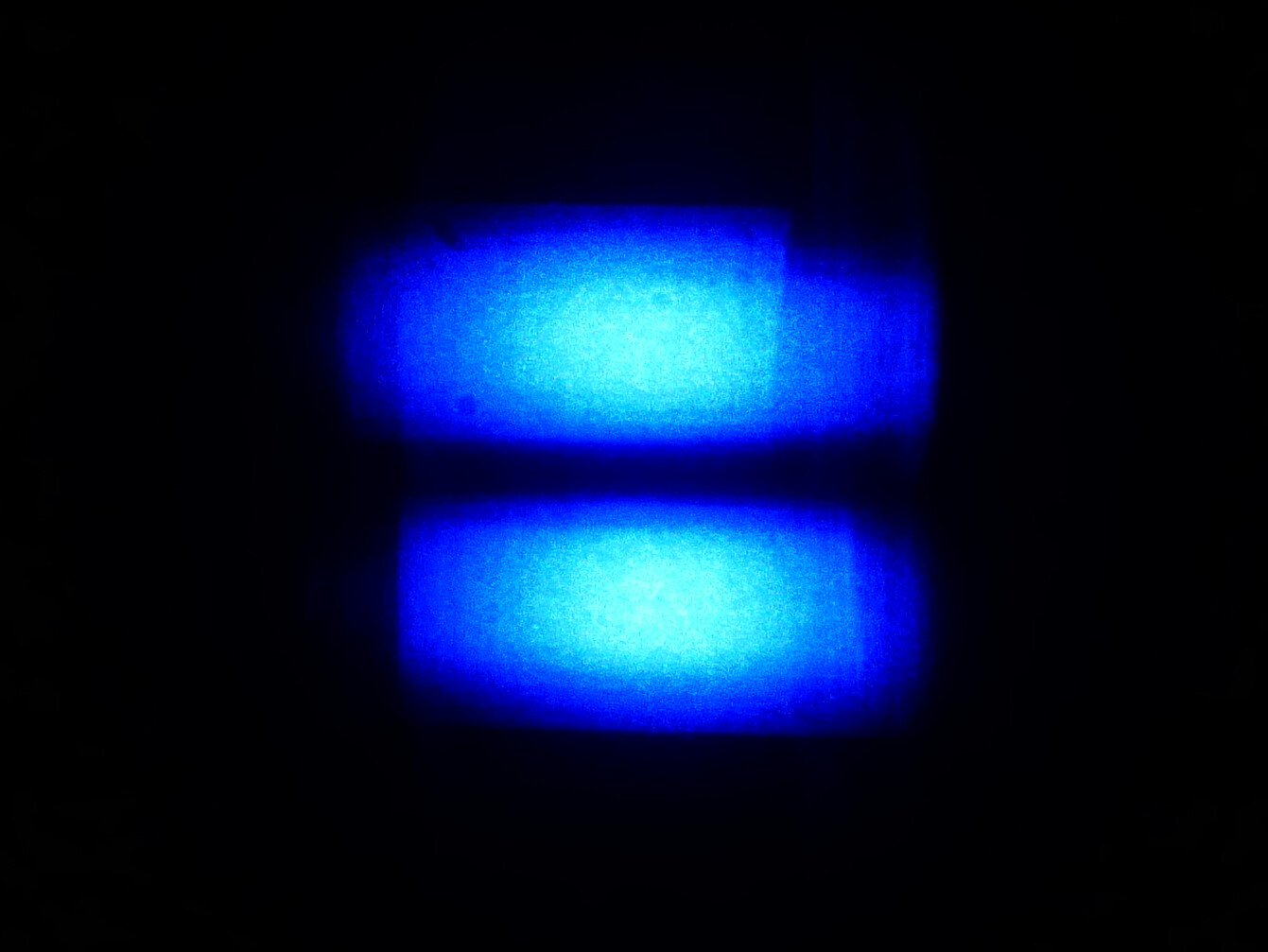
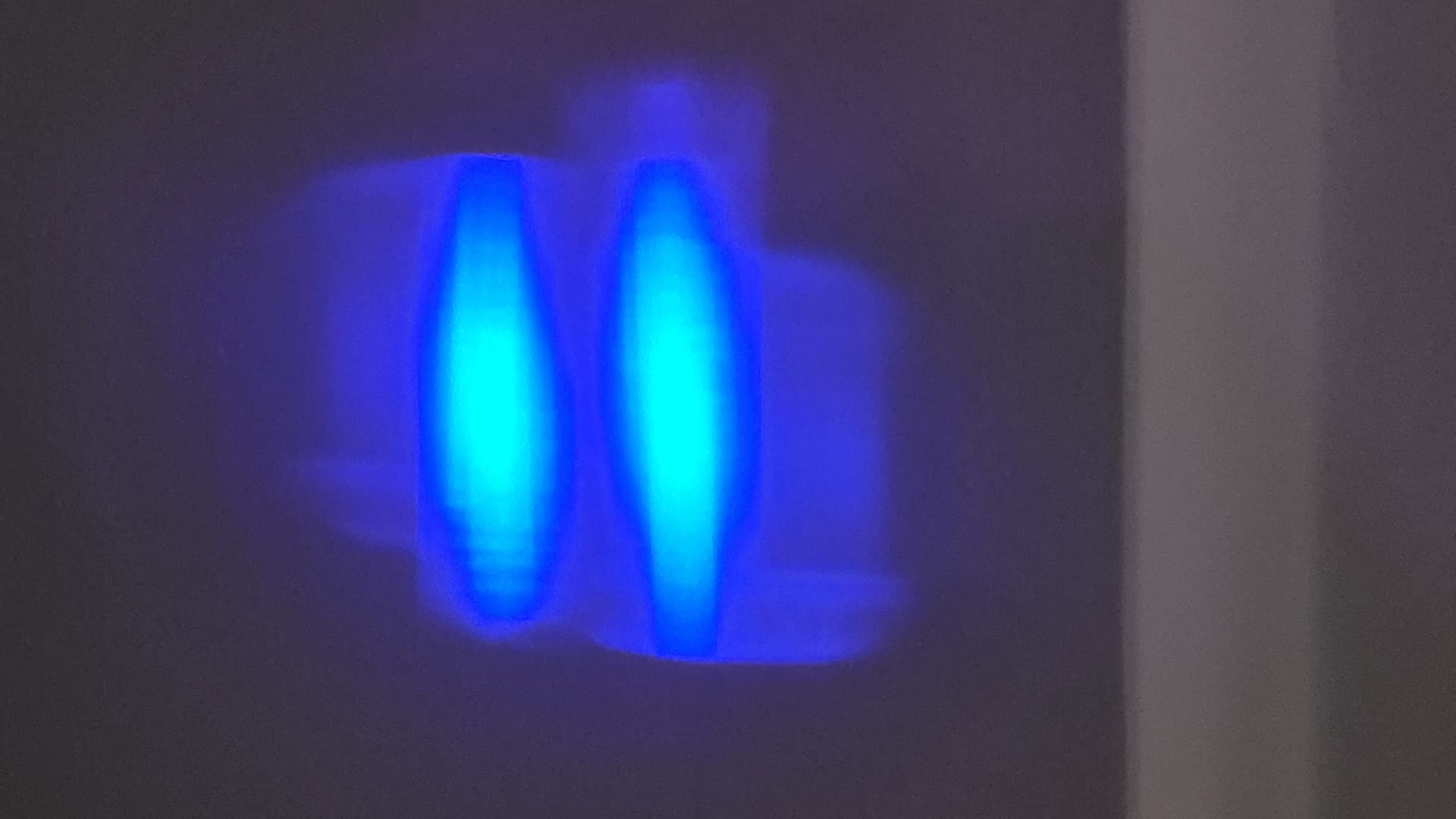
This is what I get pointing the laser at a wall about 2 meters away, at 3% power, in a dark room. Camera right behind the laser.

That doesn’t actually look so bad. It depends one the beam optics if those two spots form a (relatively square) combined beam or if they are overlain in the focus spot. In that case, the beam is very rectangular. But still, the main spot looks ok. You can see some pictures of other modules that I have taken here: Guide to mechanical adjustments and maintenance (for comparison).

The previous photo I took was at 2m. But at 1m the spot still has the same shape as before (nothing like the ones in your photos). Then I decided to photograph it at shorter distances, and here is what I found.. The shape started changing in a way I did not expect, but the final photo at 2.5cm matches exactly the problem I’m describing, as well as the macro photo of the laser spot on thermal paper. I also noticed that my previous photo at 2m did not have the correct orientation. Now all the photos are orientated to the same axis.

1 Like

To me, that looks like the optics is not aligned correctly, the spots that should be on top of each other are next to each other. I don’t have a similar module to compare it to, but you might reach out to the manufacturer to get a replacement.
You could try to do a focus test and check if the focus is just at a different distance than advertised..

2 Likes

Unfortunately, AtomStack continues to deny there’s anything wrong with the laser. For nearly a month now, they’ve insisted that everything is “normal”—despite the clear evidence to the contrary.

In their latest response today, they told me that if I’m not satisfied, I can return the laser for a refund. But here’s the catch: I’d have to ship a large, heavy package across Europe to their warehouse in Germany, entirely at my own expense.

This seems to be the core of their strategy: avoid acknowledging any fault with the product so they’re not liable for return shipping or replacement costs. They’re framing this as a case of me simply “not liking” the product, rather than admitting there’s a defect. That way, they don’t lose any money, while I’m stuck with the hassle and cost.

I’ve now opened a dispute with my bank and am in the process of filing a formal complaint with the EU consumer protection agency.

If there are any new developments, I’ll continue to update this thread.

Also, I’ve added a few new photos below (taken with a different lens this time) for anyone interested.

3 Likes

I have a similar problem, does anyone have an A24 Pro that behaves differently? Maybe it is a design flaw. The laser seems to me much weaker than advertise.

I have received replacement lenses from atomstack, which did not help.

here is my beam on a wall @2 Meters / 2% power

and the cut 10000 mm/m / 80%

That looks like a faulty optics as well.

does anyone have a picture of a “proper” A24 Pro beam?

This sounds like very poor customer service and damage control from AtomStack. Most with some diode laser experience will attest that the focus shown by your laser is not reasonably usable. Not being cooperative in troubleshooting and replacing a defective product ultimately backfires on the company.

Quick Update on How This Ended:

After what felt like endless back-and-forth with Atomstack, and discovering during the chargeback process (which I qualified for) that my bank’s customer service is probably just as bad, I finally got a resolution.

During all this, I contacted two well-known YouTubers who had reviewed the Atomstack A24. Both confirmed what we all suspected: the unit was defective, and I clearly deserved a warranty replacement. Appalled at how the issue was being handled, they went out of their way to reach out to their contacts at Atomstack to try to help. Very kind of them, I’m genuinely grateful.

And then, “coincidentally,” a couple of days later I got a return label, shipped the laser back (at no cost), and two weeks later received a full refund.

After I returned the unit, I asked why they didn’t just replace the faulty laser head like I’d originally requested. Their answer? They’re moving warehouses and have discontinued the A24, so they no longer have replacement parts. Whether or not that’s true, it doesn’t excuse the way they treated me or why it had to drag on for months. They could’ve just said that from the beginning.

Anyway, I hope none of you have to deal with something like this. Thanks again to everyone who shared their input earlier, it really helped. Also, I’m switching banks now.

Takeaway: The Atomstack A24 has been discontinued and there are no replacements, so don’t buy it. Or better yet, avoid Atomstack entirely.

All the best.

3 Likes

…long journey, but fortunately the right ending for you. As I wrote before, it is stupid for a company to be so petty and uncooperative.

3 Likes

In my case, they offered a 10% refund or a full refund on return. Since I bought it with a hefty discount to begin with, and a full refund will not help towards an upgrade, I took the 10%. It is only an engraver that cannot cut. The body is good, so I might in the future replace the laser module
It is an “ok” engraver but less than advertised.
I will do better research before buying a new one

Put a different laser module on it…

:smiley_cat:

I should’ve done more research on this company. As I barely got mine delivered today I noticed mine was doing this on the a20 20w. Y-axis is clean and small but when the x-axis starts it gets thick. I was confused because I have an xtool 10w and have rounded up some knowledge on laser engraving/cutting. So I did the typical clean the lens or adjust the tensioner and check for frame alignment but the issue was still there. So sad because now I’m worried that they’ll try to do the same with me. I just want my machine to work so I can continue making stuff to sell but after reading this I’m so scared I won’t get this resolved

Personally I have a spot of 0.08x0.08 so it exists, I chose my machine only for this characteristic